Print free AOAOAOA bingo cards or alter them,
unlimited prints! Pick from 33,500+ templates or use our bingo card generator.
Add numbers, phrases, photos, or all of them.
Play using printed PDF, online bingo cards,
and our online bingo caller, or mix physical and digital.
About: This bingo card captures the lively, chaotic energy of a pop culture or celebrity podcast, where inside jokes, industry gossip, and off-the-cuff banter are front and center. Perfect for fan events or listening parties, it’s tailored for an audience that loves tracking recurring moments and memorable quirks from their favorite hosts and guests.
How To: To save a PDF to print, click the Print button.
You can modify the card quantity and other
printing options on the Print tab.
Grid items and free space text can be changed on the Basic tab.
Appearance can be fully customized on the
corresponding tabs, or you can easily locate any option
on the 🔍 tab.
How to play AOAOAOA Bingo Cards?
Printed Caller: Print PDF calling list & calling slips and physically draw the slips.
Online Caller: Click on the Play button above.
Printed Players: Print PDF bingo cards and physically mark the cards.
Online Players: Click on the Play button above, and then click on the 🎫 button.
Combo Mode: Choose any combination above.
For instance, caller can be either Offline or Online.
And players can be Offline or Online or a combination of both.
Step-By-Step:
Start by downloading the AOAOAOA PDF by clicking on the "Print" button above.
Open the PDF and print it.
For random drawing, you can print another copy of the call list, cut, fold and then pull them randomly at play time.
Cut the bingo cards at the cut marks if there are greater than 1 bingo cards per page.
Distribute one card per player. For marking, you can use crayons. Crayons are the cheapest.
Choose one person to be the caller. If you are playing in a small group, the caller can as well play along with their own Bingo card.
The caller starts the game by randomly picking an item from the call list and saying it to all players.
The players look at their cards to see if they have the announced word. If they do, they dab that word.
The first player to complete a horizontal, vertical, or a diagonal line of crossed items announces "Bingo!" and wins the play.
The caller validates that the items marked form a proper line according to the Bingo card and call list.
You can play for multiple patterns or a full card blackout for a longer play.
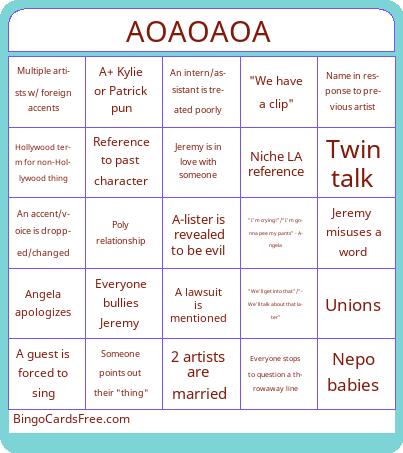
This AOAOAOA Bingo Cards Game contains following Words or Phrases: "I'm crying!"/"I'm gonna pee my pants" - Angela, "We have a clip", "We'll get into that"/"We'll talk about that later", 2 artists are married, [Blank] for animals (especially dogs), A guest is forced to sing, A lawsuit is mentioned, A+ Kylie or Patrick pun, A-lister is revealed to be evil, An accent/voice is dropped/changed, An intern/assistant is treated poorly, Angela apologizes, Any/no relation, Everyone bullies Jeremy, Everyone stops to question a throwaway line, Forgetting a character name, Forgetting a character's gender, Hollywood term for non-Hollywood thing, Ignore a question to ask a question, Impossible timeline, Jeremy is in love with someone, Jeremy misuses a word, Jeremy tries to bring it back to topic, Multiple artists w/ foreign accents, Name in response to previous artist, Nepo babies, Niche LA reference, Patrick asks a derailing question, Poly relationship, Reference to past character, Someone points out their "thing", Twin talk, Unions.

 This AOAOAOA Bingo Cards Game contains following Words or Phrases: "I'm crying!"/"I'm gonna pee my pants" - Angela, "We have a clip", "We'll get into that"/"We'll talk about that later", 2 artists are married, [Blank] for animals (especially dogs), A guest is forced to sing, A lawsuit is mentioned, A+ Kylie or Patrick pun, A-lister is revealed to be evil, An accent/voice is dropped/changed, An intern/assistant is treated poorly, Angela apologizes, Any/no relation, Everyone bullies Jeremy, Everyone stops to question a throwaway line, Forgetting a character name, Forgetting a character's gender, Hollywood term for non-Hollywood thing, Ignore a question to ask a question, Impossible timeline, Jeremy is in love with someone, Jeremy misuses a word, Jeremy tries to bring it back to topic, Multiple artists w/ foreign accents, Name in response to previous artist, Nepo babies, Niche LA reference, Patrick asks a derailing question, Poly relationship, Reference to past character, Someone points out their "thing", Twin talk, Unions.