
🔍
Advertisement

Auto Service Bingo Cards - Print Free or Customize

Print free Auto Service bingo cards or adjust them, limitless cards! Choose from 42,600+ templates or use the bingo card generator. Add numbers, words, pictures, or mix them all. Play using PDF prints, digital bingo cards, and the digital bingo caller, or go hybrid.

AUTO SERVICE BINGO
Rejects ERS to save less than $5Asks why they should have to pay for other people's claimsUpset that they have to pay a double bill after not paying last monthWants to speak with supervisor to be told what you just told themOnly says "I agree" instead of "I (name) understand and agree"
Demands discounts and then refuses all the discounts you offerAttempts to negotiate with you for a lower premiumHangs up during MOAT transferCalls in to ask for MOAT, but no JFYJFY pop-up on a third-party call
Get hung up on by MOAT agentCorrects you by telling you what the previous agent saidCasually mentions youthful driver that you must now force-addCasually mentions ridesharing or food delivery which you must now docComplains about automated system
Doesn't know policy password when calling inHas to reset their GEICO online password while you waitUpset that DUI increased premiumContinues to explain issue to you after you told them you're not in the correct departmentClaims asks for your U code
Upset that their card was drafted for a payment automatically after they set up autopayPH on can notice due to their autopay card being expired and this is somehow your faultStates GEICO doesn't have permission to add teenage driverSends picture of mail from GEICO as proof of residencyHas you on speakerphone while driving with the windows down
This is shown at the top of the template and game pages.
Optional. If this template makes to the front page, you will be credited for creating it.
Shown at the top of each bingo card.

This can be text or an image. Images larger than 50 KB may be compressed and may lose transparency.
If words on a line are separated by this text, then:
  • Bingo card will only show the text on the right side of the separator.
  • The PDF call list will show the full text.
  • To disable this feature, clear this field.
Quiz Mode ON
Select which side of the quiz separator to show on the card preview on this page. When printing or playing, calling cards always show the right side only.
If words on a line are separated by this text, then:
  • The text on the right side of the separator will be spoken by the online game play.
  • Bingo card will only show the text on the left side of the separator.
  • The PDF call list will show the full text.
  • To disable this feature, clear this field.
Audio Mode ON
Use separate item lists for each column. This is useful for american traditional 75 ball number bingo or cards where each column should draw from a different set of items.
Enter numbers, words or phrases, each one on a new line. Up to 255 items are supported.

Items Per Column:
To specify items per column, eg for 75 ball bingo, turn ON the "Items Per Column" setting.
Sort   |   No Dups
Supports:
  1. Up to 99 images.
  2. Single or multiple image uploads.
  3. Up to 5 MB file size per image.
  4. You can use both Grid Items and Grid Images.
  5. Click an image or label to edit the label or delete the image.
  6. If an image background changes to white, remove transparency or reduce the image size to < 10KB.
    Choose whether image labels appear on bingo cards. Image labels are always shown on the calling card.
    Grid size in Columns x Rows format.
    Free space is usually the center square of the card. It is like a joker or a wild square, and counts towards the winning pattern.
    • Shows text or an image in the Free Space cell.
    • Make sure Free Space Cell is not set to "None".
    • To show text, enter text.
    • To show an image, click the button on the right and select an image.
    • If the image background changes to white, remove transparency or reduce the image size to < 10KB.
    Select Yes to generate unique random cards.

    If No is selected, all cards will have the same text in the same order, which might be useful in educational or quiz settings.
    Text is automatically resized to fit inside each cell. Shorter text may appear very large. Choose a smaller maximum font size to limit how large the text can get.
    Title text color.

    * Applicable when Card Title is text.
    Title background shape.

    * Requires Title Back Opacity to be > 0%.
    Title background opacity.

    * Requires Title Back Shape.
    Title background shape color.

    * Requires Title Back Shape.
    * Requires Title Back Opacity to be > 0%.
    Title background border color.

    * Requires Title Back Shape.
    * Requires Title Back Opacity to be > 0%.
    Grid Text color.
    Grid background color.
    Grid line color.
    • Background shape for cells.
    • Select a stock image or upload your own custom image.
    • You can use Cell Transparency setting to change how prominently the background shape shows.
    • If you select a shape other than Grid, you may have to increase Cell Padding if you want to fit the text inside the shape.
    • Don't see the selected image?
      Set Cell Transparency <50.
    Empty space inside each cell between border and text.
    Space between any 2 cells.
    0% makes grid background opaque. Higher setting makes grid background transparent allowing card background image or card background color to show.
    Outside border width.
    Card outside border color.

    * Requires Card Border Width > 0%
    Yes makes the card corners rounded.
    Empty space between card border and card contents.
    Card background color.
    • Background image for the whole card.
    • Select a stock image or upload your own custom image.
    • Use Card Transparency and Cell Transparency to control how much of the image shows through.
    Don't see the selected image?
    • Set Card Transparency >50.
    • Set Card Border Width >0 or Card Padding >0.
    • Set Cell Transparency >50.
    Select how the background image covers the whole card. You can also choose to repeat the image.
    Controls the transparency of the card background color. Higher values make the card background more transparent, allowing the card background image or outer background to show through.
    This mode uses rapid animations. It may cause dizziness, nausea, or trigger sensitive individuals. Please use responsibly.
    Warning! 
    Public: Anyone can see your card template, including search engines

    Private: Only you can see and edit the card template. You will need to be signed in.

    Click to Sign-Up « Free!!!

    Click to Sign-In
    Number of cards to generate and include in the Full PDF. The Preview button will always generate only 1 card.
    Choose whether to include a call list in the Full PDF. Grid prints the call list as a grid; List prints it as a text list.
    Printer paper size.
    Paper orientation for printing. Some card layouts may look better in portrait or landscape.
    Arrangement of cards on each page of paper.
    Horizontal margin on left and right sides of each card.
    Vertical margin on top and bottom sides of each card.
    Colors: Removes background to save ink for printing.

    B&W: Removes background & changes colors to black & white to save ink for printing.
    Select amount of empty space to keep in each cell for participants to write something.

    This feature is also called human bingo, people bingo, social bingo, get-to-know bingo or ice breaker bingo.
    Starting card number. Change if you need to reprint a set of cards starting with a specific card number.

    Note: If this is not 1, then call list (index card) will not be printed.
    Header height. Header is shown only when there is 1 or more characters.
    Instructions or any other message(s) at the top of each card.
    Footer height. Footer is shown only when there is 1 or more characters.
    Instructions or any other message(s) at the bottom of each card.
    All fonts support English.

    For non-English support in PDF, please try FreeSans, FreeSerif, DejaVuSans, DejaVuSerif or NotoSans
    ✉

    Suggestions | Feedback | Bug

    Similar Bingo Cards:

    About: This bingo card captures the everyday highs and lows of working in an insurance call center, with all the quirky customer behaviors and unpredictable moments that come with it. Perfect for team meetings or a fun break during long shifts, it’s sure to entertain anyone familiar with the world of phone-based customer service at an insurance company.

    How To: To save a PDF to print, click the Print button. You can change the card count and other printing settings on the Print tab. Grid items and free space content can be added on the Basic tab. Appearance can be completely customized on the corresponding tabs, or you can easily find any option using the 🔍 tab.

    How to play Auto Service Bingo Cards?

    • Digital Players: Click on the Play button above, and then click on the 🎫 button.
    • Printed Players: Print PDF bingo cards and physically scratch the cards.
    • Digital Caller: Click on the Play button above.
    • Printed Caller: Print PDF calling list & calling slips and physically select the slips.
    • Combo Play: Select any combination above. For example, caller can be either Paper or Digital. And players can be Paper or Digital or a combo of both.

    Step-By-Step:

    1. Start by saving the Auto Service Bingo PDF by clicking on the "Print" button above.
    2. Open the PDF and print it.
    3. For random calling, you can print another copy of the call list, cut, fold and then draw them randomly at play time.
    4. Cut the bingo cards at the cut lines if there are more than 1 bingo cards per page.
    5. Distribute one card per player. For marking, you can use markers. Crayons are the cheapest.
    6. Select one person to be the caller. If you are playing in a small group, the caller can as well play along with their own Bingo card.
    7. The caller begins the game by randomly drawing an item from the call list and announcing it to all players.
    8. The players scan their cards to see if they have the announced word. If they do, they mark that word.
    9. The first player to finish a horizontal, vertical, or a diagonal line of marked items announces "Bingo!" and wins the play.
    10. The caller verifies that the items crossed off form a proper line according to the Bingo card and call list.
    11. You can play for multiple patterns or a full card blackout for an extended play.
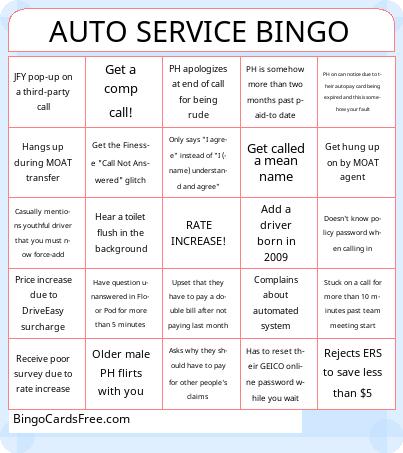
    Auto Service Bingo CardsThis Auto Service Bingo Cards Game contains following Words or Phrases: Rejects ERS to save less than $5, Asks why they should have to pay for other people's claims, Upset that they have to pay a double bill after not paying last month, Wants to speak with supervisor to be told what you just told them, Only says "I agree" instead of "I (name) understand and agree", Demands discounts and then refuses all the discounts you offer, Attempts to negotiate with you for a lower premium, Hangs up during MOAT transfer, Calls in to ask for MOAT, but no JFY, JFY pop-up on a third-party call, Get hung up on by MOAT agent, Corrects you by telling you what the previous agent said, Casually mentions youthful driver that you must now force-add, Casually mentions ridesharing or food delivery which you must now doc, Complains about automated system, Doesn't know policy password when calling in, Has to reset their GEICO online password while you wait, Upset that DUI increased premium, Continues to explain issue to you after you told them you're not in the correct department, Claims asks for your U code, Upset that their card was drafted for a payment automatically after they set up autopay, PH on can notice due to their autopay card being expired and this is somehow your fault, States GEICO doesn't have permission to add teenage driver, Sends picture of mail from GEICO as proof of residency, Has you on speakerphone while driving with the windows down, Receive poor survey due to rate increase, Receive five excellent surveys in a row!, Get the Finesse "Call Not Answered" glitch, Get called a mean name, Get a comp call!, Have question unanswered in Floor Pod for more than 5 minutes, Get 5 MOAT transfers in one shift!, Stuck on a call for more than 10 minutes past team meeting start, PH apologizes at end of call for being rude, Get told Progressive quoted them at lower amount, Add a driver born in 2009, Hear a toilet flush in the background, Older male PH flirts with you, Asks you why their policy is so expensive, PH is somehow more than two months past paid-to date, Upset that they have to send you a written request to cancel, Agent blamed for something that is state law, Infant or child crying in background for most of call, Price increase due to DriveEasy surcharge.

    Advertisement