
Chris' Favorite Characters Bingo Cards - Print Free or Customize
Print free Chris' Favorite Characters bingo cards or alter them, unlimited cards! Choose from 40,600+ designs or use the bingo card generator. Add numbers, words, photos, or any combination. Play using PDF prints, online bingo cards, and the online bingo caller, or go hybrid.
About: This bingo card is a fun mashup of quirky, iconic, and sometimes underrated characters from video games, cartoons, anime, and cult classics. It’s perfect for a fandom party, game night, or convention icebreaker where everyone loves to celebrate offbeat pop culture favorites. Expect plenty of “aha!” moments and lively conversation as fans spot their favorites.
How To: To get a printable PDF, click the Print button. You can change the card quantity and other print settings on the Print tab. Grid items and free space text can be changed on the Basic tab. Appearance can be highly personalized on the corresponding tabs, or you can easily search any setting on the 🔍 tab.
How to play Chris' Favorite Characters Bingo Cards?
- Printed Caller: Print PDF calling list & calling slips and physically select the slips.
- Printed Players: Print PDF bingo cards and physically scratch the cards.
- Online Players: Click on the Play button above, and then click on the 🎫 button.
- Online Caller: Click on the Play button above.
- Hybrid Play: Select any combination above. For instance, caller can be either Printed or Online. And players can be Printed or Online or a combination of both.
Step-By-Step:
- Start by downloading the Chris' Favorite Characters PDF by clicking on the "Print" button above.
- Open the PDF and print a hard copy.
- For random calling, you can print another copy of the call list, cut, fold and then pull them randomly at play time.
- Cut the bingo cards at the cut lines if there are more than 1 bingo cards per page.
- Give one card to each player. For marking, you can use crayons. Crayons cost the least.
- Select one person to be the caller. If you are playing in a small group, the caller can also play along with their own Bingo card.
- The caller starts the play by randomly drawing an item from the call list and saying it to all players.
- The players scan their cards to see if they have the announced word. If they do, they dab that word.
- The first player to finish a horizontal, vertical, or a diagonal line of marked items announces "Bingo!" and wins the play.
- The caller verifies that the items marked form a proper line as per the Bingo card and call list.
- You can play for multiple patterns or a full card blackout for a longer play.
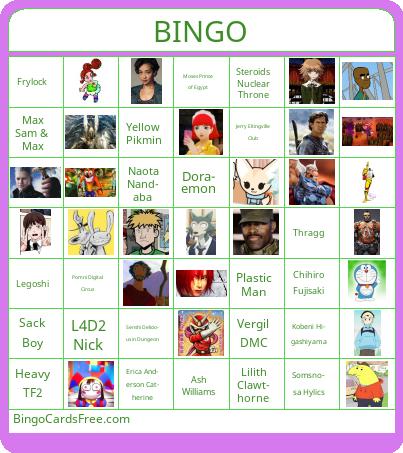 This Chris' Favorite Characters Bingo Cards Game contains following Words or Phrases: Kim Kitsuragi, Heavy TF2, Dr. Orpheous, Frylock, Arcade Gannon, Steroids Nuclear Throne, Thragg, Razputin Aquato, Somsnosa Hylics, Shinobu Miyake Urusei Yatsura, Barney Calhoun, Mac McDonald It's Always Sunny, Flaky HTF, Erica Anderson Catherine, Pomni Digital Circus, Serena MTV Downtown, Max Sam & Max, L4D2 Nick, Doraemon, Chihiro Fujisaki, Verde Little King's Story, Ash Williams, Beta Ray Bill, Vergil DMC, Viewtiful Joe, Sack Boy, Senshi Delicious in Dungeon, Aenarion the Defender, Moses Prince of Egypt, Plastic Man, Scud the Disposable Assassin, Kobeni Higashiyama, Sgt. Johnson, Naota Nandaba, Legoshi, Crash Bandicoot, Dino Crisis Regina, Travis Touchdown, Fenneko, Penta, Fillmore, Jerry Eltingville Club, Yellow Pikmin, Lilith Clawthorne, Smiling Friends Charlie, Vivian Paper Mario, Kratos God of War, Tulip O'Hare, Salvador BL2 and following Images: 1463408231 Crash1920 1443129303790, Gc7LRJqXsAAXM5 , Borderlands 2 Salvador Gunzerker 540x960, Tulip O Hare Preacher, Why Is Kratos Always Angry And Why Is His Name..., Vivian Blogroll 1716314736838, The Iconic Smiling Friends V0 0t3tv0x3yhdd1, Actor Lilith Clawthorne 573674 Large, Yellow Pikmins Thoughts On Pikmin 4 Theres No Fear..., Jerry Stokes Welcome To Eltingville , Test Of The Tested 14 , Fenn, Imagestrav, Dino Crisis Key Art Waypoint, 8606946 6bf8772a E949 4ac2 Aaa5 Ff0c5a4e10e6, Naota Nandaba, Daf6e27c52be18d18f3ef0f7cc7e894c076477ddr1 542..., Kobeniscarownercolored, Scud Sign, Plastic Man Movie 900x900, Moses The Prince Of Egypt, AENARION72dpik, Senshi AB Profile, 1fb67c3b5278442d3eec7ee1d578fb63 L, ViewtifulJoe Jpg, Devil May Cry 5 5c86ca689b1d1, Marvel BetaRayBill Premier 05 28288, Ash Williams, Verde, DR1 Chihiro Fujisaki, 2616399 Doraemon Pic, Bg Nick, Images, Serena From Mtv Downtown V0 7kayn6e58tgb1, 1900x1900 000000 80 0 0, EricasPhone.