Print free Bachelorettebingo cards or alter them,
unlimited cards! Choose from 33,500+ templates or use the bingo card generator.
Add numbers, words, photos, or mix them all.
Play using PDF printouts, online bingo cards,
and the online bingo caller, or go hybrid.
About: This bingo card is perfect for a wedding weekend or bachelorette party, capturing all the hilarious chaos and classic moments that happen when friends get together to celebrate. Expect plenty of laughter, inside jokes, and a little bit of mischief. It’s made for groups ready to make unforgettable memories and share plenty of laughs along the way.
How To: To download a printable PDF, click the Print button.
You can adjust the card count and other
printing options on the Print tab.
Grid items and free space text can be changed on the Basic tab.
Appearance can be completely customized on the
relevant tabs, or you can quickly find any option
on the 🔍 tab.
How to play BacheloretteBingo Cards?
Paper Players: Print PDF bingo cards and manually write on the cards.
Virtual Caller: Click on the Play button above.
Paper Caller: Print PDF calling list & calling slips and manually pick the slips.
Virtual Players: Click on the Play button above, and then click on the 🎫 button.
Hybrid Mode: Pick any combination above.
For instance, caller can be either Paper or Virtual.
And players can be Paper or Virtual or a combination of both.
Step-By-Step:
Start by downloading the BacheloretteBingo PDF by clicking on the "Print" button above.
Open the PDF and print a hard copy.
For random calling, you can print another copy of the call list, cut, fold and then pull them randomly at play time.
Cut the bingo cards at the cut marks if there are greater than 1 bingo cards per page.
Distribute one card per player. For marking, you can use markers. Crayons are the cheapest.
Pick one person to be the caller. If you are playing in a small group, the caller may also play along with their own Bingo card.
The caller initiates the game by randomly pulling an item from the call list and calling out it to all players.
The players look at their cards to see if they have the announced word. If they do, they cross off that word.
The first player to finish a horizontal, vertical, or a diagonal line of crossed items shouts "Bingo!" and wins the play.
The caller verifies that the items marked form a proper line as per the Bingo card and call list.
You can play for different patterns or a full card blackout for a longer play.
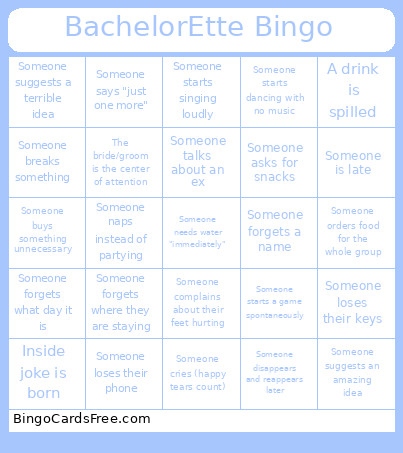
This BacheloretteBingo Cards Game contains following Words or Phrases: Someone loses their phone, Someone loses their keys, A drink is spilled, Someone orders shots "by accident", A hangover is mentioned before noon, Someone says "I'm never drinking again", A stranger joins the group for a bit, Someone cries (happy tears count), Group selfie is taken, A blurry group photo happens, Someone is late, Someone forgets what day it is, Someone naps instead of partying, Someone starts dancing with no music, Inside joke is born, Someone loses a shoe, Someone gives relationship advice, A drink is rejected as "too strong", A drink is rejected as "too weak", Someone orders food for the whole group, Someone eats someone else's food, Someone Googles something, Someone starts singing loudly, Someone needs water "immediately", Someone talks about the wedding, Someone talks about an ex, Someone says "just one more", Someone forgets a name, Someone wears something very impractical, Someone complains about their feet hurting, Someone suggests a terrible idea, Someone suggests an amazing idea, Someone disappears and reappears later, Someone buys something unnecessary, Someone asks for snacks, Someone starts a game spontaneously, Someone laughs uncontrollably, Someone falls asleep fully dressed, Someone forgets where they are staying, Someone breaks something, The bride/groom is the center of attention.

 This BacheloretteBingo Cards Game contains following Words or Phrases: Someone loses their phone, Someone loses their keys, A drink is spilled, Someone orders shots "by accident", A hangover is mentioned before noon, Someone says "I'm never drinking again", A stranger joins the group for a bit, Someone cries (happy tears count), Group selfie is taken, A blurry group photo happens, Someone is late, Someone forgets what day it is, Someone naps instead of partying, Someone starts dancing with no music, Inside joke is born, Someone loses a shoe, Someone gives relationship advice, A drink is rejected as "too strong", A drink is rejected as "too weak", Someone orders food for the whole group, Someone eats someone else's food, Someone Googles something, Someone starts singing loudly, Someone needs water "immediately", Someone talks about the wedding, Someone talks about an ex, Someone says "just one more", Someone forgets a name, Someone wears something very impractical, Someone complains about their feet hurting, Someone suggests a terrible idea, Someone suggests an amazing idea, Someone disappears and reappears later, Someone buys something unnecessary, Someone asks for snacks, Someone starts a game spontaneously, Someone laughs uncontrollably, Someone falls asleep fully dressed, Someone forgets where they are staying, Someone breaks something, The bride/groom is the center of attention.