Christmas Classics Bingo Cards - Print Free or Customize
Print free Christmas Classics bingo cards or modify,
limitless cards! Choose from 20,900+ designs or use the bingo card generator.
Add numbers, words, pictures, or mix them all.
Play using printed PDF, virtual bingo cards,
and the virtual bingo caller, or go hybrid.
About: This bingo card is a festive celebration of classic and beloved Christmas songs, perfect for livening up any holiday party or family gathering. With everything from cheerful carols to timeless pop hits, it’s ideal for music lovers and anyone looking to add some extra fun to their seasonal events. Get ready for some nostalgic, toe-tapping holiday spirit!
How To: To download a PDF to print, click the Print button.
You can alter the number of cards and other
printing settings on the Print tab.
Grid items and free space content can be edited on the Basic tab.
Appearance can be highly customized on the
corresponding tabs, or you can easily find any option
on the 🔍 tab.
How to play Christmas Classics Bingo Cards?
Virtual Players: Click on the Play button above, and then click on the 🎫 button.
Paper Caller: Print PDF calling list & calling slips and manually draw the slips.
Paper Players: Print PDF bingo cards and manually cross off the cards.
Virtual Caller: Click on the Play button above.
Hybrid Play: Pick any combination above.
For example, caller can be either Paper or Virtual.
And players can be Paper or Virtual or a mix of both.
Step-By-Step:
Start by getting the Christmas Classics PDF by clicking on the "Print" button above.
Open the PDF and print it.
For random drawing, you can print another copy of the call list, cut, fold and then draw them randomly at play time.
Cut the bingo cards at the cut marks if there are more than 1 bingo cards per page.
Give one card to each player. For marking, you can use pens. Crayons are the cheapest.
Pick one person to be the caller. If you are playing in a small group, the caller can also play along with their own Bingo card.
The caller starts the game by randomly pulling an item from the call list and saying it to all players.
The players scan their cards to see if they have the called word. If they do, they dab that word.
The first player to finish a horizontal, vertical, or a diagonal line of crossed items yells "Bingo!" and wins the play.
The caller verifies that the items marked form a correct line as per the Bingo card and call list.
You can play for different patterns or a full card blackout for a longer play.
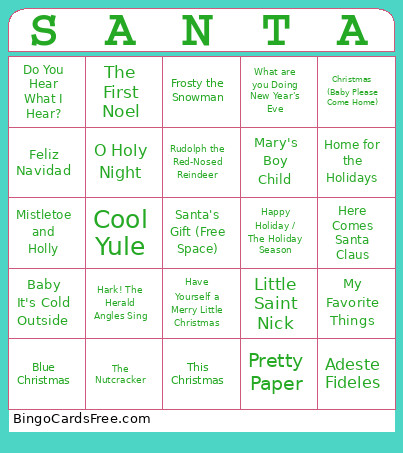
This Christmas Classics Bingo Cards Game contains following Words or Phrases: Rockin' Around the Christmas Tree, Let it Snow! Let it Snow! Let it Snow!, Christmas (Baby Please Come Home), Jingle Bell Rock, The Christmas Song, Sleigh Ride, It's the Most Wonderful Time of the Year, Run Rudolph Run, I Want a Hippopotamus for Christmas, White Christmas, Feliz Navidad, Deck the Hall, Santa Baby, Blue Christmas, A Holly Jolly Christmas, Please Come Home for Christmas, It's Beginning to Look alot like Christmas, Santa Claus Is Coming To Town, Have Yourself a Merry Little Christmas, Rudolph the Red-Nosed Reindeer, Christmas Time is Here, Little Saint Nick, Jingle Bells (Sinatra), You're a Mean One, Mr. Grinch, Here Comes Santa Claus, Mele Kalikimaka, Winter Wonderland, This Christmas, God Rest Ye Merry Gentlemen, Cool Yule, Linus and Lucy, A Marshmellow World, The Man with the Bag, Frosty the Snowman, Caroling, Caroling, Do You Hear What I Hear?, Happy Holiday / The Holiday Season, Merry Christmas Darling, Silver Bells, I'm Gonna Be Warm This Winter, Home for the Holidays, O Tannenbaum, I've Got My Love to Keep Me Warm, O Come All Ye Faithful, My Favorite Things, The First Noel, The Little Drummer Boy, Mary's Boy Child, O Little Town of Bethleham, Baby It's Cold Outside, I'll Be Home For Christmas, Joy to the World, Mistletoe and Holly, Pretty Paper, What are you Doing New Year's Eve, Adeste Fideles, Here We Come-a-Caroling, I Saw Mommy Kissing Santa Claus, O Christmas Tree, What Child is This, All I Want for Christmas (Is My Two Front Teeth), The Christmas Waltz, Zat You, Santa Claus?, Twelve Days of Christmas, Hark! The Herald Angles Sing, O Holy Night, The Nutcracker.

 This Christmas Classics Bingo Cards Game contains following Words or Phrases: Rockin' Around the Christmas Tree, Let it Snow! Let it Snow! Let it Snow!, Christmas (Baby Please Come Home), Jingle Bell Rock, The Christmas Song, Sleigh Ride, It's the Most Wonderful Time of the Year, Run Rudolph Run, I Want a Hippopotamus for Christmas, White Christmas, Feliz Navidad, Deck the Hall, Santa Baby, Blue Christmas, A Holly Jolly Christmas, Please Come Home for Christmas, It's Beginning to Look alot like Christmas, Santa Claus Is Coming To Town, Have Yourself a Merry Little Christmas, Rudolph the Red-Nosed Reindeer, Christmas Time is Here, Little Saint Nick, Jingle Bells (Sinatra), You're a Mean One, Mr. Grinch, Here Comes Santa Claus, Mele Kalikimaka, Winter Wonderland, This Christmas, God Rest Ye Merry Gentlemen, Cool Yule, Linus and Lucy, A Marshmellow World, The Man with the Bag, Frosty the Snowman, Caroling, Caroling, Do You Hear What I Hear?, Happy Holiday / The Holiday Season, Merry Christmas Darling, Silver Bells, I'm Gonna Be Warm This Winter, Home for the Holidays, O Tannenbaum, I've Got My Love to Keep Me Warm, O Come All Ye Faithful, My Favorite Things, The First Noel, The Little Drummer Boy, Mary's Boy Child, O Little Town of Bethleham, Baby It's Cold Outside, I'll Be Home For Christmas, Joy to the World, Mistletoe and Holly, Pretty Paper, What are you Doing New Year's Eve, Adeste Fideles, Here We Come-a-Caroling, I Saw Mommy Kissing Santa Claus, O Christmas Tree, What Child is This, All I Want for Christmas (Is My Two Front Teeth), The Christmas Waltz, Zat You, Santa Claus?, Twelve Days of Christmas, Hark! The Herald Angles Sing, O Holy Night, The Nutcracker.