Etiquette Education Bingo Cards - Print Free or Customize
Print free Etiquette Education bingo cards or customize,
unlimited prints! Choose from 41,100+ templates or use the bingo card generator.
Add numbers, phrases, images, or any combination.
Play using PDF prints, digital bingo cards,
and the digital bingo caller, or mix physical and digital.
About: This bingo card is perfect for a teekkari-themed trivia night or student orientation at a Finnish university, especially for new engineering students in Tampere or beyond. Covering teekkari culture, traditions, dress codes, and quirky etiquette, it’s designed to make learning campus customs fun and interactive for freshers or anyone eager to dive into student life.
How To: To save a PDF to print, click the Print button.
You can modify the card quantity and other
print settings on the Print tab.
Grid items and free space text can be added on the Basic tab.
Appearance can be completely personalized on the
corresponding tabs, or you can easily locate any preference
using the 🔍 tab.
How to play Etiquette Education Bingo Cards?
Digital Caller: Click on the Play button above.
Paper Players: Print PDF bingo cards and manually scratch the cards.
Paper Caller: Print PDF calling list & calling slips and manually draw the slips.
Digital Players: Click on the Play button above, and then click on the 🎫 button.
Combo Play: Choose any combination above.
For instance, caller can be either Printed or Digital.
And players can be Printed or Digital or a combination of both.
Step-By-Step:
Start by getting the Etiquette Education Bingo PDF by clicking on the "Print" button above.
Open the PDF and print it.
For random drawing, you can print another copy of the call list, cut, fold and then pull them randomly at play time.
Cut the bingo cards at the cut lines if there are more than 1 bingo cards per page.
Distribute one card per player. For marking, you can use pencils. Crayons are the cheapest.
Choose one person to be the caller. If you are playing in a small group, the caller may also play along with their own Bingo card.
The caller opens the play by randomly picking an item from the call list and saying it to all players.
The players scan their cards to see if they have the announced word. If they do, they cross off that word.
The first player to complete a horizontal, vertical, or a diagonal line of marked items yells "Bingo!" and wins the play.
The caller validates that the items crossed off form a proper line as per the Bingo card and call list.
You can play for multiple patterns or a full card blackout for an extended play.
This Etiquette Education Bingo Cards Game contains following Words or Phrases: What is a teekkari?, When did the first teekkari students in Tampere begin their studies?, Where can you find the instructions for using the Tampere teekkari cap?, How does the Oulu teekkari cap differ from other teekkari caps in Finland?, When does the teekkari cap wearing period end?, Who should you contact if your teekkari cap breaks?, When did student overalls start being used in Finland?, Are you allowed to drink alcohol in the corridors of the Hervanta campus?, Where can you find the Rasputin songbook online?, What are you not allowed to bring into a sauna?, How do you traditionally thank the bus driver after an excursion?, What is a tempaus?, When will the Wappu revelation be organized this year?, Where does the "avec" sit at a sitsis?, What is a "donkey bridge"?, What other song besides "Hyvät ystävät" can be used to start sitsis?, What does the "Skål!" shout mean at sitsis?, What is a Toastmaster?, How are student overalls worn in the fuksi parade?, Where is the black tie dress code used?, How long should a dress be for the black tie dress code?, When is a dress long enough for the white tie dress code?, How can a tailcoat be substituted in the white tie dress code?, What must be done to hair according to the white tie dress code?, In what two ways can you wear a representative ribbon?, Where can you find out how honors and merit badges should preferably be worn?, Where can you find out how to dress appropriately for an event?, What is the worst etiquette mistake?.

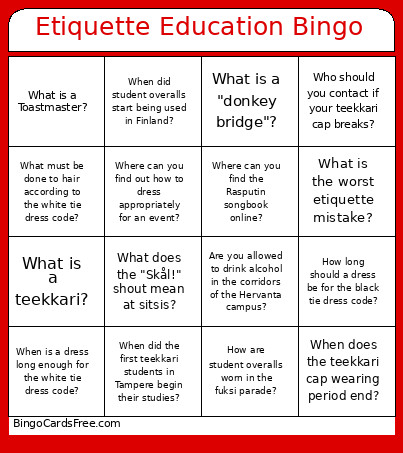 This Etiquette Education Bingo Cards Game contains following Words or Phrases: What is a teekkari?, When did the first teekkari students in Tampere begin their studies?, Where can you find the instructions for using the Tampere teekkari cap?, How does the Oulu teekkari cap differ from other teekkari caps in Finland?, When does the teekkari cap wearing period end?, Who should you contact if your teekkari cap breaks?, When did student overalls start being used in Finland?, Are you allowed to drink alcohol in the corridors of the Hervanta campus?, Where can you find the Rasputin songbook online?, What are you not allowed to bring into a sauna?, How do you traditionally thank the bus driver after an excursion?, What is a tempaus?, When will the Wappu revelation be organized this year?, Where does the "avec" sit at a sitsis?, What is a "donkey bridge"?, What other song besides "Hyvät ystävät" can be used to start sitsis?, What does the "Skål!" shout mean at sitsis?, What is a Toastmaster?, How are student overalls worn in the fuksi parade?, Where is the black tie dress code used?, How long should a dress be for the black tie dress code?, When is a dress long enough for the white tie dress code?, How can a tailcoat be substituted in the white tie dress code?, What must be done to hair according to the white tie dress code?, In what two ways can you wear a representative ribbon?, Where can you find out how honors and merit badges should preferably be worn?, Where can you find out how to dress appropriately for an event?, What is the worst etiquette mistake?.