Print free Freshman bingo 1 cards or customize,
limitless cards! Choose from 40,100+ templates or use our bingo card generator.
Add numbers, words, images, or any combination.
Play using PDF printouts, virtual bingo cards,
and our virtual bingo caller, or mix physical and digital.
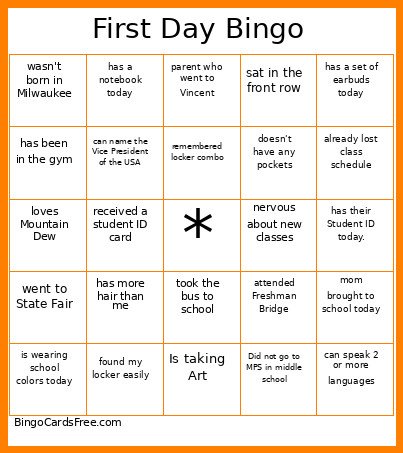
About: This bingo card is perfect for welcoming freshmen or new students to high school, especially during orientation or the first week of classes. It's filled with icebreaker moments and common experiences that help everyone connect and laugh about the transition into high school life. Great for making new friends and easing first-day jitters!
How To: To download a printable PDF, click the Print button.
You can change the card count and other
print preferences on the Print tab.
Grid items and free space content can be edited on the Basic tab.
Appearance can be exactly personalized on the
relevant tabs, or you can quickly find any preference
using the 🔍 tab.
How to play Freshman Bingo 1 Cards?
Virtual Players: Click on the Play button above, and then click on the 🎫 button.
Paper Players: Print PDF bingo cards and physically scratch the cards.
Paper Caller: Print PDF calling list & calling slips and physically choose the slips.
Virtual Caller: Click on the Play button above.
Combo Play: Choose any combination above.
For instance, caller can be either Paper or Virtual.
And players can be Paper or Virtual or a combo of both.
Step-By-Step:
Start by saving the Freshman Bingo 1 PDF by clicking on the "Print" button above.
Open the PDF and print it.
For random calling, you can print another copy of the call list, cut, fold and then draw them randomly at play time.
Cut the bingo cards at the cut lines if there are more than 1 bingo cards per page.
Distribute one card per player. For marking, you can use pencils. Crayons cost the least.
Choose one person to be the caller. If you are playing in a small group, the caller may also play along with their own Bingo card.
The caller initiates the game by randomly picking an item from the call list and calling out it to everyone.
The players look at their cards to see if they have the called word. If they do, they dab that word.
The first player to complete a horizontal, vertical, or a diagonal line of marked items yells "Bingo!" and wins the play.
The caller checks that the items crossed off form a correct line as per the Bingo card and call list.
You can play for multiple patterns or a full card blackout for an extended play.
This Freshman Bingo 1 Cards Game contains following Words or Phrases: is wearing school colors today, first day of high school, found my locker easily, remembered locker combo, had trouble opening my locker, was late to class today, has a pet at home, brother/sister already at Vincent, parent who went to Vincent, Is wearing make-up today, attended Freshman Bridge, has their Student ID today., met my homeroom teacher, nervous about new classes, received a student ID card, sat in the front row, Is taking Art, took the bus to school, does NOT take the bus, has a set of earbuds today, brought a backpack to class., worried about making friends here, family member who graduated from Vincent, mom brought to school today, excited for gym class., has seen the swimming pool, participates in fall sport, is not wearing tennis shoes, is wearing a smart watch, is wearing a sweatshirt, already lost class schedule, has been in the gym, has a notebook today, wears glasses, plays an instrument, Did not go to MPS in middle school, wasn't born in Milwaukee, doesn't have any pockets, went to State Fair, did 5 pushups in class, has more hair than me, left the state on vacation this summer, reads/watches anime, can speak 2 or more languages, loves Mountain Dew, can name the Vice President of the USA, owns a xBox or PS.

 This Freshman Bingo 1 Cards Game contains following Words or Phrases: is wearing school colors today, first day of high school, found my locker easily, remembered locker combo, had trouble opening my locker, was late to class today, has a pet at home, brother/sister already at Vincent, parent who went to Vincent, Is wearing make-up today, attended Freshman Bridge, has their Student ID today., met my homeroom teacher, nervous about new classes, received a student ID card, sat in the front row, Is taking Art, took the bus to school, does NOT take the bus, has a set of earbuds today, brought a backpack to class., worried about making friends here, family member who graduated from Vincent, mom brought to school today, excited for gym class., has seen the swimming pool, participates in fall sport, is not wearing tennis shoes, is wearing a smart watch, is wearing a sweatshirt, already lost class schedule, has been in the gym, has a notebook today, wears glasses, plays an instrument, Did not go to MPS in middle school, wasn't born in Milwaukee, doesn't have any pockets, went to State Fair, did 5 pushups in class, has more hair than me, left the state on vacation this summer, reads/watches anime, can speak 2 or more languages, loves Mountain Dew, can name the Vice President of the USA, owns a xBox or PS.