Holiday Classics Bingo Cards - Print Free or Customize
Print free Holiday Classics bingo cards or adjust them,
limitless prints! Pick from 20,900+ templates or use the bingo card generator.
Add numbers, phrases, photos, or all of them.
Play using printable PDF, virtual bingo cards,
and the virtual bingo caller, or mix physical and digital.
About: This bingo card celebrates the magic of holiday music, bringing together cherished Christmas classics from every era. With an upbeat and nostalgic vibe, it’s perfect for holiday parties, office gatherings, family get-togethers, or even a festive music night. Participants can enjoy revisiting songs that have defined the season and sparked memories year after year.
How To: To get a printable PDF, click the Print button.
You can adjust the number of cards and other
printing preferences on the Print tab.
Grid items and free space text can be added on the Basic tab.
Appearance can be completely personalized on the
corresponding tabs, or you can easily find any setting
using the 🔍 tab.
How to play Holiday Classics Bingo Cards?
Paper Caller: Print PDF calling list & calling slips and physically select the slips.
Paper Players: Print PDF bingo cards and physically cross off the cards.
Virtual Players: Click on the Play button above, and then click on the 🎫 button.
Virtual Caller: Click on the Play button above.
Mixed Play: Choose any combination above.
For example, caller can be either Offline or Virtual.
And players can be Offline or Virtual or a combo of both.
Step-By-Step:
Start by saving the Holiday Classics PDF by clicking on the "Print" button above.
Open the PDF and print a hard copy.
For random drawing, you can print another copy of the call list, cut, fold and then pick them randomly at play time.
Cut the bingo cards at the cut marks if there are greater than 1 bingo cards per page.
Distribute one card per player. For marking, you can use crayons. Crayons are the cheapest.
Choose one person to be the caller. If you are playing in a small group, the caller may also play along with their own Bingo card.
The caller opens the play by randomly pulling an item from the call list and announcing it to everyone.
The players look at their cards to see if they have the called word. If they do, they cross off that word.
The first player to complete a horizontal, vertical, or a diagonal line of marked items announces "Bingo!" and wins the play.
The caller validates that the items crossed off form a correct line as per the Bingo card and call list.
You can play for multiple patterns or a full card blackout for an extended play.
This Holiday Classics Bingo Cards Game contains following Words or Phrases: White Christmas, I'll Be Home For Christmas, The Christmas Song, Have Yourself A Merry Little Christmas, Let It Snow! Let It Snow! Let It Snow!, It's Beginning to Look a Lot Like Christmas, It's The Most Wonderful Time of the Year, A Holly Jolly Christmas, Rockin' Around The Christmas Tree, Rudolph the Red-Nosed Reindeer, O Come, O Come, Emmanuel!, Once In Royal David's City, Carol of the Bells, Silent Night - Vienna Boys' Choir, Oh Holy Night, Blue Christmas, Silent Night - The Temptations, Sleigh Ride, Santa Claus Is Coming to Town, I Saw Mommy Kissing Santa Claus, What Christmas Means To Me, Wonderful Christmastime, Happy Xmas (War Is Over), Merry Christmas Darling, Feliz Navidad, What Are You Doing New Year's Eve?, Cool Yule, Winter Wonderland, It's Beginning to Look Like Christmas, Suzy Snowflake, Mary's Boy Child, Christmas Carousel, The Christmas Song (Chestnuts Roasting On An Open Fire), Silver Bells - Doris Day, Christmas Time Is Here, O Tannenbaum, Jingle Bell Rock, Santa Baby, Silver And Gold, Here Comes Santa Claus, Silver Bells - Bing Crosby, Deck The Halls.

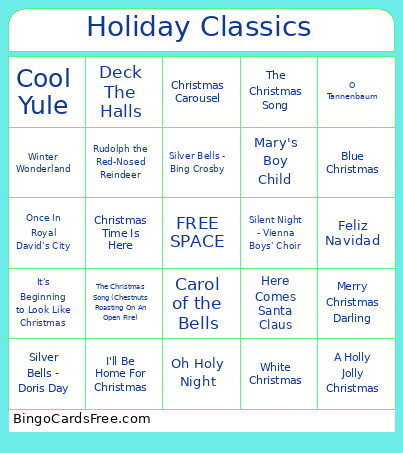 This Holiday Classics Bingo Cards Game contains following Words or Phrases: White Christmas, I'll Be Home For Christmas, The Christmas Song, Have Yourself A Merry Little Christmas, Let It Snow! Let It Snow! Let It Snow!, It's Beginning to Look a Lot Like Christmas, It's The Most Wonderful Time of the Year, A Holly Jolly Christmas, Rockin' Around The Christmas Tree, Rudolph the Red-Nosed Reindeer, O Come, O Come, Emmanuel!, Once In Royal David's City, Carol of the Bells, Silent Night - Vienna Boys' Choir, Oh Holy Night, Blue Christmas, Silent Night - The Temptations, Sleigh Ride, Santa Claus Is Coming to Town, I Saw Mommy Kissing Santa Claus, What Christmas Means To Me, Wonderful Christmastime, Happy Xmas (War Is Over), Merry Christmas Darling, Feliz Navidad, What Are You Doing New Year's Eve?, Cool Yule, Winter Wonderland, It's Beginning to Look Like Christmas, Suzy Snowflake, Mary's Boy Child, Christmas Carousel, The Christmas Song (Chestnuts Roasting On An Open Fire), Silver Bells - Doris Day, Christmas Time Is Here, O Tannenbaum, Jingle Bell Rock, Santa Baby, Silver And Gold, Here Comes Santa Claus, Silver Bells - Bing Crosby, Deck The Halls.