
mudae Bingo Cards - Print Free or Customize
Print free mudae bingo cards or personalize, unlimited prints! Pick from 36,300+ templates or use the bingo card generator. Add numbers, phrases, images, or any combination. Play using PDF printouts, digital bingo cards, and the digital bingo caller, or mix physical and digital.
About: This bingo card is a wild mashup of challenges perfect for hardcore Mudae fans, Pokémon enthusiasts, and anyone who loves the thrill of luck-based Discord games. Expect playful competition, quirky achievements, and some rule-bending fun. It's great for lively server events or community game nights where everyone wants to show off their Mudae skills and creativity.
How To: To save a printable PDF, click the Print button. You can adjust the number of cards and other print preferences on the Print tab. Grid items and free space text can be added on the Basic tab. Appearance can be entirely personalized on the corresponding tabs, or you can quickly search any preference on the 🔍 tab.
How to play mudae Bingo Cards?
- Online Caller: Click on the Play button above.
- Online Players: Click on the Play button above, and then click on the 🎫 button.
- Paper Caller: Print PDF calling list & calling slips and manually pick the slips.
- Paper Players: Print PDF bingo cards and manually write on the cards.
- Combo Mode: Pick any combination above. For example, caller can be either Paper or Online. And players can be Paper or Online or a combination of both.
Step-By-Step:
- Start by saving the mudae PDF by clicking on the "Print" button above.
- Open the PDF and print a hard copy.
- For random drawing, you can print another copy of the call list, cut, fold and then pull them randomly at play time.
- Cut the bingo cards at the cut lines if there are more than 1 bingo cards per page.
- Distribute one card per player. For marking, you can use markers. Crayons cost the least.
- Pick one person to be the caller. If you are playing in a small group, the caller can also play along with their own Bingo card.
- The caller starts the game by randomly pulling an item from the call list and calling out it to all players.
- The players check their cards to see if they have the called word. If they do, they dab that word.
- The first player to finish a horizontal, vertical, or a diagonal line of crossed items yells "Bingo!" and wins the play.
- The caller verifies that the items crossed off form a proper line according to the Bingo card and call list.
- You can play for multiple patterns or a full card blackout for an extended play.
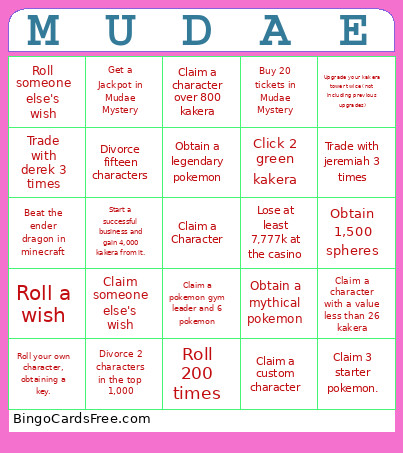 This mudae Bingo Cards Game contains following Words or Phrases: Claim a wish, Claim someone else's wish, Claim your wish, Claim a pokemon gym leader and 6 pokemon, Claim a main character in one of the Pokemon animes and six pokemon, Win 10 games of tea against people, Win 20 games of tea against people, Gamble 50 times at the Casino, Win at least 7,777k at the Casino, Win at least 14,444k at the Casino, Win 10 cockfights, Become Cursed in Mudae Mystery 3 times, Become Cursed in Mudae Mystery twice in a row, Re-spin in Mudae Mystery 5 times, Get a Jackpot in Mudae Mystery, Get a Jackpot in Mudae Mystery 3 times, Obtain 30 rolls in Mudae Mystery, Convince people to give 5,000 kakera, Convince people to give you 20 characters, Claim a Pokemon team, then win in every doubles format on showdown with it, Create a cover of a song with Mudae-related lyrics and have more than half of the members like it., Buy 20 tickets in Mudae Mystery, Upgrade your kakera tower twice (not including previous upgrades), Divorce 25 Characters, Break a rule. Any Rule, Add 25 custom characters to the server, Change 100 character's aliases to "shitbutt", Claim a character over 800 kakera, Claim a character with a value less than 26 kakera, Beat a level in Mudae Arena, Beat the ender dragon in minecraft, Make an edit of a character in your harem and have over half of the server enjoy it, Trade with micah 3 times, Trade with cam ron 3 times, Trade with adorie 3 times, Trade with jode 3 times, Trade with derek 3 times, Trade with alyssa 3 times, Trade with dj 3 times, Trade with marquel 3 times, Trade with jeremiah 3 times, Trade with jaylon 3 times, Trade with sajjad 3 times, Trade with zach 3 times, Lose at least 7,777k at the casino, Lose at least 14,444k at the casino., Obtain a legendary pokemon, Write two paragraphs about how much you love mudae. (8 sentences), Give someone a character over 1,500 kakera without intending to get it back, Be given (not traded) a character with a value over 400 kakera without giving it back, Claim a character in the top 1,000, Claim a custom character, Divorce fifteen characters, Obtain Sapphire 2, Obtain Ruby 1, Roll a wish, Roll your own wish, Roll someone else's wish, Divorce 2 characters in the top 1,000, Complete any bounty that existed before 1/25/26, Start a successful business and gain 4,000 kakera from it., Claim enough musicians (irl or anime) to be in a band (4. They must play different instruments.), Have 5 musical artists in your harem at once., Claim 3 starter pokemon., Roll your own character, obtaining a key., Obtain a mythical pokemon, Claim 3 characters with a 29 kakera value, Roll 200 times, Have your starwish spawn, Click 1 white kakera, Click 2 green kakera, Click on 10 kakera buttons, Click on 10 purple kakera, Obtain 1,500 spheres, Invest 1,500 spheres into a character..