
Бинго Bingo Cards - Print Free or Customize
Print free Бинго bingo cards or customize, limitless cards! Choose from 42,200+ templates or use our bingo card generator. Add numbers, phrases, photos, or all of them. Play using printed PDF, digital bingo cards, and our digital bingo caller, or combine all formats.
How To: To download a PDF to print, click the Print button. You can adjust the card quantity and other print settings on the Print tab. Grid items and free space content can be edited on the Basic tab. Appearance can be exactly customized on the corresponding tabs, or you can quickly find any option on the 🔍 tab.
How to play Бинго Bingo Cards?
- Digital Players: Click on the Play button above, and then click on the 🎫 button.
- Printed Players: Print PDF bingo cards and manually cross off the cards.
- Printed Caller: Print PDF calling list & calling slips and manually select the slips.
- Digital Caller: Click on the Play button above.
- Combo Mode: Pick any combination above. For example, caller can be either Printed or Digital. And players can be Printed or Digital or a combo of both.
Step-By-Step:
- Start by downloading the Бинго PDF by clicking on the "Print" button above.
- Open the PDF and print a hard copy.
- For random calling, you can print another copy of the call list, cut, fold and then pull them randomly at play time.
- Cut the bingo cards at the cut marks if there are more than 1 bingo cards per page.
- Give one card to each player. For marking, you can use pens. Crayons are the cheapest.
- Pick one person to be the caller. If you are playing in a small group, the caller may also play along with their own Bingo card.
- The caller opens the play by randomly drawing an item from the call list and announcing it to all players.
- The players look at their cards to see if they have the announced word. If they do, they mark that word.
- The first player to finish a horizontal, vertical, or a diagonal line of crossed items shouts "Bingo!" and wins the play.
- The caller confirms that the items marked form a correct line according to the Bingo card and call list.
- You can play for multiple patterns or a full card blackout for an extended play.
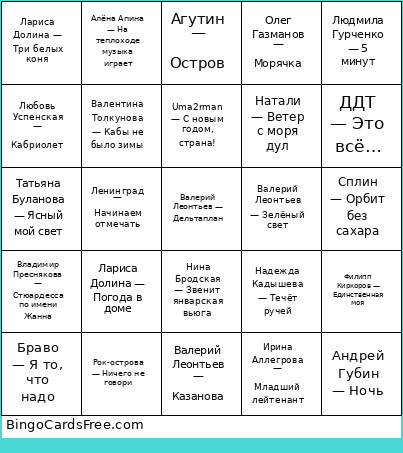 This Бинго Bingo Cards Game contains following Words or Phrases: Мираж — Музыка нас связала, Фристайл — Ах, какая женщина, Майя Кристалинская — А снег идёт, Филипп Киркоров — Единственная моя, Нэнси — Чистый лист, Рок-острова — Ничего не говори, Татьяна Буланова — Мой ненаглядный, Нана — Фаина, Земляне — Трава у дома, Анжелика Варум — Зимняя вишня, Гости из будущего — Беги от меня, Игорь Скляр — Комарово, Андрей Губин — Ночь, Звери — Всё что тебя касается, Hi-Fi — Седьмой лепесток, Машина времени — Поворот, Любэ — Ты неси меня река, Агутин — Остров, Шура — Отшумели летние дожди, DEMO — Солнышко, Иванушки International — Тополиный пух, Руки вверх — Крошка моя, Иванушки International — Снегири, Любэ — Позови меня (фото размыто), Нина Бродская — Звенит январская вьюга, Эдуард Хиль — Зима в избушке, Uma2rman — С новым годом, страна!, Дискотека Авария — Новогодняя, Лариса Долина — Три белых коня, Юрий Никулин — Песня про зайцев, Валерий Леонтьев — Дельтаплан, Валерий Леонтьев — Зелёный свет, Андрей Губин — Зима-холода, Людмила Гурченко — 5 минут, Игорь Николаев — Выпьем за любовь, Самоцветы — Всё, что в жизни есть у меня, Владимир Преснякова — Стюардесса по имени Жанна, Алёна Свиридова — Розовый фламинго, Мираж — Наступает ночь, Анжелика Варум — Городок, Любовь Успенская — Кабриолет, Ирина Аллегрова — Угонщица, Ирина Аллегрова — Императрица, Ирина Аллегрова — Младший лейтенант, Комбинация — Бухгалтер, Алла Пугачёва — Мне нравится, Олег Анофриев — Есть только миг, Валентина Толкунова — Кабы не было зимы, Ленинград — Начинаем отмечать, Лариса Долина — Погода в доме, Григорий Лепс — Рюмка водки на столе, Юрий Шатунов — Седая ночь, Юрий Шатунов — Белые розы, Игорь Корнелюк — Дожди, Алсу — Зимний сон, Алексей Глызин — Зимний сад, Григорий Лепс — Натали, Любэ — Атас, Олег Газманов — Морячка, Валерий Леонтьев — Казанова, Алёна Апина — На теплоходе музыка играет, ВИА Пламя — Снег кружится, Руки вверх — Алёшка, Александр Серов — Я люблю тебя до слёз, Александр Иванов — Боже, какой пустяк, Татьяна Буланова — Ясный мой свет, Танцы Минус — Город, КАР-МЕН — Лондон, гуд бай, Дмитрий Маликов — Звезда моя далёкая, Сплин — Орбит без сахара, ДДТ — Это всё…, Браво — Я то, что надо, Натали — Ветер с моря дул, Леонид Агутин — Хоп Хэй Лала Лэй, Руки Вверх — 18 мне уже, Олег Газманов — Мои ясные дни, Максим Леонидов — Видение, Белый орёл — Как упоительны в России вечера, Надежда Кадышева — Течёт ручей, Лев Лещенко — Прощай.