Print free 2026 F1 bingo cards or personalize,
unlimited cards! Choose from 41,500+ templates or use the bingo card generator.
Add numbers, phrases, pictures, or mix them all.
Play using PDF prints, virtual bingo cards,
and the virtual bingo caller, or combine all formats.
About: This bingo card is built for die-hard Formula 1 fans who love the wild unpredictability of modern Grand Prix racing. With a cheeky focus on dramatic moments, off-track controversies, and team shenanigans, it’s perfect for race watch parties or fan gatherings wanting a fun way to keep track of this season’s chaos and surprises.
How To: To save a PDF to print, click the Print button.
You can alter the number of cards and other
print settings on the Print tab.
Grid items and free space text can be changed on the Basic tab.
Appearance can be entirely customized on the
relevant tabs, or you can quickly search any option
on the 🔍 tab.
How to play 2026 F1 Bingo Cards?
Online Players: Click on the Play button above, and then click on the 🎫 button.
Printed Players: Print PDF bingo cards and physically cross off the cards.
Online Caller: Click on the Play button above.
Printed Caller: Print PDF calling list & calling slips and physically select the slips.
Combo Mode: Choose any combination above.
For instance, caller can be either Offline or Online.
And players can be Offline or Online or a combination of both.
Step-By-Step:
Start by getting the 2026 F1 PDF by clicking on the "Print" button above.
Open the PDF and print a hard copy.
For random drawing, you can print another copy of the call list, cut, fold and then pick them randomly at play time.
Cut the bingo cards at the cut marks if there are more than 1 bingo cards per page.
Give one card to each player. For marking, you can use crayons. Crayons cost the least.
Choose one person to be the caller. If you are playing in a small group, the caller may also play along with their own Bingo card.
The caller begins the play by randomly picking an item from the call list and calling out it to everyone.
The players look at their cards to see if they have the announced word. If they do, they dab that word.
The first player to complete a horizontal, vertical, or a diagonal line of crossed items yells "Bingo!" and wins the game.
The caller validates that the items crossed off form a correct line according to the Bingo card and call list.
You can play for different patterns or a full card blackout for an extended game.
This 2026 F1 Bingo Cards Game contains following Words or Phrases: Championship decided in the last race, Lando relationship drama, New Driver (not OG 22), Wildlife on track during race, Three drivers lead the championship, MBS tousles boy hair, Driver gets cancelled, Session postponed or cancelled, Papaya Rules (derogatory), Pole position wins Monaco (Never Passed), Botched pit changes podium, Double DNF (Mechanical/ Electrical), Someone stalls on race start, Kimi relationship hard-launch, Audi or Cadillac podium, Non-European driver wins race, Ferrari strategy blunder, Mercedes engine team wins a race Home race win, George says something crazy on the radio, Team gets sold, Shot of sad DNF driver sitting next to track, T1 incident takes out 3+ cars, Ferrari engine team wins a race, New race winner, 2 red flags in one race, No DNF race, Teammates Tangle, Max gets fined, New podium finisher, Red Bull engine team wins a race, Stewards blow call (undeniably), Someone crashes out over new cars over radio, The ol' Redbull switcheroo Active aero failure, Audi/Honda engine team wins a race, Double DNF (driver error), Something cringe at Vegas podium ceremony, Madrid GP is a shitshow, Gasly Ocon incident, Last lap lead change, Team principle is fired, Lance Stroll does not crash, Physical altercations, #2 driver becomes #1, Yuki returns, Aston Martin gearbox explodes, Team caught cheating, Smooooth Operator, Passive- aggressive post- race interview.

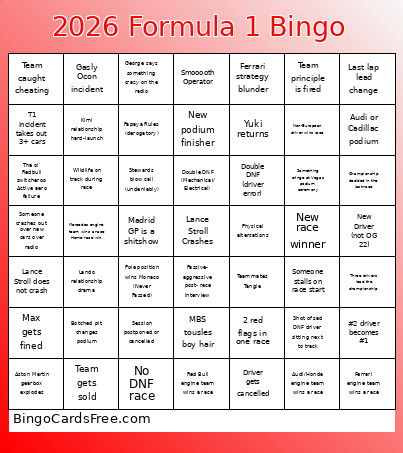 This 2026 F1 Bingo Cards Game contains following Words or Phrases: Championship decided in the last race, Lando relationship drama, New Driver (not OG 22), Wildlife on track during race, Three drivers lead the championship, MBS tousles boy hair, Driver gets cancelled, Session postponed or cancelled, Papaya Rules (derogatory), Pole position wins Monaco (Never Passed), Botched pit changes podium, Double DNF (Mechanical/ Electrical), Someone stalls on race start, Kimi relationship hard-launch, Audi or Cadillac podium, Non-European driver wins race, Ferrari strategy blunder, Mercedes engine team wins a race Home race win, George says something crazy on the radio, Team gets sold, Shot of sad DNF driver sitting next to track, T1 incident takes out 3+ cars, Ferrari engine team wins a race, New race winner, 2 red flags in one race, No DNF race, Teammates Tangle, Max gets fined, New podium finisher, Red Bull engine team wins a race, Stewards blow call (undeniably), Someone crashes out over new cars over radio, The ol' Redbull switcheroo Active aero failure, Audi/Honda engine team wins a race, Double DNF (driver error), Something cringe at Vegas podium ceremony, Madrid GP is a shitshow, Gasly Ocon incident, Last lap lead change, Team principle is fired, Lance Stroll does not crash, Physical altercations, #2 driver becomes #1, Yuki returns, Aston Martin gearbox explodes, Team caught cheating, Smooooth Operator, Passive- aggressive post- race interview.