Print free 2026goals bingo cards or customize,
unlimited cards! Choose from 37,300+ designs or use our bingo card generator.
Add numbers, words, pictures, or any combination.
Play using printed PDF, digital bingo cards,
and our digital bingo caller, or mix physical and digital.
About: This bingo card is perfect for couples or close roommates looking to motivate each other with a mix of personal goals, shared adventures, and home improvement tasks. With an upbeat and encouraging tone, it’s designed for those who love gaming, saving money, organizing their space, and making time for fun outings. Ideal for a fresh start to the year or as a fun way to track progress together!
How To: To save a PDF to print, click the Print button.
You can change the number of cards and other
printing options on the Print tab.
Grid items and free space content can be edited on the Basic tab.
Appearance can be completely personalized on the
corresponding tabs, or you can quickly search any preference
using the 🔍 tab.
How to play 2026goals Bingo Cards?
Digital Players: Click on the Play button above, and then click on the 🎫 button.
Printed Caller: Print PDF calling list & calling slips and physically draw the slips.
Printed Players: Print PDF bingo cards and physically mark the cards.
Digital Caller: Click on the Play button above.
Hybrid Mode: Pick any combination above.
For example, caller can be either Offline or Digital.
And players can be Offline or Digital or a mix of both.
Step-By-Step:
Start by getting the 2026goals PDF by clicking on the "Print" button above.
Open the PDF and print it.
For random drawing, you can print another copy of the call list, cut, fold and then pick them randomly at play time.
Cut the bingo cards at the cut marks if there are greater than 1 bingo cards per page.
Distribute one card per player. For marking, you can use crayons. Crayons are the cheapest.
Pick one person to be the caller. If you are playing in a small group, the caller may also play along with their own Bingo card.
The caller starts the game by randomly pulling an item from the call list and calling out it to all players.
The players check their cards to see if they have the announced word. If they do, they dab that word.
The first player to complete a horizontal, vertical, or a diagonal line of marked items shouts "Bingo!" and wins the play.
The caller verifies that the items marked form a correct line as per the Bingo card and call list.
You can play for varied patterns or a full card blackout for an extended play.
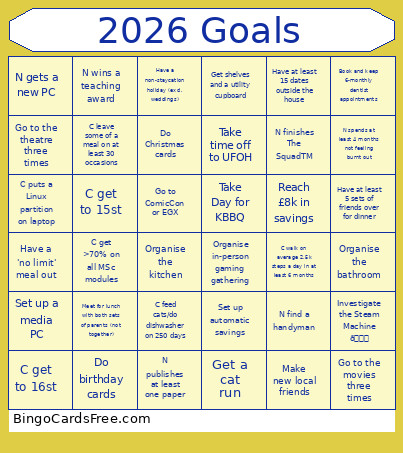
This 2026goals Bingo Cards Game contains following Words or Phrases: Reach £8k in savings, Go to ComicCon or EGX, Organise in-person gaming gathering, Meet for lunch with both sets of parents (not together), Get a cat run, Set up a media PC, Organise the bathroom, Organise the kitchen, Get shelves and a utility cupboard, Have a non-staycation holiday (excl. weddings), Take Day for KBBQ, C leave some of a meal on at least 30 occasions, C get to 15st, C get to 16st, Set up automatic savings, Go to the theatre three times, Go to the movies three times, C walk on average 2.5k steps a day in at least 6 months, Do birthday cards, Do Christmas cards, N finishes The SquadTM, N publishes at least one paper, N wins a teaching award, Book and keep 6-monthly dentist appointments, Have at least 5 sets of friends over for dinner, Make new local friends, C get >70% on all MSc modules, Take time off to UFOH, Have a 'no limit' meal out, Have at least 15 dates outside the house, N find a handyman, N gets a new PC, Investigate the Steam Machine 👀, C puts a Linux partition on laptop, N spends at least 4 months not feeling burnt out, C feed cats/do dishwasher on 250 days.

 This 2026goals Bingo Cards Game contains following Words or Phrases: Reach £8k in savings, Go to ComicCon or EGX, Organise in-person gaming gathering, Meet for lunch with both sets of parents (not together), Get a cat run, Set up a media PC, Organise the bathroom, Organise the kitchen, Get shelves and a utility cupboard, Have a non-staycation holiday (excl. weddings), Take Day for KBBQ, C leave some of a meal on at least 30 occasions, C get to 15st, C get to 16st, Set up automatic savings, Go to the theatre three times, Go to the movies three times, C walk on average 2.5k steps a day in at least 6 months, Do birthday cards, Do Christmas cards, N finishes The SquadTM, N publishes at least one paper, N wins a teaching award, Book and keep 6-monthly dentist appointments, Have at least 5 sets of friends over for dinner, Make new local friends, C get >70% on all MSc modules, Take time off to UFOH, Have a 'no limit' meal out, Have at least 15 dates outside the house, N find a handyman, N gets a new PC, Investigate the Steam Machine 👀, C puts a Linux partition on laptop, N spends at least 4 months not feeling burnt out, C feed cats/do dishwasher on 250 days.