Print free A Plague Of bingo cards or personalize,
limitless prints! Pick from 41,500+ templates or use the bingo card generator.
Add numbers, words, pictures, or mix them all.
Play using printed PDF, digital bingo cards,
and the digital bingo caller, or go hybrid.
Similar Bingo Cards: Environment, Plasticpollution, Marinewildlife
About: This bingo card is perfect for an environmental awareness event or classroom discussion focused on the impact of plastic pollution in our oceans. With references to compelling statistics, emotional appeals, and real-world evidence, it encourages players to reflect on the dangers of plastics to marine life. It's ideal for sparking conversation about conservation and inspiring positive change.
How To: To get a printable PDF, click the Print button.
You can adjust the card quantity and other
print options on the Print tab.
Grid items and free space text can be edited on the Basic tab.
Appearance can be entirely customized on the
relevant tabs, or you can quickly search any option
using the 🔍 tab.
How to play A Plague Of Bingo Cards?
Paper Players: Print PDF bingo cards and manually cross off the cards.
Online Players: Click on the Play button above, and then click on the 🎫 button.
Paper Caller: Print PDF calling list & calling slips and manually select the slips.
Online Caller: Click on the Play button above.
Combo Mode: Choose any combination above.
For example, caller can be either Offline or Online.
And players can be Offline or Online or a combo of both.
Step-By-Step:
Start by saving the A Plague Of Bingo PDF by clicking on the "Print" button above.
Open the PDF and print a hard copy.
For random drawing, you can print another copy of the call list, cut, fold and then pick them randomly at play time.
Cut the bingo cards at the cut lines if there are more than 1 bingo cards per page.
Distribute one card per player. For marking, you can use markers. Crayons cost the least.
Choose one person to be the caller. If you are playing in a small group, the caller may as well play along with their own Bingo card.
The caller initiates the play by randomly drawing an item from the call list and calling out it to everyone.
The players scan their cards to see if they have the called word. If they do, they cross off that word.
The first player to finish a horizontal, vertical, or a diagonal line of marked items announces "Bingo!" and wins the game.
The caller verifies that the items marked form a correct line according to the Bingo card and call list.
You can play for different patterns or a full card blackout for a longer game.
This A Plague Of Bingo Cards Game contains following Words or Phrases: Barry Yeoman, 2050, June 2019, Plastic Is Bad For Animals, Can Be Injured And Entangled, Can Be Killed, Can Ingest It And Get Toxic Exposure, Single-Use Plastic, Weak Waste Systems, Rising Plastic Pollution, Ocean Cleanup Projects, Human Waste Prevention Actions, Imagery, Pathos, Ethos, Logos, Marine Wildlife, A Plague Of Plastics, He Uses Death Rates And Future Statistics About Animals And Plastic, He Discovered Five Trillion Pieces Of Plastic In The Ocean, By 2050, 99% Of All Seabirds Will Have Consumed Plastic, Stephanie Borrelle's Statement, Marcus Eriksen's Statement And His Expedition, Appeals To Readers' Feelings And Tries To Get An Emotional Reaction Using Photo Evidence, Uses Persuasion To Sway Readers To Enhance Their Awareness With Facts About How Bad Plastic Is For Earth, Uses Understanding To Show How Horrible Plastic Is And Recalls Many Events Of Marine Life Injury And Death, It Is Used To Give A Visual Example Of Animals That Are Dying Due To Plastic Pollution, Statistics.

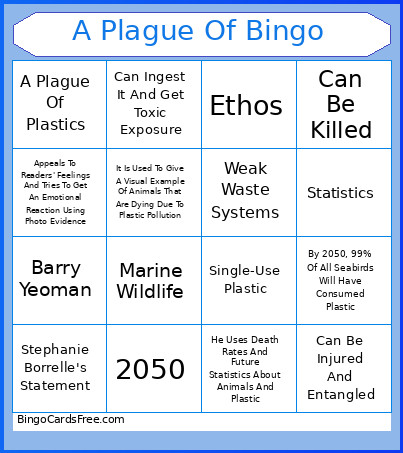 This A Plague Of Bingo Cards Game contains following Words or Phrases: Barry Yeoman, 2050, June 2019, Plastic Is Bad For Animals, Can Be Injured And Entangled, Can Be Killed, Can Ingest It And Get Toxic Exposure, Single-Use Plastic, Weak Waste Systems, Rising Plastic Pollution, Ocean Cleanup Projects, Human Waste Prevention Actions, Imagery, Pathos, Ethos, Logos, Marine Wildlife, A Plague Of Plastics, He Uses Death Rates And Future Statistics About Animals And Plastic, He Discovered Five Trillion Pieces Of Plastic In The Ocean, By 2050, 99% Of All Seabirds Will Have Consumed Plastic, Stephanie Borrelle's Statement, Marcus Eriksen's Statement And His Expedition, Appeals To Readers' Feelings And Tries To Get An Emotional Reaction Using Photo Evidence, Uses Persuasion To Sway Readers To Enhance Their Awareness With Facts About How Bad Plastic Is For Earth, Uses Understanding To Show How Horrible Plastic Is And Recalls Many Events Of Marine Life Injury And Death, It Is Used To Give A Visual Example Of Animals That Are Dying Due To Plastic Pollution, Statistics.