ASDL Grand Challenge Review Bingo Cards - Print Free or Customize
Print free ASDL Grand Challenge Review bingo cards or personalize,
unlimited prints! Choose from 41,500+ templates or use the bingo card generator.
Add numbers, words, images, or mix them all.
Play using printable PDF, virtual bingo cards,
and the virtual bingo caller, or mix physical and digital.
About: This bingo card is perfect for academic seminars or workshops focused on systems engineering, MBSE, and policy analysis. It captures the quirky side comments, technical debates, and classic teaching moments that come up in these settings. Participants will enjoy spotting common phrases and scenarios that everyone in this field encounters, making for a fun yet insightful addition to any event.
How To: To get a PDF to print, click the Print button.
You can modify the card count and other
printing options on the Print tab.
Grid items and free space text can be edited on the Basic tab.
Appearance can be entirely customized on the
relevant tabs, or you can quickly find any setting
on the 🔍 tab.
How to play ASDL Grand Challenge Review Bingo Cards?
Online Players: Click on the Play button above, and then click on the 🎫 button.
Printed Caller: Print PDF calling list & calling slips and manually choose the slips.
Online Caller: Click on the Play button above.
Printed Players: Print PDF bingo cards and manually write on the cards.
Hybrid Mode: Select any combination above.
For example, caller can be either Printed or Online.
And players can be Printed or Online or a combination of both.
Step-By-Step:
Start by saving the ASDL Grand Challenge Review PDF by clicking on the "Print" button above.
Open the PDF and print a hard copy.
For random calling, you can print another copy of the call list, cut, fold and then pick them randomly at play time.
Cut the bingo cards at the cut lines if there are more than 1 bingo cards per page.
Give one card to each player. For marking, you can use pencils. Crayons cost the least.
Select one person to be the caller. If you are playing in a small group, the caller may as well play along with their own Bingo card.
The caller begins the play by randomly picking an item from the call list and calling out it to everyone.
The players scan their cards to see if they have the announced word. If they do, they mark that word.
The first player to finish a horizontal, vertical, or a diagonal line of crossed items announces "Bingo!" and wins the game.
The caller validates that the items crossed off form a proper line according to the Bingo card and call list.
You can play for multiple patterns or a full card blackout for a longer game.
This ASDL Grand Challenge Review Bingo Cards Game contains following Words or Phrases: Quantitative policymaking, MDAO-enabled MBSE, but also MBSE-MDAO, Blind leading the blind, They want to hire AFSIM people, Outline is apples, oranges and tangerines, Think of the automotive example from class, What questions are you trying to answer, What is an alternative in your problem?, Orchestra example, Comes across as a software engineering exercise, A policy is like adding a constraint to my problem, Set it up as a decision making problem, Supply and demand problem, Spots typo on the font size 7 citation, GCs do not have a SoW, but it does not mean we don't need one, This looks like a calculator, not a dashboard, Mentions MRO and sustainment anyway, Concluding remarks, not conclusions, Font types don't match, Set it up as an inverse design problem, Look for outlier events at tail ends of distribution, Is everyone gainfully employed?, Model it as a system dynamics problem, Need to bring INTA in the fold, Bullets are not sentences, remove periods, Forgot the Heilmeiers, MBSE and requirements allocation and derivation, Your head looks huge in the photo, What's your endgame vision.

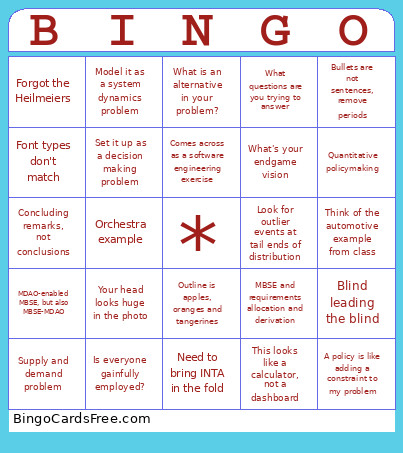 This ASDL Grand Challenge Review Bingo Cards Game contains following Words or Phrases: Quantitative policymaking, MDAO-enabled MBSE, but also MBSE-MDAO, Blind leading the blind, They want to hire AFSIM people, Outline is apples, oranges and tangerines, Think of the automotive example from class, What questions are you trying to answer, What is an alternative in your problem?, Orchestra example, Comes across as a software engineering exercise, A policy is like adding a constraint to my problem, Set it up as a decision making problem, Supply and demand problem, Spots typo on the font size 7 citation, GCs do not have a SoW, but it does not mean we don't need one, This looks like a calculator, not a dashboard, Mentions MRO and sustainment anyway, Concluding remarks, not conclusions, Font types don't match, Set it up as an inverse design problem, Look for outlier events at tail ends of distribution, Is everyone gainfully employed?, Model it as a system dynamics problem, Need to bring INTA in the fold, Bullets are not sentences, remove periods, Forgot the Heilmeiers, MBSE and requirements allocation and derivation, Your head looks huge in the photo, What's your endgame vision.