Print free bingo Reply V2 cards or personalize,
limitless prints! Choose from 41,500+ templates or use the bingo card generator.
Add numbers, phrases, images, or mix them all.
Play using PDF printouts, virtual bingo cards,
and the virtual bingo caller, or combine all formats.
About: This bingo card brings the future of AI and cloud solutions to life, making it perfect for tech conferences, innovation workshops, or company training days. With a focus on cutting-edge Gemini advancements, enterprise AI, and cloud modernisation, it energizes teams who want to stay ahead in artificial intelligence and data-driven technologies. The tone is inspiring and forward-looking, fostering discussion among experts and industry leaders.
How To: To download a PDF to print, click the Print button.
You can adjust the card quantity and other
print preferences on the Print tab.
Grid items and free space text can be changed on the Basic tab.
Appearance can be totally customized on the
relevant tabs, or you can quickly search any setting
using the 🔍 tab.
How to play Bingo Reply V2 Cards?
Printed Players: Print PDF bingo cards and manually mark the cards.
Printed Caller: Print PDF calling list & calling slips and manually pick the slips.
Digital Players: Click on the Play button above, and then click on the 🎫 button.
Digital Caller: Click on the Play button above.
Hybrid Play: Choose any combination above.
For instance, caller can be either Paper or Digital.
And players can be Paper or Digital or a mix of both.
Step-By-Step:
Start by downloading the Bingo Reply V2 PDF by clicking on the "Print" button above.
Open the PDF and print it.
For random calling, you can print another copy of the call list, cut, fold and then draw them randomly at play time.
Cut the bingo cards at the cut lines if there are greater than 1 bingo cards per page.
Distribute one card per player. For marking, you can use crayons. Crayons are the cheapest.
Choose one person to be the caller. If you are playing in a small group, the caller may as well play along with their own Bingo card.
The caller starts the game by randomly pulling an item from the call list and calling out it to everyone.
The players look at their cards to see if they have the called word. If they do, they cross off that word.
The first player to complete a horizontal, vertical, or a diagonal line of marked items shouts "Bingo!" and wins the game.
The caller confirms that the items crossed off form a proper line as per the Bingo card and call list.
You can play for varied patterns or a full card blackout for an extended game.
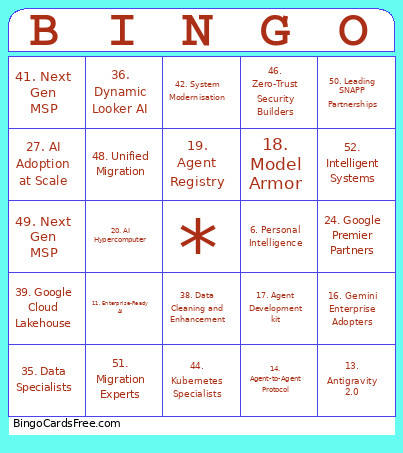
This Bingo Reply V2 Cards Game contains following Words or Phrases: 1. Conversational Insights, 2. Gemini Geniuses, 3. Multimodal Technology, 4. NotebookLM, 5. Gemini 3.5, 6. Personal Intelligence, 7. Long Horizon Tasks, 8. Google DeepMind, 9. Next Gen AI, 10. Frontier Intelligence, 11. Enterprise-Ready AI, 12. AiDOPT Framework, 13. Antigravity 2.0, 14. Agent-to-Agent Protocol, 15. Gemini Enterprise Agent Platform, 16. Gemini Enterprise Adopters, 17. Agent Development kit, 18. Model Armor, 19. Agent Registry, 20. AI Hypercomputer, 21. Breakthrough TPUs, 22. Deep Research Agent, 23. Agentic Taskforce, 24. Google Premier Partners, 25. 2026 Partner of the Year, 26. Google Cloud Specialists, 27. AI Adoption at Scale, 28. Google Certified Experts, 29. Partner Advantage, 30. AI Accelerators, 31. Gemini Onboarding, 32. AI at Scale, 33. Delivery Excellence, 34. Innovation Velocity, 35. Data Specialists, 36. Dynamic Looker AI, 37. Automating Data Engineering, 38. Data Cleaning and Enhancement, 39. Google Cloud Lakehouse, 40. Data Platform Modernisation, 41. Next Gen MSP, 42. System Modernisation, 43. Certified Data Experts, 44. Kubernetes Specialists, 45. Infrastructure Modernisation, 46. Zero-Trust Security Builders, 47. Sovereign Cloud Solutions, 48. Unified Migration, 49. Next Gen MSP, 50. Leading SNAPP Partnerships, 51. Migration Experts, 52. Intelligent Systems.

 This Bingo Reply V2 Cards Game contains following Words or Phrases: 1. Conversational Insights, 2. Gemini Geniuses, 3. Multimodal Technology, 4. NotebookLM, 5. Gemini 3.5, 6. Personal Intelligence, 7. Long Horizon Tasks, 8. Google DeepMind, 9. Next Gen AI, 10. Frontier Intelligence, 11. Enterprise-Ready AI, 12. AiDOPT Framework, 13. Antigravity 2.0, 14. Agent-to-Agent Protocol, 15. Gemini Enterprise Agent Platform, 16. Gemini Enterprise Adopters, 17. Agent Development kit, 18. Model Armor, 19. Agent Registry, 20. AI Hypercomputer, 21. Breakthrough TPUs, 22. Deep Research Agent, 23. Agentic Taskforce, 24. Google Premier Partners, 25. 2026 Partner of the Year, 26. Google Cloud Specialists, 27. AI Adoption at Scale, 28. Google Certified Experts, 29. Partner Advantage, 30. AI Accelerators, 31. Gemini Onboarding, 32. AI at Scale, 33. Delivery Excellence, 34. Innovation Velocity, 35. Data Specialists, 36. Dynamic Looker AI, 37. Automating Data Engineering, 38. Data Cleaning and Enhancement, 39. Google Cloud Lakehouse, 40. Data Platform Modernisation, 41. Next Gen MSP, 42. System Modernisation, 43. Certified Data Experts, 44. Kubernetes Specialists, 45. Infrastructure Modernisation, 46. Zero-Trust Security Builders, 47. Sovereign Cloud Solutions, 48. Unified Migration, 49. Next Gen MSP, 50. Leading SNAPP Partnerships, 51. Migration Experts, 52. Intelligent Systems.