
🔍
Advertisement

Borahae Bingo Cards - Print Free or Customize

Print free Borahae bingo cards or modify, limitless prints! Select from 43,000+ designs or use the bingo card generator. Add numbers, phrases, pictures, or mix them all. Play using printable PDF, virtual bingo cards, and the virtual bingo caller, or mix physical and digital.

Borahae Bingo
Bias is JinBias wrecker is JinHas been ARMY since BTS's debutBecame ARMY this yearHas attended a BTS concert
Has watched a BTS concert onlineHas travelled to see BTS performHas a BTS concert memory to shareOwns an ARMY BombHas decorated their ARMY Bomb
Has a BTS tattooIs wearing BTS or ARMY merchHas made their own BTS merchBrought a friend to this eventCame to this event alone
Is attending their first cupsleeve eventCollects BTS photocardsHas the same fav BTS album as youHas the same fav BTS song as youCan name 3 of Jin's solo songs
Has "Super Tuna" on a playlistHas "Moon" on a playlistHas "Look Here" on a playlistHas listened to every BTS albumHas learned a BTS dance
This is shown at the top of the template and game pages.
Optional. If this template makes to the front page, you will be credited for creating it.
Shown at the top of each bingo card.

This can be text or an image. Images larger than 50 KB may be compressed and may lose transparency.
If words on a line are separated by this text, then:
  • Bingo card will only show the text on the right side of the separator.
  • The PDF call list will show the full text.
  • To disable this feature, clear this field.
Quiz Mode ON
Select which side of the quiz separator to show on the card preview on this page. When printing or playing, calling cards always show the right side only.
If words on a line are separated by this text, then:
  • The text on the right side of the separator will be spoken by the online game play.
  • Bingo card will only show the text on the left side of the separator.
  • The PDF call list will show the full text.
  • To disable this feature, clear this field.
Audio Mode ON
Use separate item lists for each column. This is useful for american traditional 75 ball number bingo or cards where each column should draw from a different set of items.
Enter numbers, words or phrases, each one on a new line. Up to 255 items are supported.

Items Per Column:
To specify items per column, eg for 75 ball bingo, turn ON the "Items Per Column" setting.
Sort   |   No Dups
Supports:
  1. Up to 99 images.
  2. Single or multiple image uploads.
  3. Up to 5 MB file size per image.
  4. You can use both Grid Items and Grid Images.
  5. Click an image or label to edit the label or delete the image.
  6. If an image background changes to white, remove transparency or reduce the image size to < 10KB.
    Choose whether image labels appear on bingo cards. Image labels are always shown on the calling card.
    Grid size in Columns x Rows format.
    Free space is usually the center square of the card. It is like a joker or a wild square, and counts towards the winning pattern.
    • Shows text or an image in the Free Space cell.
    • Make sure Free Space Cell is not set to "None".
    • To show text, enter text.
    • To show an image, click the button on the right and select an image.
    • If the image background changes to white, remove transparency or reduce the image size to < 10KB.
    Select Yes to generate unique random cards.

    If No is selected, all cards will have the same text in the same order, which might be useful in educational or quiz settings.
    Text is automatically resized to fit inside each cell. Shorter text may appear very large. Choose a smaller maximum font size to limit how large the text can get.
    Title text color.

    * Applicable when Card Title is text.
    Title background shape.

    * Requires Title Back Opacity to be > 0%.
    Title background opacity.

    * Requires Title Back Shape.
    Title background shape color.

    * Requires Title Back Shape.
    * Requires Title Back Opacity to be > 0%.
    Title background border color.

    * Requires Title Back Shape.
    * Requires Title Back Opacity to be > 0%.
    Grid Text color.
    Grid background color.
    Grid line color.
    • Background shape for cells.
    • Select a stock image or upload your own custom image.
    • You can use Cell Transparency setting to change how prominently the background shape shows.
    • If you select a shape other than Grid, you may have to increase Cell Padding if you want to fit the text inside the shape.
    • Don't see the selected image?
      Set Cell Transparency <50.
    Empty space inside each cell between border and text.
    Space between any 2 cells.
    0% makes grid background opaque. Higher setting makes grid background transparent allowing card background image or card background color to show.
    Outside border width.
    Card outside border color.

    * Requires Card Border Width > 0%
    Yes makes the card corners rounded.
    Empty space between card border and card contents.
    Card background color.
    • Background image for the whole card.
    • Select a stock image or upload your own custom image.
    • Use Card Transparency and Cell Transparency to control how much of the image shows through.
    Don't see the selected image?
    • Set Card Transparency >50.
    • Set Card Border Width >0 or Card Padding >0.
    • Set Cell Transparency >50.
    Select how the background image covers the whole card. You can also choose to repeat the image.
    Controls the transparency of the card background color. Higher values make the card background more transparent, allowing the card background image or outer background to show through.
    This mode uses rapid animations. It may cause dizziness, nausea, or trigger sensitive individuals. Please use responsibly.
    Warning! 
    Public: Anyone can see your card template, including search engines

    Private: Only you can see and edit the card template. You will need to be signed in.

    Click to Sign-Up « Free!!!

    Click to Sign-In
    Number of cards to generate and include in the Full PDF. The Preview button will always generate only 1 card.
    Choose whether to include a call list in the Full PDF. Grid prints the call list as a grid; List prints it as a text list.
    Printer paper size.
    Paper orientation for printing. Some card layouts may look better in portrait or landscape.
    Arrangement of cards on each page of paper.
    Horizontal margin on left and right sides of each card.
    Vertical margin on top and bottom sides of each card.
    Colors: Removes background to save ink for printing.

    B&W: Removes background & changes colors to black & white to save ink for printing.
    Select amount of empty space to keep in each cell for participants to write something.

    This feature is also called human bingo, people bingo, social bingo, get-to-know bingo or ice breaker bingo.
    Starting card number. Change if you need to reprint a set of cards starting with a specific card number.

    Note: If this is not 1, then call list (index card) will not be printed.
    Header height. Header is shown only when there is 1 or more characters.
    Instructions or any other message(s) at the top of each card.
    Footer height. Footer is shown only when there is 1 or more characters.
    Instructions or any other message(s) at the bottom of each card.
    All fonts support English.

    For non-English support in PDF, please try FreeSans, FreeSerif, DejaVuSans, DejaVuSerif or NotoSans
    ✉

    Suggestions | Feedback | Bug

    Similar Bingo Cards: , ,

    About: This bingo card is a fun, interactive way for BTS fans—especially Jin stans and dedicated ARMYs—to connect and share their love for the group. Perfect for fan meetups, cupsleeve events, or BTS-themed gatherings, it encourages conversation about concerts, favorite songs, personal experiences, and creative projects related to BTS. It’s all about celebrating fandom pride and finding fellow fans with similar stories.

    How To: To download a PDF to print, click the Print button. You can alter the card quantity and other print settings on the Print tab. Grid items and free space text can be changed on the Basic tab. Appearance can be highly customized on the relevant tabs, or you can quickly search any setting using the 🔍 tab.

    How to play Borahae Bingo Cards?

    • Printed Caller: Print PDF calling list & calling slips and physically pick the slips.
    • Virtual Players: Click on the Play button above, and then click on the 🎫 button.
    • Printed Players: Print PDF bingo cards and physically cross off the cards.
    • Virtual Caller: Click on the Play button above.
    • Hybrid Mode: Select any combination above. For example, caller can be either Paper or Virtual. And players can be Paper or Virtual or a combination of both.

    Step-By-Step:

    1. Start by getting the Borahae Bingo PDF by clicking on the "Print" button above.
    2. Open the PDF and print it.
    3. For random drawing, you can print another copy of the call list, cut, fold and then draw them randomly at play time.
    4. Cut the bingo cards at the cut lines if there are greater than 1 bingo cards per page.
    5. Give one card to each player. For marking, you can use pens. Crayons cost the least.
    6. Select one person to be the caller. If you are playing in a small group, the caller may as well play along with their own Bingo card.
    7. The caller initiates the game by randomly picking an item from the call list and calling out it to everyone.
    8. The players scan their cards to see if they have the announced word. If they do, they cross off that word.
    9. The first player to finish a horizontal, vertical, or a diagonal line of marked items shouts "Bingo!" and wins the play.
    10. The caller verifies that the items marked form a proper line as per the Bingo card and call list.
    11. You can play for different patterns or a full card blackout for a longer play.
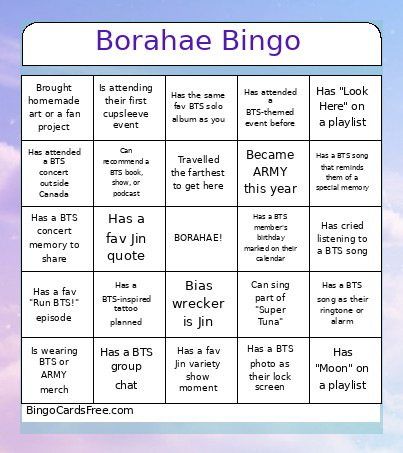
    Borahae Bingo CardsThis Borahae Bingo Cards Game contains following Words or Phrases: Bias is Jin, Bias wrecker is Jin, Has been ARMY since BTS's debut, Became ARMY this year, Has attended a BTS concert, Has watched a BTS concert online, Has travelled to see BTS perform, Has a BTS concert memory to share, Owns an ARMY Bomb, Has decorated their ARMY Bomb, Has a BTS tattoo, Is wearing BTS or ARMY merch, Has made their own BTS merch, Brought a friend to this event, Came to this event alone, Is attending their first cupsleeve event, Collects BTS photocards, Has the same fav BTS album as you, Has the same fav BTS song as you, Can name 3 of Jin's solo songs, Has "Super Tuna" on a playlist, Has "Moon" on a playlist, Has "Look Here" on a playlist, Has listened to every BTS album, Has learned a BTS dance, Can do a BTS dance move right now, Knows Jin's birthday without looking it up, Knows Jin's zodiac sign, Has a fav Jin variety show moment, Has watched "Run BTS!" from the beginning, Has a fav "Run BTS!" episode, Has a fav Jin quote, Has recreated a Jin outfit, Has a BTS photo as their lock screen, Has over 50 songs on their BTS playlist, Knows a fellow ARMY from online, Has made an ARMY friend at an event, Has a BTS group chat, Shares your BTS bias, Has the same fav BTS era as you, Speaks more than one language, Travelled the farthest to get here, Has a birthday in the same month as Jin, Has a creative hobby, Brought homemade art or a fan project, Has made BTS fan art, Can recommend a BTS book, show, or podcast, Has a fun Jin or BTS story to share, Has all 7 BTS members as their bias, Has no bias wrecker, Has changed their BTS bias at least once, Has seen BTS perform more than once, Has attended a BTS concert outside Canada, Has attended a BTS-themed event before, Has visited a location featured in BTS content, Has travelled somewhere because of BTS, Has a BTS-inspired tattoo planned, Owns a physical copy of a BTS solo album, Has a BTS song as their ringtone or alarm, Has cried listening to a BTS song, Has a BTS song that reminds them of a special memory, Has a BTS member's birthday marked on their calendar, Can name all 7 BTS members in age order, Can say at least one Korean phrase without assistance, Has studied Korean because of BTS, Has tried making a Korean dish because of BTS, Has eaten at a restaurant visited by a BTS member, Has a BTS-related item in their bag right now, Has a photocard of Jin with them, Has traded photocards with another ARMY, Has given or received an ARMY freebie today, Has a BTS-inspired craft project in progress, Has the same fav BTS solo album as you, Has attended a BTS concert in Toronto, Can sing part of "Super Tuna", Can name a solo album from every BTS members.

    Advertisement