
Bout Bingo Cards - Print Free or Customize
Print free Bout bingo cards or adjust them, unlimited prints! Pick from 41,500+ designs or use the bingo card generator. Add numbers, words, pictures, or mix them all. Play using printed PDF, online bingo cards, and the online bingo caller, or mix physical and digital.
About: This bingo card is packed with classic roller derby moments and mishaps, making it perfect for fans attending a bout or watching a game with friends. Expect to spot dramatic jams, quirky referee calls, wild audience participation, and plenty of derby lingo. It’s a fun way to stay engaged and celebrate all the unpredictable, action-packed energy of the sport.
How To: To get a printable PDF, click the Print button. You can change the number of cards and other printing settings on the Print tab. Grid items and free space text can be edited on the Basic tab. Appearance can be totally personalized on the corresponding tabs, or you can easily search any preference using the 🔍 tab.
How to play Bout Bingo Cards?
- Online Caller: Click on the Play button above.
- Paper Caller: Print PDF calling list & calling slips and physically draw the slips.
- Paper Players: Print PDF bingo cards and physically scratch the cards.
- Online Players: Click on the Play button above, and then click on the 🎫 button.
- Mixed Play: Pick any combination above. For instance, caller can be either Offline or Online. And players can be Offline or Online or a mix of both.
Step-By-Step:
- Start by saving the Bout Bingo PDF by clicking on the "Print" button above.
- Open the PDF and print it.
- For random calling, you can print another copy of the call list, cut, fold and then pull them randomly at play time.
- Cut the bingo cards at the cut marks if there are more than 1 bingo cards per page.
- Distribute one card per player. For marking, you can use pens. Crayons cost the least.
- Pick one person to be the caller. If you are playing in a small group, the caller can as well play along with their own Bingo card.
- The caller starts the game by randomly picking an item from the call list and saying it to everyone.
- The players look at their cards to see if they have the called word. If they do, they mark that word.
- The first player to finish a horizontal, vertical, or a diagonal line of crossed items shouts "Bingo!" and wins the game.
- The caller confirms that the items marked form a proper line according to the Bingo card and call list.
- You can play for different patterns or a full card blackout for a longer game.
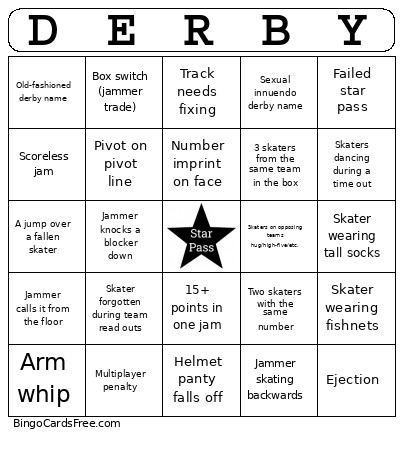 This Bout Bingo Cards Game contains following Words or Phrases: 1-on-1 blocking, 15+ points in one jam, 2 minute jam, 3 skaters from the same team in the box, 3+ skater pileup, 4-digit number, 50 point gap, A jump/step over a fallen skater, Announcer gets something wrong, Apex jump goes awry, Arm whip, Back block, Blocker takes jammer back, Blood check, Bloody nose, Boots that aren't black and/or white, Box switch (jammer trade), Coach argues with ref, Crazy makeup, Cut track penalty, Directional penalty, Double penalty, Double star pass, Dropped star, Ejection, Failed star pass, False start, Forearm, Foul out, Gear malfunction, Grand slam, Head block, Helmet panty falls off, Helmet with 3+ stickers, Helmet with 5+ stickers, High block, Hip whip, Jammer calls it from the floor, Jammer knocks a blocker down, Jammer recycling, Jammer skating backwards, Jammer stuck entire jam, Jammer takes off the star and then puts it back on, Jammer yells "Go!", Jammer-on-jammer action, Leg block, Low block, Makeup ends up on another skater, Multiplayer penalty, No lead jammer, No pack, Non-pun derby name, Official review, Official time-out, Old-fashioned derby name, Overtime, Pivot on pivot line, Pop culture name, Power jam, Power start, Push, Recovery from 50+ point deficit, Ref take-out, Scoreless jam, Sexual innuendo derby name, Shirt whip, Single-digit number, Skater argues with ref, Skater forgotten during team read outs, Skater has Halo wheels, Skater has mismatched wheels, Skater skating under legal name, Skater wearing fishnets, Skater wearing skirt, Skater wearing tall socks, Skater with visible bruises, Skaters dancing during a time out/half-time/etc, Skaters on opposing teams hug/high-five/etc., Someone (not a coach) yells "Call it!", Someone has a clack fan, Spectator argues with ref, Spectator has a cowbell, Spectator has a megaphone, Successful apex jump, Team time-out, Technical difficulty, The mythical Peg-Assist, Tied score, Toe stop running, Track needs fixing, Triple-digit score, Two skaters with the same number, Under-30-second jam, Waterfall.