
CBS PD Day 2026 Human Bingo Cards - Print Free or Customize
Print free CBS PD Day 2026 Human bingo cards or modify, unlimited cards! Pick from 41,500+ designs or use the bingo card generator. Add numbers, words, images, or mix them all. Play using printed PDF, digital bingo cards, and the digital bingo caller, or go hybrid.
About: This bingo card is all about celebrating the rich diversity, experiences, and unique backgrounds of the Columbia Business School community. Perfect for staff mixers, orientation events, or team-building activities, it spotlights everything from cultural traditions to adventurous hobbies and deep CBS connections. Expect lots of laughs and “aha” moments as people discover what they have in common.
How To: To save a PDF to print, click the Print button. You can alter the card quantity and other print settings on the Print tab. Grid items and free space text can be edited on the Basic tab. Appearance can be exactly personalized on the corresponding tabs, or you can quickly search any preference on the 🔍 tab.
How to play CBS PD Day 2026 Human Bingo Cards?
- Digital Players: Click on the Play button above, and then click on the 🎫 button.
- Paper Players: Print PDF bingo cards and physically scratch the cards.
- Digital Caller: Click on the Play button above.
- Paper Caller: Print PDF calling list & calling slips and physically choose the slips.
- Mixed Mode: Pick any combination above. For example, caller can be either Printed or Digital. And players can be Printed or Digital or a combo of both.
Step-By-Step:
- Start by getting the CBS PD Day 2026 Human Bingo PDF by clicking on the "Print" button above.
- Open the PDF and print a hard copy.
- For random calling, you can print another copy of the call list, cut, fold and then draw them randomly at play time.
- Cut the bingo cards at the cut marks if there are more than 1 bingo cards per page.
- Distribute one card per player. For marking, you can use pencils. Crayons are the cheapest.
- Pick one person to be the caller. If you are playing in a small group, the caller can also play along with their own Bingo card.
- The caller begins the play by randomly picking an item from the call list and announcing it to everyone.
- The players look at their cards to see if they have the called word. If they do, they dab that word.
- The first player to finish a horizontal, vertical, or a diagonal line of marked items yells "Bingo!" and wins the game.
- The caller confirms that the items crossed off form a proper line as per the Bingo card and call list.
- You can play for different patterns or a full card blackout for a longer game.
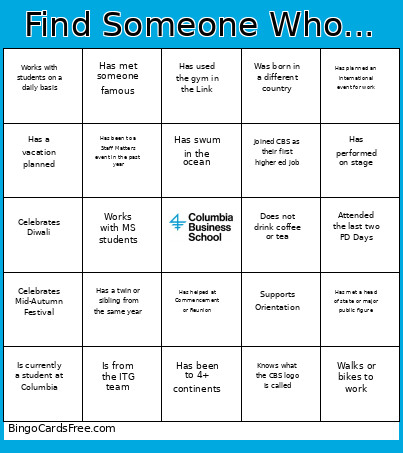 This CBS PD Day 2026 Human Bingo Cards Game contains following Words or Phrases: Member of more than 1 Employee Resource Group, Celebrates Diwali, Worked at CBS for 10+ years, Teaches at CBS, Was born in a different country, Is a New York native, Attended the last two PD Days, Is from the Heilbrunn Center team, Celebrates Mid-Autumn Festival, Has run (or is training for) a marathon, Has traveled to 10+ countries, Is currently a student at Columbia, Grew up in a town with fewer than 10,000 people, Has been to a national park this year, Has been skydiving or bungee jumping, Has tried a sport for the first time in the last year, Has gone camping in the last year, Speaks 3+ languages, Plays 2+ musical instruments, Has met someone famous, Has a hobby most people wouldn't guess, Has read a book this month, Started at CBS in the last 6 months, Worked at CBS before the move to MHVL, Has worked in 3+ depts or schools at Columbia, Has helped at Commencement or Reunion, Works with faculty on a daily basis, Works with students on a daily basis, Commutes more than an hour to get to work, Walks or bikes to work, Is from the Chazen Institute team, Has a pet with a funny name, Wakes up before 6 am by choice, Has hosted a guest speaker at CBS, Has worked with a startup at CBS, Has been on TV or radio, Has met a head of state or major public figure, Has competed at a national level in something, Has a twin or sibling from the same year, Has been to 2+ Broadway shows, Has been to a concert in the past year, Has a vacation planned, Is from the ITG team, Is from the Dean's Office team, Has more than two siblings, Worked at CBS for 20+ years, Has taken a road trip longer than 10 hours, Has swum in the ocean, Lives in a state that is not NY or NJ, Has performed on stage, Knits, crochets, or sews, Does not drink coffee or tea, Works with MS students, Has planned an international event for work, Has been inside Low Library, Has used the gym in the Link, Consistently keeps an inbox with 0 unread emails, Has been to 4+ continents, Has used the Sweetgreen app/outpost, Has been to a Staff Matters event in the past year, Volunteered for Community Service Day, Supports Orientation, Is a CBS alum, Works in an academic division, Has worked with a student club, Went to school in another country, Was a Knicks fan before last year, Is currently learning a new skill or hobby, Knows what the CBS logo is called, Has baked something from scratch in the past month, Joined CBS as their first higher ed job.