Print free CCS BINGO cards or modify,
unlimited prints! Pick from 42,200+ designs or use our bingo card generator.
Add numbers, phrases, images, or any combination.
Play using PDF printouts, online bingo cards,
and our online bingo caller, or mix physical and digital.
About: This bingo card is perfect for tech enthusiasts, IT students, or anyone attending a computer science event. Packed with hardware, software, programming concepts, and cybersecurity terms, it brings a fun twist to learning or reviewing digital literacy topics. Use it in classrooms, workshops, or at tech meetups to spark conversations and test your technology know-how!
How To: To get a printable PDF, click the Print button.
You can change the number of cards and other
printing options on the Print tab.
Grid items and free space text can be edited on the Basic tab.
Appearance can be entirely personalized on the
relevant tabs, or you can quickly find any option
using the 🔍 tab.
How to play CCS BINGO Cards?
Digital Players: Click on the Play button above, and then click on the 🎫 button.
Digital Caller: Click on the Play button above.
Paper Caller: Print PDF calling list & calling slips and manually select the slips.
Paper Players: Print PDF bingo cards and manually write on the cards.
Hybrid Mode: Select any combination above.
For example, caller can be either Offline or Digital.
And players can be Offline or Digital or a combo of both.
Step-By-Step:
Start by downloading the CCS BINGO PDF by clicking on the "Print" button above.
Open the PDF and print a hard copy.
For random drawing, you can print another copy of the call list, cut, fold and then pull them randomly at play time.
Cut the bingo cards at the cut lines if there are greater than 1 bingo cards per page.
Give one card to each player. For marking, you can use pencils. Crayons cost the least.
Select one person to be the caller. If you are playing in a small group, the caller can also play along with their own Bingo card.
The caller begins the play by randomly pulling an item from the call list and announcing it to everyone.
The players check their cards to see if they have the announced word. If they do, they dab that word.
The first player to complete a horizontal, vertical, or a diagonal line of crossed items announces "Bingo!" and wins the play.
The caller verifies that the items crossed off form a proper line according to the Bingo card and call list.
You can play for multiple patterns or a full card blackout for an extended play.
This CCS BINGO Cards Game contains following Words or Phrases: Computer, Keyboard, Mouse, Monitor, Printer, Scanner, Motherboard, Processor, CPU, RAM, ROM, Hard Drive, SSD, Graphics Card, Power Supply, Flash Drive, Webcam, Microphone, Touchscreen, Software, Operating System, Windows, Linux, macOS, Android, Application, Web Browser, Microsoft Word, Microsoft Excel, PowerPoint, Database, Antivirus, File, Folder, Cloud Computing, Virtual Machine, Open Source, User Interface, Installation, Programming, Coding, Algorithm, Flowchart, Variable, Function, Loop, Conditional Statement, Syntax, Debugging, Compiler, Interpreter, Python, Java, C++, JavaScript, HTML, CSS, SQL, Source Code, Cybersecurity, Password, Encryption, Malware, Phishing, Hacker, Data Privacy, Authentication, Backup, Recovery, Digital Footprint, Two-Factor Authentication, Ransomware, Spyware, Data, Information, Artificial Intelligence, Machine Learning, Robotics, Information Technology, Database Management System, Cybercrime, Data Structures, Object-Oriented Programming, Software Engineering, System Analyst, Programmer, Web Developer, Troubleshooting, Information System, Digital Literacy, E-Commerce, E-Learning, Artificial Neural Network, Big Data, Blockchain, Internet of Things, User Experience, GUI, Artificial Reality.

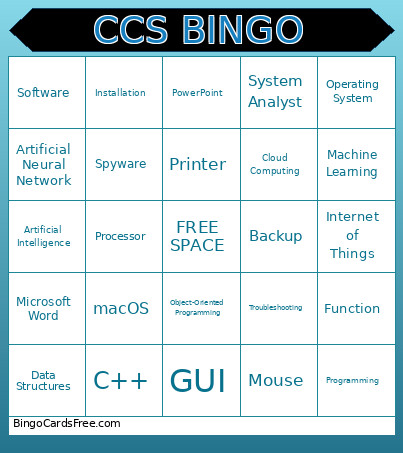 This CCS BINGO Cards Game contains following Words or Phrases: Computer, Keyboard, Mouse, Monitor, Printer, Scanner, Motherboard, Processor, CPU, RAM, ROM, Hard Drive, SSD, Graphics Card, Power Supply, Flash Drive, Webcam, Microphone, Touchscreen, Software, Operating System, Windows, Linux, macOS, Android, Application, Web Browser, Microsoft Word, Microsoft Excel, PowerPoint, Database, Antivirus, File, Folder, Cloud Computing, Virtual Machine, Open Source, User Interface, Installation, Programming, Coding, Algorithm, Flowchart, Variable, Function, Loop, Conditional Statement, Syntax, Debugging, Compiler, Interpreter, Python, Java, C++, JavaScript, HTML, CSS, SQL, Source Code, Cybersecurity, Password, Encryption, Malware, Phishing, Hacker, Data Privacy, Authentication, Backup, Recovery, Digital Footprint, Two-Factor Authentication, Ransomware, Spyware, Data, Information, Artificial Intelligence, Machine Learning, Robotics, Information Technology, Database Management System, Cybercrime, Data Structures, Object-Oriented Programming, Software Engineering, System Analyst, Programmer, Web Developer, Troubleshooting, Information System, Digital Literacy, E-Commerce, E-Learning, Artificial Neural Network, Big Data, Blockchain, Internet of Things, User Experience, GUI, Artificial Reality.