Christmas Music Bingo Cards - Print Free or Customize
Print free Christmas Music bingo cards or modify,
unlimited prints! Pick from 19,800+ designs or use our bingo card generator.
Add numbers, words, images, or all of them.
Play using printable PDF, virtual bingo cards,
and our virtual bingo caller, or combine all formats.
About: Celebrate the holiday spirit with this festive Christmas Song Bingo card, perfect for family gatherings, office parties, or any seasonal get-together. Packed with classic tunes and modern favorites, it’s designed to spark nostalgia and joy while everyone competes to recognize their beloved holiday melodies. This card is sure to keep the atmosphere merry and bright!
How To: To get a PDF to print, click the Print button.
You can adjust the card quantity and other
print settings on the Print tab.
Grid items and free space content can be changed on the Basic tab.
Appearance can be completely customized on the
corresponding tabs, or you can quickly locate any preference
using the 🔍 tab.
How to play Christmas Music Bingo Cards?
Printed Players: Print PDF bingo cards and physically mark the cards.
Virtual Caller: Click on the Play button above.
Virtual Players: Click on the Play button above, and then click on the 🎫 button.
Printed Caller: Print PDF calling list & calling slips and physically draw the slips.
Hybrid Mode: Choose any combination above.
For instance, caller can be either Offline or Virtual.
And players can be Offline or Virtual or a mix of both.
Step-By-Step:
Start by downloading the Christmas Music PDF by clicking on the "Print" button above.
Open the PDF and print it.
For random drawing, you can print another copy of the call list, cut, fold and then draw them randomly at play time.
Cut the bingo cards at the cut lines if there are more than 1 bingo cards per page.
Distribute one card per player. For marking, you can use pencils. Crayons are the cheapest.
Choose one person to be the caller. If you are playing in a small group, the caller may as well play along with their own Bingo card.
The caller starts the game by randomly pulling an item from the call list and calling out it to all players.
The players scan their cards to see if they have the announced word. If they do, they cross off that word.
The first player to complete a horizontal, vertical, or a diagonal line of crossed items shouts "Bingo!" and wins the play.
The caller verifies that the items crossed off form a correct line according to the Bingo card and call list.
You can play for multiple patterns or a full card blackout for a longer play.
This Christmas Music Bingo Cards Game contains following Words or Phrases: 12 Days of Christmas, All I want for Christmas Is You, Blue Christmas, Carol of the Bells, Chipmunk Song, Christmas Baby Please Come Home, Christmas Wrapping, Deck the Hall, Do you Hear What I Hear, Feliz Navidad, The 1st Noel, Frosty the Snowman, God Rest Ye Merry Gentlemen, Grandma Got Run Over, Grown-Up Christmas List, Have Yourself a Merry Little Christmas, Here Comes Santa Clause, Holiday Road, Holly Jolly Christmas, I Saw Mommy Kissing Santa Clause, Most Wonderful Time of the Year, Hippopotamus 4 Christmas, Jingle Bell Rock, Jolly Old St. Nicholas, Joy to the World, Last Christmas, Last 1st Christmas, Let It Snow, Mele Kalikimaka, Merry Christmas, Happy Holidays, Mistletoe, My Favorite Things, My Gift is You, My Only Wish, O come Emmanuel, Oh Santa!, Please Come Home 4 Christmas, Rockin' Round the Christmas Tree, Rudolph Red Nose Reindeer, Run Run Rudolph, Santa Baby, Santa, Can't You Hear Me, Santa Clause is Coming to Town, Santa Tell Me, Sleigh Ride, Underneath the Tree, Up on the House Top, What Child Is This, Where Are You Christmas, Winter Wonderland, You Make It Feel Like Christmas, You're a Mean 1 Mr. Grinch.

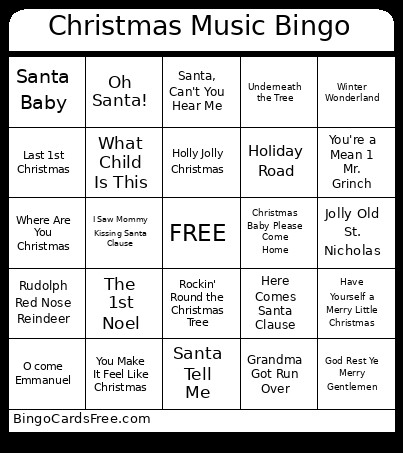 This Christmas Music Bingo Cards Game contains following Words or Phrases: 12 Days of Christmas, All I want for Christmas Is You, Blue Christmas, Carol of the Bells, Chipmunk Song, Christmas Baby Please Come Home, Christmas Wrapping, Deck the Hall, Do you Hear What I Hear, Feliz Navidad, The 1st Noel, Frosty the Snowman, God Rest Ye Merry Gentlemen, Grandma Got Run Over, Grown-Up Christmas List, Have Yourself a Merry Little Christmas, Here Comes Santa Clause, Holiday Road, Holly Jolly Christmas, I Saw Mommy Kissing Santa Clause, Most Wonderful Time of the Year, Hippopotamus 4 Christmas, Jingle Bell Rock, Jolly Old St. Nicholas, Joy to the World, Last Christmas, Last 1st Christmas, Let It Snow, Mele Kalikimaka, Merry Christmas, Happy Holidays, Mistletoe, My Favorite Things, My Gift is You, My Only Wish, O come Emmanuel, Oh Santa!, Please Come Home 4 Christmas, Rockin' Round the Christmas Tree, Rudolph Red Nose Reindeer, Run Run Rudolph, Santa Baby, Santa, Can't You Hear Me, Santa Clause is Coming to Town, Santa Tell Me, Sleigh Ride, Underneath the Tree, Up on the House Top, What Child Is This, Where Are You Christmas, Winter Wonderland, You Make It Feel Like Christmas, You're a Mean 1 Mr. Grinch.