
Client Services Bingo Cards - Print Free or Customize
Print free Client Services bingo cards or adjust them, unlimited cards! Select from 34,600+ designs or use the bingo card generator. Add numbers, phrases, photos, or any combination. Play using printable PDF, virtual bingo cards, and the virtual bingo caller, or combine all formats.
About: This bingo card is perfect for a company training or team-building event, encouraging coworkers to connect by discovering quirky facts, talents, and personal stories. With a lighthearted and social tone, it's designed to break the ice, spark conversation, and help everyone get to know each other in a fun and memorable way. Ideal for both in-person and virtual gatherings!
How To: To download a PDF to print, click the Print button. You can adjust the card quantity and other print options on the Print tab. Grid items and free space content can be changed on the Basic tab. Appearance can be exactly personalized on the relevant tabs, or you can quickly find any setting using the 🔍 tab.
How to play Client Services Bingo Cards?
- Paper Caller: Print PDF calling list & calling slips and manually pick the slips.
- Digital Caller: Click on the Play button above.
- Paper Players: Print PDF bingo cards and manually write on the cards.
- Digital Players: Click on the Play button above, and then click on the 🎫 button.
- Hybrid Play: Select any combination above. For instance, caller can be either Paper or Digital. And players can be Paper or Digital or a combination of both.
Step-By-Step:
- Start by getting the Client Services PDF by clicking on the "Print" button above.
- Open the PDF and print it.
- For random drawing, you can print another copy of the call list, cut, fold and then pull them randomly at play time.
- Cut the bingo cards at the cut marks if there are greater than 1 bingo cards per page.
- Give one card to each player. For marking, you can use pencils. Crayons cost the least.
- Select one person to be the caller. If you are playing in a small group, the caller may as well play along with their own Bingo card.
- The caller starts the game by randomly pulling an item from the call list and saying it to everyone.
- The players check their cards to see if they have the called word. If they do, they mark that word.
- The first player to finish a horizontal, vertical, or a diagonal line of crossed items yells "Bingo!" and wins the game.
- The caller confirms that the items crossed off form a correct line as per the Bingo card and call list.
- You can play for multiple patterns or a full card blackout for a longer game.
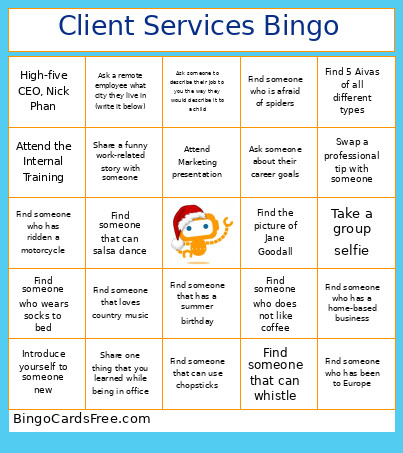 This Client Services Bingo Cards Game contains following Words or Phrases: Find someone who has been to Europe, Find someone who does not have any pets, Find someone who had braces, Find someone who has a home-based business, Find someone who is left-handed, Find someone that can salsa dance, Find someone that can play a musical instrument, Find someone who failed their first driving test, Find someone who has more than three children, Find someone who wears socks to bed, Find someone who loves to swim, Find someone that can whistle, Find someone that can use chopsticks, Find someone who has never broken a bone, Find someone who does not like coffee, Find someone that has a summer birthday, Find someone who has ridden a motorcycle, Find someone who is afraid of spiders, Find someone that loves country music, Find someone who has changed a tire, Find someone that knows how to ski, Find someone who is fluent in another language, Find someone that dislikes brussel sprouts, Find someone that likes very spicy food, Find someone that likes superhero movies, Attend the Internal Training, Ask someone how they stay motivated, Say hello to a remote employee, Compliment someone on their presentation, Ask a teammate about their favorite book, Ask a teammate about their favorite song, Ask a teammate about their favorite movie, Share a fun fact about yourself with someone, Take a group selfie, Ask someone to describe their job to you the way they would describe it to a child, Share one thing that you learned while being in office, Ask a teammate what their first job was, Swap a professional tip with someone, Bring up your favorite hobby to someone, Give someone recognition for their contribution to a recent project, High-five CEO, Nick Phan, Take a picture of the best decorated office/cubicle, Find the picture of Jane Goodall, Introduce yourself to someone new, Find 5 Aivas of all different types, Attend Development session, Attend Marketing presentation, Attend Sales presentation, Ask a remote employee what city they live in (write it below), Share a funny work-related story with someone, Ask someone about their career goals.