Coin Concede Podcast Bingo Cards - Print Free or Customize
Print free Coin Concede Podcast bingo cards or customize,
unlimited prints! Choose from 42,200+ designs or use our bingo card generator.
Add numbers, words, images, or mix them all.
Play using printable PDF, virtual bingo cards,
and our virtual bingo caller, or mix physical and digital.
About: This bingo card captures the lively banter and recurring moments from a Hearthstone-themed podcast, perfect for dedicated listeners or fans tuning in live. It highlights inside jokes, hosts’ quirks, spontaneous debates, and classic podcast tangents. Use this card to add some extra fun during listening parties or community events with fellow Hearthstone enthusiasts.
How To: To get a PDF to print, click the Print button.
You can adjust the number of cards and other
print options on the Print tab.
Grid items and free space text can be changed on the Basic tab.
Appearance can be fully personalized on the
corresponding tabs, or you can quickly find any option
on the 🔍 tab.
How to play Coin Concede Podcast Bingo Cards?
Paper Players: Print PDF bingo cards and physically mark the cards.
Virtual Caller: Click on the Play button above.
Paper Caller: Print PDF calling list & calling slips and physically choose the slips.
Virtual Players: Click on the Play button above, and then click on the 🎫 button.
Combo Mode: Select any combination above.
For example, caller can be either Paper or Virtual.
And players can be Paper or Virtual or a combination of both.
Step-By-Step:
Start by saving the Coin Concede Podcast Bingo PDF by clicking on the "Print" button above.
Open the PDF and print a hard copy.
For random calling, you can print another copy of the call list, cut, fold and then pull them randomly at play time.
Cut the bingo cards at the cut marks if there are greater than 1 bingo cards per page.
Distribute one card per player. For marking, you can use markers. Crayons cost the least.
Select one person to be the caller. If you are playing in a small group, the caller may also play along with their own Bingo card.
The caller opens the game by randomly picking an item from the call list and announcing it to everyone.
The players scan their cards to see if they have the announced word. If they do, they dab that word.
The first player to finish a horizontal, vertical, or a diagonal line of crossed items announces "Bingo!" and wins the game.
The caller verifies that the items marked form a correct line according to the Bingo card and call list.
You can play for varied patterns or a full card blackout for an extended game.
This Coin Concede Podcast Bingo Cards Game contains following Words or Phrases: "I'm not saying this is good, but...", "We have a LOT to talk about", "We'll have to see what happens, but...", Hosts belatedly remember to describe card, Bug in News was fixed day after recording, Debate on how a card interaction works, Discord community member mentioned, Discussion about card not played in 4+ years, Edel complains about Druid, Edel is playing weird deck not in show notes, Edel says "That's not how I built the deck", Edel tries valiantly to move things along, Magesa advocates for going face, Magesa complains about DK, Magesa describes rabbit hole she spent too much time on, Magesa writes show notes in full paragraphs, Mini decks-planation in Life and Ladder, Tangent about game Magesa does not play, Tournament, Economy, or Legendary bumper, Transition consists entirely of "And on that note...", Wicked advocates for value and trading, Wicked complains about Rogue, Wicked makes dad joke, Edel sighs, Wicked plays up his "broken human" control player villainy.

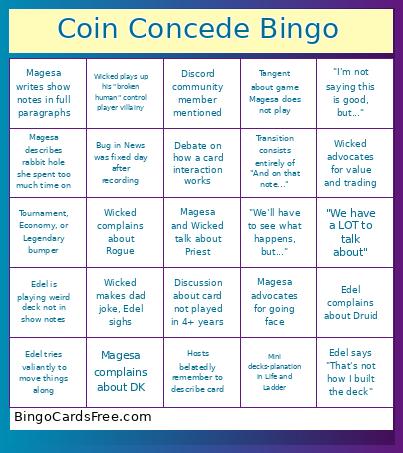 This Coin Concede Podcast Bingo Cards Game contains following Words or Phrases: "I'm not saying this is good, but...", "We have a LOT to talk about", "We'll have to see what happens, but...", Hosts belatedly remember to describe card, Bug in News was fixed day after recording, Debate on how a card interaction works, Discord community member mentioned, Discussion about card not played in 4+ years, Edel complains about Druid, Edel is playing weird deck not in show notes, Edel says "That's not how I built the deck", Edel tries valiantly to move things along, Magesa advocates for going face, Magesa complains about DK, Magesa describes rabbit hole she spent too much time on, Magesa writes show notes in full paragraphs, Mini decks-planation in Life and Ladder, Tangent about game Magesa does not play, Tournament, Economy, or Legendary bumper, Transition consists entirely of "And on that note...", Wicked advocates for value and trading, Wicked complains about Rogue, Wicked makes dad joke, Edel sighs, Wicked plays up his "broken human" control player villainy.