byu vs georgia Bingo Cards - Print Free or Customize
Print free byu vs georgia bingo cards or customize,
unlimited prints! Select from 36,300+ designs or use our bingo card generator.
Add numbers, words, pictures, or all of them.
Play using printable PDF, online bingo cards,
and our online bingo caller, or combine all formats.
About: This bingo card captures all the energy and tradition of a major college football matchup between BYU and Georgia. Perfect for game day watch parties or tailgates, it highlights everything from thrilling plays to fan moments in the stadium. It’s great for students, families, and football fans who want to make the live or televised event even more fun.
How To: To download a PDF to print, click the Print button.
You can adjust the card quantity and other
print settings on the Print tab.
Grid items and free space text can be edited on the Basic tab.
Appearance can be entirely personalized on the
relevant tabs, or you can easily search any preference
on the 🔍 tab.
How to play byu vs georgia Bingo Cards?
Online Players: Click on the Play button above, and then click on the 🎫 button.
Online Caller: Click on the Play button above.
Paper Players: Print PDF bingo cards and physically write on the cards.
Paper Caller: Print PDF calling list & calling slips and physically draw the slips.
Combo Mode: Choose any combination above.
For instance, caller can be either Offline or Online.
And players can be Offline or Online or a combo of both.
Step-By-Step:
Start by downloading the byu vs georgia PDF by clicking on the "Print" button above.
Open the PDF and print it.
For random calling, you can print another copy of the call list, cut, fold and then pull them randomly at play time.
Cut the bingo cards at the cut marks if there are greater than 1 bingo cards per page.
Distribute one card per player. For marking, you can use pens. Crayons cost the least.
Choose one person to be the caller. If you are playing in a small group, the caller can as well play along with their own Bingo card.
The caller opens the play by randomly pulling an item from the call list and saying it to everyone.
The players scan their cards to see if they have the called word. If they do, they dab that word.
The first player to complete a horizontal, vertical, or a diagonal line of crossed items shouts "Bingo!" and wins the game.
The caller verifies that the items marked form a correct line as per the Bingo card and call list.
You can play for varied patterns or a full card blackout for a longer game.
This byu vs georgia Bingo Cards Game contains following Words or Phrases: BYU and Georgia compete in a close football game, BYU and Georgia meet on Saturday night football, BYU defense stops a Georgia running play, BYU fans travel to watch the game at Georgia, BYU kicker attempts a field goal versus Georgia, BYU players warm up before facing the Georgia Bulldogs, BYU plays Georgia in a thrilling football game, BYU scores a touchdown against Georgia, Both teams shake hands after the exciting matchup ends, Coaches from both teams encourage their players on sidelines, Everyone stands for national anthem before game begins, Fans cheer for BYU and Georgia during the match, Fans clap and cheer every time their team makes a big play, Georgia Bulldogs challenge BYU Cougars this season, Georgia coach plans strategy for BYU matchup, Georgia faces off against BYU on the field, Georgia fans wear red and black to support their team, Georgia running back rushes past BYU defenders, Kids enjoy snacks while watching BYY versus Georga together, Marching bands perform lively music at halftime of big matchup, Parents bring their kids to see BYU play at Georgia, Rain falls during part of the BYU versus Georgia contest, Referee tosses coin before the BYU vs Georgia kickoff, School fight songs echo around stadium during breaks in play, Student sections chant loudly at the BYU vs. Georgia event, Team captains meet midfield before kickoff between BYU, Georgia, Team mascots pose for photos with excited children in crowd, The stadium is packed for BYU versus Georgia showdown, Vendors sell souvenirs with both school logos on them, Young fans wear jerseys of their favorite team to stadium.

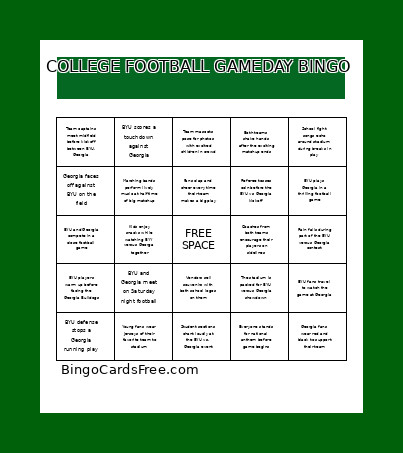 This byu vs georgia Bingo Cards Game contains following Words or Phrases: BYU and Georgia compete in a close football game, BYU and Georgia meet on Saturday night football, BYU defense stops a Georgia running play, BYU fans travel to watch the game at Georgia, BYU kicker attempts a field goal versus Georgia, BYU players warm up before facing the Georgia Bulldogs, BYU plays Georgia in a thrilling football game, BYU scores a touchdown against Georgia, Both teams shake hands after the exciting matchup ends, Coaches from both teams encourage their players on sidelines, Everyone stands for national anthem before game begins, Fans cheer for BYU and Georgia during the match, Fans clap and cheer every time their team makes a big play, Georgia Bulldogs challenge BYU Cougars this season, Georgia coach plans strategy for BYU matchup, Georgia faces off against BYU on the field, Georgia fans wear red and black to support their team, Georgia running back rushes past BYU defenders, Kids enjoy snacks while watching BYY versus Georga together, Marching bands perform lively music at halftime of big matchup, Parents bring their kids to see BYU play at Georgia, Rain falls during part of the BYU versus Georgia contest, Referee tosses coin before the BYU vs Georgia kickoff, School fight songs echo around stadium during breaks in play, Student sections chant loudly at the BYU vs. Georgia event, Team captains meet midfield before kickoff between BYU, Georgia, Team mascots pose for photos with excited children in crowd, The stadium is packed for BYU versus Georgia showdown, Vendors sell souvenirs with both school logos on them, Young fans wear jerseys of their favorite team to stadium.