Computer Science Bingo Cards - Print Free or Customize
Print free Computer Science bingo cards or modify,
unlimited prints! Select from 41,500+ designs or use our bingo card generator.
Add numbers, phrases, pictures, or mix them all.
Play using PDF prints, online bingo cards,
and our online bingo caller, or go hybrid.
About: This bingo card is perfect for a tech-savvy youth event or a classroom of budding programmers. It highlights digital skills and geek culture, featuring everything from game creation to cybersecurity habits. The tone is playful yet insightful, encouraging friendly competition and celebrating those who love exploring the world of technology and coding.
How To: To save a PDF to print, click the Print button.
You can alter the number of cards and other
print options on the Print tab.
Grid items and free space text can be changed on the Basic tab.
Appearance can be entirely personalized on the
corresponding tabs, or you can quickly find any preference
using the 🔍 tab.
How to play Computer Science Bingo Cards?
Printed Caller: Print PDF calling list & calling slips and manually draw the slips.
Online Players: Click on the Play button above, and then click on the 🎫 button.
Online Caller: Click on the Play button above.
Printed Players: Print PDF bingo cards and manually write on the cards.
Hybrid Mode: Choose any combination above.
For example, caller can be either Offline or Online.
And players can be Offline or Online or a combination of both.
Step-By-Step:
Start by downloading the Computer Science PDF by clicking on the "Print" button above.
Open the PDF and print a hard copy.
For random calling, you can print another copy of the call list, cut, fold and then draw them randomly at play time.
Cut the bingo cards at the cut marks if there are greater than 1 bingo cards per page.
Give one card to each player. For marking, you can use pencils. Crayons cost the least.
Choose one person to be the caller. If you are playing in a small group, the caller may also play along with their own Bingo card.
The caller begins the game by randomly pulling an item from the call list and announcing it to all players.
The players check their cards to see if they have the announced word. If they do, they cross off that word.
The first player to finish a horizontal, vertical, or a diagonal line of marked items announces "Bingo!" and wins the play.
The caller validates that the items marked form a proper line according to the Bingo card and call list.
You can play for varied patterns or a full card blackout for a longer play.
This Computer Science Bingo Cards Game contains following Words or Phrases: Builds their own ROBLOX games, Uses Minecraft Command Blocks, Has used an Arduino or Raspberry Pi, Has their own computer at home, Fixes their router at home, Has programmed before this class, Knows the difference between hardware and software, Uses multi-factor authentication (2FA/MFA), Knows at least three keyboard shortcuts, Uses a smart device at home, Has made their own game on Scratch or MakeCode, Can name three input devices, Can name three hardware parts of a computer, Has used more than 100 GB of storage on their device, Uses "Dark Mode" on their devices, Uses folders to keep their files organized, Has used AI in the last week, Makes pixel art, Has found a glitch or bug in a video game, Has over 100 Mbps download or upload speed at home, Uses biometrics like face scan or fingerprint scan, Can check the properties of a picture they've taken, Knows at least three file extensions, Uses an ad-blocker on the web, Reads Terms of Conditions before clicking accept, Can count in binary, Manages app permissions on their device, Knows at least three ways to spot a fake scam message, Makes their own ROBLOX scripts, Uses Minecraft Redstone, Knows the difference between AND and OR logic gates, Can represent a color using hexadecimal, Makes their own YouTube videos, Has followed a coding tutorial online, Knows where to find Python's official documentation.

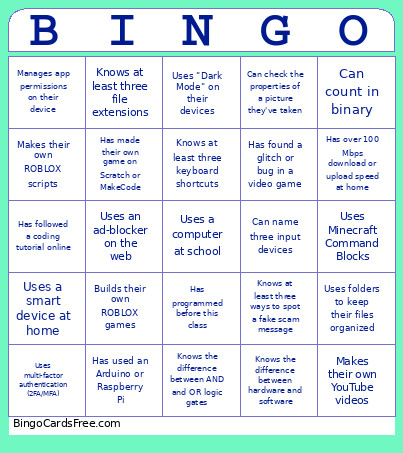 This Computer Science Bingo Cards Game contains following Words or Phrases: Builds their own ROBLOX games, Uses Minecraft Command Blocks, Has used an Arduino or Raspberry Pi, Has their own computer at home, Fixes their router at home, Has programmed before this class, Knows the difference between hardware and software, Uses multi-factor authentication (2FA/MFA), Knows at least three keyboard shortcuts, Uses a smart device at home, Has made their own game on Scratch or MakeCode, Can name three input devices, Can name three hardware parts of a computer, Has used more than 100 GB of storage on their device, Uses "Dark Mode" on their devices, Uses folders to keep their files organized, Has used AI in the last week, Makes pixel art, Has found a glitch or bug in a video game, Has over 100 Mbps download or upload speed at home, Uses biometrics like face scan or fingerprint scan, Can check the properties of a picture they've taken, Knows at least three file extensions, Uses an ad-blocker on the web, Reads Terms of Conditions before clicking accept, Can count in binary, Manages app permissions on their device, Knows at least three ways to spot a fake scam message, Makes their own ROBLOX scripts, Uses Minecraft Redstone, Knows the difference between AND and OR logic gates, Can represent a color using hexadecimal, Makes their own YouTube videos, Has followed a coding tutorial online, Knows where to find Python's official documentation.