Print free Corporate bingo cards or customize,
unlimited cards! Pick from 41,500+ templates or use the bingo card generator.
Add numbers, phrases, pictures, or mix them all.
Play using printed PDF, virtual bingo cards,
and the virtual bingo caller, or combine all formats.
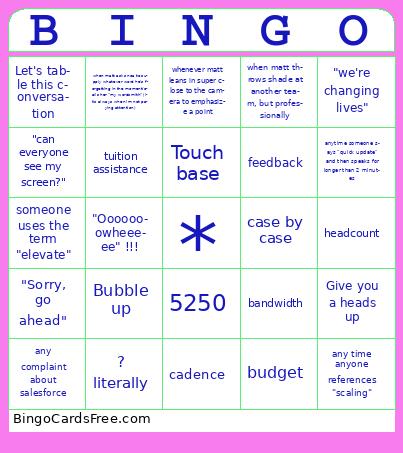
About: This bingo card captures all the classic moments and inside jokes from virtual team meetings, making it perfect for remote work calls or corporate retreats. With a playful nod to company jargon, technical mishaps, and team personalities, it’s designed to liven up routine check-ins and keep everyone engaged as you power through another busy workday together.
How To: To download a PDF to print, click the Print button.
You can alter the card count and other
printing options on the Print tab.
Grid items and free space text can be edited on the Basic tab.
Appearance can be entirely customized on the
corresponding tabs, or you can easily find any preference
using the 🔍 tab.
How to play Corporate Bingo Cards?
Digital Caller: Click on the Play button above.
Paper Caller: Print PDF calling list & calling slips and manually pick the slips.
Digital Players: Click on the Play button above, and then click on the 🎫 button.
Paper Players: Print PDF bingo cards and manually write on the cards.
Mixed Mode: Choose any combination above.
For instance, caller can be either Printed or Digital.
And players can be Printed or Digital or a combination of both.
Step-By-Step:
Start by downloading the Corporate Bingo PDF by clicking on the "Print" button above.
Open the PDF and print it.
For random drawing, you can print another copy of the call list, cut, fold and then pick them randomly at play time.
Cut the bingo cards at the cut lines if there are more than 1 bingo cards per page.
Give one card to each player. For marking, you can use pens. Crayons are the cheapest.
Choose one person to be the caller. If you are playing in a small group, the caller may also play along with their own Bingo card.
The caller begins the play by randomly picking an item from the call list and announcing it to all players.
The players scan their cards to see if they have the announced word. If they do, they mark that word.
The first player to complete a horizontal, vertical, or a diagonal line of marked items shouts "Bingo!" and wins the game.
The caller checks that the items marked form a proper line according to the Bingo card and call list.
You can play for varied patterns or a full card blackout for an extended game.
This Corporate Bingo Cards Game contains following Words or Phrases: budget, i have to jump/hop off, circle back, bandwidth, action item, someone starts speaking while on mute, "can everyone see my screen?", best practice(s), someone stumbles over our new "engagement specialist" titles, "we're changing lives", "great callout", cadence, any complaint about salesforce, "living the dream", Bubble up, tuition assistance, Let's table this conversation, "Sorry, go ahead", 5250, partner(s), some apology for being "on the road", Think outside the box, Touch base, Low-hanging fruit, On my radar, shifting gears, Buy-In, headcount, territory, Deep Dive/Dive Deeper, Win/Win, Shoutout, anytime someone says "quick update" and then speaks for longer than 2 minutes, any time anyone references "scaling", Give you a heads up, Reference of "Volume", feedback, Keep us posted, Connect offline, whenever matt leans in super close to the camera to emphasize a point, "Ooooooowheeeee" !!!, Reference of the team being "family" ???? literally, anytime noa says "slay" in a team call, if brandon replies to one of your comments in a chat with a fist bump or ???? (must be during whatever meeting we're playing this in), when you catch marc/anyone clearly working on something else in the background of a meeting, When Jess is working somewhere other than a desk/Matt comments on Jess' work area, when matt throws shade at another team, but professionally, when matt asks noa to supply whatever word he's forgetting in the moment/calls her "my wordsmith" (it's always when im not paying attention), someone uses the term "elevate", case by case.

 This Corporate Bingo Cards Game contains following Words or Phrases: budget, i have to jump/hop off, circle back, bandwidth, action item, someone starts speaking while on mute, "can everyone see my screen?", best practice(s), someone stumbles over our new "engagement specialist" titles, "we're changing lives", "great callout", cadence, any complaint about salesforce, "living the dream", Bubble up, tuition assistance, Let's table this conversation, "Sorry, go ahead", 5250, partner(s), some apology for being "on the road", Think outside the box, Touch base, Low-hanging fruit, On my radar, shifting gears, Buy-In, headcount, territory, Deep Dive/Dive Deeper, Win/Win, Shoutout, anytime someone says "quick update" and then speaks for longer than 2 minutes, any time anyone references "scaling", Give you a heads up, Reference of "Volume", feedback, Keep us posted, Connect offline, whenever matt leans in super close to the camera to emphasize a point, "Ooooooowheeeee" !!!, Reference of the team being "family" ???? literally, anytime noa says "slay" in a team call, if brandon replies to one of your comments in a chat with a fist bump or ???? (must be during whatever meeting we're playing this in), when you catch marc/anyone clearly working on something else in the background of a meeting, When Jess is working somewhere other than a desk/Matt comments on Jess' work area, when matt throws shade at another team, but professionally, when matt asks noa to supply whatever word he's forgetting in the moment/calls her "my wordsmith" (it's always when im not paying attention), someone uses the term "elevate", case by case.