
CS260 Bingo Cards - Print Free or Customize
Print free CS260 bingo cards or personalize, unlimited cards! Select from 41,500+ templates or use the bingo card generator. Add numbers, words, pictures, or mix them all. Play using PDF prints, virtual bingo cards, and the virtual bingo caller, or mix physical and digital.
About: This bingo card captures the hilarious chaos and quirky moments of a typical online computer science class, especially one led by a colorful instructor. With references to technical mishaps, in-jokes, and classic teaching blunders, it’s perfect for students looking to add some fun to their virtual lectures, study sessions, or coding club meetups.
How To: To save a PDF to print, click the Print button. You can adjust the card quantity and other print options on the Print tab. Grid items and free space text can be edited on the Basic tab. Appearance can be fully personalized on the corresponding tabs, or you can quickly find any preference using the 🔍 tab.
How to play CS260 Bingo Cards?
- Virtual Caller: Click on the Play button above.
- Virtual Players: Click on the Play button above, and then click on the 🎫 button.
- Printed Players: Print PDF bingo cards and physically mark the cards.
- Printed Caller: Print PDF calling list & calling slips and physically pick the slips.
- Mixed Play: Select any combination above. For instance, caller can be either Paper or Virtual. And players can be Paper or Virtual or a combination of both.
Step-By-Step:
- Start by downloading the CS260 PDF by clicking on the "Print" button above.
- Open the PDF and print a hard copy.
- For random drawing, you can print another copy of the call list, cut, fold and then pick them randomly at play time.
- Cut the bingo cards at the cut marks if there are greater than 1 bingo cards per page.
- Give one card to each player. For marking, you can use pens. Crayons are the cheapest.
- Select one person to be the caller. If you are playing in a small group, the caller may also play along with their own Bingo card.
- The caller begins the play by randomly picking an item from the call list and announcing it to all players.
- The players look at their cards to see if they have the called word. If they do, they cross off that word.
- The first player to finish a horizontal, vertical, or a diagonal line of marked items shouts "Bingo!" and wins the play.
- The caller verifies that the items marked form a correct line according to the Bingo card and call list.
- You can play for varied patterns or a full card blackout for a longer play.
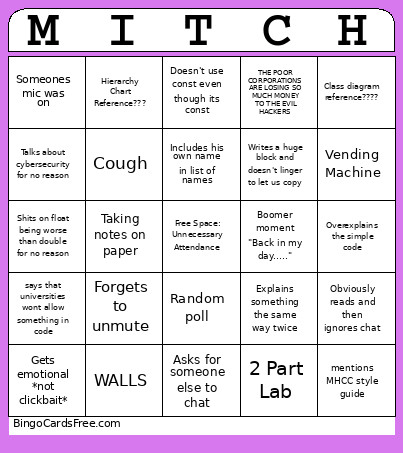 This CS260 Bingo Cards Game contains following Words or Phrases: "A pointer points to...", "baby" variable instead of new, "Idiomatic", 2 Part Lab, 420, 67, 69, Asks for someone else to chat, Assumes that the entire class is CompSci majors, Boomer moment "Back in my day.....", Break, Breakout rooms, Breakout Rooms CANCELLED, Calls something we barely understand 'trivial' or something similar, Class ends early, Class ends late, Copy and pastes code from finished program, Cough, Deliberately obscuring code, Does not compile first try, Does not explain the complicated code, Doesn't notice drawing, Doesn't use const even though its const, Drinks water, ENEMIES, Explains something the same way twice, Forgets he taught previous class, Forgets to change screen, Forgets to unmute, Gets confused by a chat message, Gets emotional *not clickbait*, Glaze student's question excessively, Goes silent for a long time, Includes his own name in list of names, Lab is already in blackboard, Lab is just the weekly program, Laughs at his own joke, Magic number, Mentions AI, Mentions Big O notation, mentions MHCC style guide, Mentions PSU, mispronounces an easy word, Mitch is sick, Mitch Laughs, Mitch Lore Drop, names a variable temp, No Break, Obviously reads and then ignores chat, OnlineGDB Moment, Overexplains the simple code, Random poll, Re-explains something we already know, Redundant else Statement, references variable by incorrect name, Says "undefined behavior", Says someones name, Says something categorically false, says that universities wont allow something in code, says: "you guys should know this", Shares wrong screen, Someones mic was on, Something AI generated, Taking notes on paper, talks about circuit party, talks about coding party, Talks about cybersecurity for no reason, Talks about log base 2, Talks about next classes in transfer major, Technical Difficulties, Tells us to react to a message, THE POOR CORPORATIONS ARE LOSING SO MUCH MONEY TO THE EVIL HACKERS, Unfinished Lab, unnecessary #include string, Vending Machine, WALLS, Writes a comment that just restates the code, Writes a huge block and doesn't linger to let us copy, Hierarchy Chart Reference???, Flowchart reference????, Class diagram reference????, Uses protected: but never uses class inheritance, Shits on float being worse than double for no reason.