Print free CureIS bingo cards or alter them,
unlimited cards! Choose from 37,300+ templates or use the bingo card generator.
Add numbers, words, photos, or all of them.
Play using PDF printouts, virtual bingo cards,
and the virtual bingo caller, or go hybrid.
About: This bingo card is all about discovering fun and surprising facts about your colleagues or fellow attendees. It's designed to spark conversations and help people find common ground through unique life experiences. Perfect for team-building events, office parties, or networking sessions, this game encourages everyone to learn something new and unexpected about each other in a lighthearted way.
How To: To download a printable PDF, click the Print button.
You can adjust the number of cards and other
printing settings on the Print tab.
Grid items and free space text can be added on the Basic tab.
Appearance can be exactly customized on the
corresponding tabs, or you can quickly locate any option
using the 🔍 tab.
How to play CureIS Bingo Cards?
Paper Caller: Print PDF calling list & calling slips and physically choose the slips.
Paper Players: Print PDF bingo cards and physically write on the cards.
Virtual Players: Click on the Play button above, and then click on the 🎫 button.
Virtual Caller: Click on the Play button above.
Hybrid Mode: Select any combination above.
For example, caller can be either Printed or Virtual.
And players can be Printed or Virtual or a combo of both.
Step-By-Step:
Start by saving the CureIS PDF by clicking on the "Print" button above.
Open the PDF and print it.
For random calling, you can print another copy of the call list, cut, fold and then draw them randomly at play time.
Cut the bingo cards at the cut marks if there are greater than 1 bingo cards per page.
Distribute one card per player. For marking, you can use crayons. Crayons are the cheapest.
Select one person to be the caller. If you are playing in a small group, the caller may as well play along with their own Bingo card.
The caller opens the game by randomly pulling an item from the call list and announcing it to everyone.
The players look at their cards to see if they have the announced word. If they do, they mark that word.
The first player to complete a horizontal, vertical, or a diagonal line of crossed items yells "Bingo!" and wins the play.
The caller confirms that the items crossed off form a proper line as per the Bingo card and call list.
You can play for multiple patterns or a full card blackout for an extended play.
This CureIS Bingo Cards Game contains following Words or Phrases: 1. Find someone who has pulled a harmless prank on a coworker, 2. Find someone who has met a celebrity or public figure, 3. Find someone who has completed a marathon or Ironman event, 4. Find someone who speaks a foreign language other than Spanish, 5. Find someone who plays a musical instrument, 6. Find someone who knows how to knit or crochet, 7. Find someone who has piloted a plane or helicopter, 8. Find someone who can name all five Spice Girls, 9. Find someone who has been skydiving, 10. Find someone who has seen Big Ben and the Tower of London in person, 11. Find someone who got into trouble at school aFind someone who had a funny childhood nickname, Find someone who is left-handed, Find someone who strongly dislikes vegetables, Find someone who has won a radio contest, Find someone who has had an embarrassing moment in public, Find someone who has three or more siblings, Find someone who is an only child, Find someone who has visited three or more continents, Find someone who has written a blog or created a vlog, Find someone who doesn't use social media, Find someone who has more than two children, Find someone who has been on a safari, Find someone who played a sport in college, Find someone who has earned a master's degree.

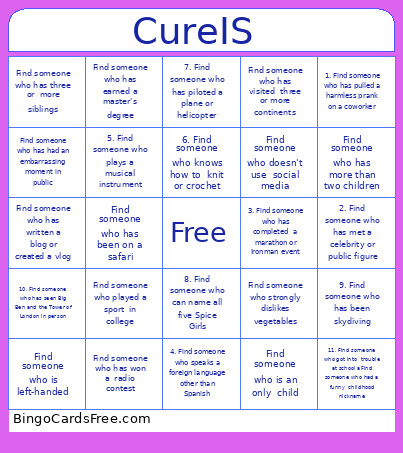 This CureIS Bingo Cards Game contains following Words or Phrases: 1. Find someone who has pulled a harmless prank on a coworker, 2. Find someone who has met a celebrity or public figure, 3. Find someone who has completed a marathon or Ironman event, 4. Find someone who speaks a foreign language other than Spanish, 5. Find someone who plays a musical instrument, 6. Find someone who knows how to knit or crochet, 7. Find someone who has piloted a plane or helicopter, 8. Find someone who can name all five Spice Girls, 9. Find someone who has been skydiving, 10. Find someone who has seen Big Ben and the Tower of London in person, 11. Find someone who got into trouble at school aFind someone who had a funny childhood nickname, Find someone who is left-handed, Find someone who strongly dislikes vegetables, Find someone who has won a radio contest, Find someone who has had an embarrassing moment in public, Find someone who has three or more siblings, Find someone who is an only child, Find someone who has visited three or more continents, Find someone who has written a blog or created a vlog, Find someone who doesn't use social media, Find someone who has more than two children, Find someone who has been on a safari, Find someone who played a sport in college, Find someone who has earned a master's degree.