
Daytona 24 Bingo Cards - Print Free or Customize
Print free Daytona 24 bingo cards or alter them, limitless cards! Select from 41,500+ designs or use the bingo card generator. Add numbers, words, photos, or mix them all. Play using PDF prints, online bingo cards, and the online bingo caller, or mix physical and digital.
About: This bingo card is perfect for die-hard fans of endurance racing, especially those attending or watching the Rolex 24 at Daytona. It captures all the thrilling race moments, quirky traditions, and fan culture that make up the unique atmosphere of a 24-hour sports car race. Great for groups, watch parties, or trackside fun!
How To: To get a PDF to print, click the Print button. You can alter the number of cards and other printing preferences on the Print tab. Grid items and free space text can be edited on the Basic tab. Appearance can be totally customized on the corresponding tabs, or you can easily search any preference on the 🔍 tab.
How to play Daytona 24 Bingo Cards?
- Paper Players: Print PDF bingo cards and physically cross off the cards.
- Virtual Caller: Click on the Play button above.
- Virtual Players: Click on the Play button above, and then click on the 🎫 button.
- Paper Caller: Print PDF calling list & calling slips and physically draw the slips.
- Hybrid Play: Pick any combination above. For example, caller can be either Printed or Virtual. And players can be Printed or Virtual or a mix of both.
Step-By-Step:
- Start by getting the Daytona 24 PDF by clicking on the "Print" button above.
- Open the PDF and print it.
- For random drawing, you can print another copy of the call list, cut, fold and then pick them randomly at play time.
- Cut the bingo cards at the cut lines if there are more than 1 bingo cards per page.
- Give one card to each player. For marking, you can use markers. Crayons are the cheapest.
- Pick one person to be the caller. If you are playing in a small group, the caller can as well play along with their own Bingo card.
- The caller begins the game by randomly drawing an item from the call list and calling out it to everyone.
- The players scan their cards to see if they have the called word. If they do, they dab that word.
- The first player to finish a horizontal, vertical, or a diagonal line of crossed items announces "Bingo!" and wins the play.
- The caller verifies that the items crossed off form a correct line according to the Bingo card and call list.
- You can play for varied patterns or a full card blackout for an extended play.
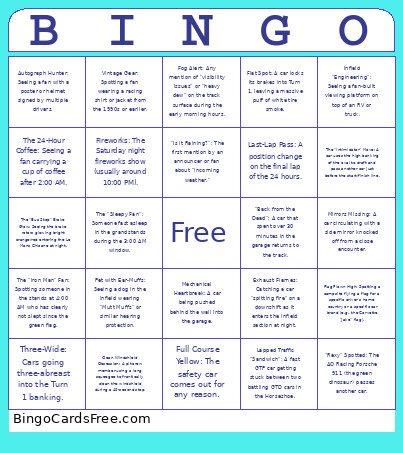 This Daytona 24 Bingo Cards Game contains following Words or Phrases: "Rexy" Spotted: The AO Racing Porsche 911 (the green dinosaur) passes another car., Full Course Yellow: The safety car comes out for any reason., The "Bus Stop" Brake Glow: Seeing the brake rotors glowing bright orange/red entering the Le Mans Chicane at night., Leader Pit Stop: A GTP (top class) car enters the pits while leading., Driver Swap: Catching a glimpse of a driver climbing out of the car during a stop., Blue Flag: A slower car being warned to let a faster car pass., Sunrise Lap: You actually see the sun come up while cars are still lapping., Three-Wide: Cars going three-abreast into the Turn 1 banking., Pit Road Penalty: A car serving a "drive-through" or "stop-and-go" penalty., Last-Lap Pass: A position change on the final lap of the 24 hours., Electric Pit Exit: A GTP car pulls away from its pit box in silent "electric mode" before the engine kicks in., Flat Spot: A car locks its brakes into Turn 1, leaving a massive puff of white tire smoke., The "Intimidator" Move: A car uses the high banking of the oval to draft and pass another car just before the start/finish line., Exhaust Flames: Catching a car "spitting fire" on a downshift as it enters the infield section at night., Mirrors Missing: A car circulating with a side mirror knocked off from a close encounter., Lapped Traffic "Sandwich": A fast GTP car getting stuck between two battling GTD cars in the Horseshoe., Ferris Wheel at Night: Seeing the Ferris wheel fully lit up from the grandstands., "I Signed the Track": Find a spot on the start/finish line where a fan has written their name., Ear Protection Fashion: Seeing someone wearing massive, neon-colored earmuffs., The "Cold Front" Pivot: Someone changing from a T-shirt into a heavy winter parka as the sun goes down., Autograph Hunter: Seeing a fan with a poster or helmet signed by multiple drivers., Infield BBQ: Catching the smell (or sight) of a fan's campsite grill., Celebrity Sighting: Spotting an IndyCar or F1 driver (like Scott Dixon or Logan Sargeant) walking in the paddock., Manufacturer Swag: Seeing a fan full decked out in a team/manufacturer kit (hat/t-shirt), The "Sleepy Fan": Someone fast asleep in the grandstands during the 3:00 AM window., Trophy Display: Catching a glimpse of the actual Rolex watches or the overall trophy., The Scanner Super-Fan: Seeing someone wearing a full racing headset plugged into a scanner to listen to team radios., Vintage Gear: Spotting a fan wearing a racing shirt or jacket from the 1990s or earlier., Infield "Engineering": Seeing a fan-built viewing platform on top of an RV or truck., Pet with Ear-Muffs: Seeing a dog in the infield wearing "Mutt Muffs" or similar hearing protection., The "Merch" Line: Seeing the line for the official IMSA or Rolex 24 trailer stretching more than 20 people deep., Flag Flown High: Spotting a campsite flying a flag for a specific driver's home country or a specific car brand (e.g., the Corvette "Jake" flag)., Fireworks: The Saturday night fireworks show (usually around 10:00 PM)., Mechanical Heartbreak: A car being pushed behind the wall into the garage., Sparks Flying: A car bottoming out on the banking, creating a trail of sparks., "Is it Raining?": The first mention by an announcer or fan about "incoming weather.", The 24-Hour Coffee: Seeing a fan carrying a cup of coffee after 2:00 AM., "Back from the Dead": A car that spent over 30 minutes in the garage returns to the track., The "Marbles": Seeing the announcers point out the "marbles" (shredded tire rubber) accumulating off the racing line., Clean Windshield Obsession: A pit crew member using a long squeegee to frantically clean the windshield during a 40-second stop., Fog Alert: Any mention of "visibility issues" or "heavy dew" on the track surface during the early morning hours., Pace Car Wave-Around: The complicated "pass-around" procedure where the field resets during a yellow flag., The "Iron Man" Fan: Spotting someone in the stands at 4:00 AM who has clearly not slept since the green flag..