Print free DCN bingo cards or customize,
unlimited prints! Pick from 42,200+ designs or use our bingo card generator.
Add numbers, phrases, photos, or any combination.
Play using PDF prints, online bingo cards,
and our online bingo caller, or combine all formats.
About: This bingo card is perfect for a digital literacy class or tech-themed event, packed with familiar technology terms and basic computer skills. It’s designed to make learning about devices, programs, and online safety fun and engaging, whether you’re teaching beginners or testing seasoned users. Great for workshops, classrooms, or community library events!
How To: To download a printable PDF, click the Print button.
You can alter the card quantity and other
printing settings on the Print tab.
Grid items and free space text can be changed on the Basic tab.
Appearance can be entirely personalized on the
corresponding tabs, or you can quickly find any option
using the 🔍 tab.
How to play DCN Bingo Cards?
Digital Caller: Click on the Play button above.
Digital Players: Click on the Play button above, and then click on the 🎫 button.
Printed Players: Print PDF bingo cards and manually cross off the cards.
Printed Caller: Print PDF calling list & calling slips and manually choose the slips.
Mixed Play: Select any combination above.
For instance, caller can be either Paper or Digital.
And players can be Paper or Digital or a combination of both.
Step-By-Step:
Start by downloading the DCN Bingo PDF by clicking on the "Print" button above.
Open the PDF and print it.
For random calling, you can print another copy of the call list, cut, fold and then pick them randomly at play time.
Cut the bingo cards at the cut marks if there are more than 1 bingo cards per page.
Distribute one card per player. For marking, you can use pens. Crayons are the cheapest.
Select one person to be the caller. If you are playing in a small group, the caller can as well play along with their own Bingo card.
The caller opens the play by randomly picking an item from the call list and calling out it to all players.
The players scan their cards to see if they have the announced word. If they do, they mark that word.
The first player to complete a horizontal, vertical, or a diagonal line of marked items announces "Bingo!" and wins the game.
The caller confirms that the items marked form a correct line according to the Bingo card and call list.
You can play for different patterns or a full card blackout for an extended game.
This DCN Bingo Cards Game contains following Words or Phrases: Face ID, Monitor, Cloud Storage, Settings, Folder, Calendar, Printer, Start Menu, Cellphone, Fingerprint ID, Keyboard, Virus, Email, Headphones, Mouse, Laptop, Airplane Mode, Pointer, Diploma, Enter Key, Power Button, USB Flashdrive, A+, Charger, No Internet, WiFi, Graduation Cap, Delete Key, Backspace Key, Space Key, Tab key, Microsoft Word, Microsoft Excel, Microsoft Powerpoint, Google Chrome, Microsoft Edge, Windows 11, Mac OS, Digital Footprint, Northstar, Smart City Logo, Update, Bluetooth, Volume, Mute, Brightness, Alt Key, Shift Key, Caps Lock, Ctrl Key, Esc Key, Fn Key, Num Lock Key, Zoom, Teams, Gmail, Outlook, Yahoo, Facebook, Mouse Pad, Touch Pad, Camera, Microphone, Speakers, Laptop case, Tablet, Smart Watch, ChatGPT, Copilot, Gemini, Antivirus, HDMI Cable, Recycle Bin, Desktop, Arrow Keys, QR Code, Password, HTTPS, Secure Lock, Cut, Copy, Paste, Bold, Italic, Underline, Google Docs, Scroll Bar, Racine Public Library, Racine Literacy Council, RKCAA, Firefox, Safari, Opera, Siri, Alexa, Youtube, Online Banking, Exit, Minimize, Maximize / Restore, Taskbar, Search bar, Refresh, Undue, Canva, Spreadsheet.

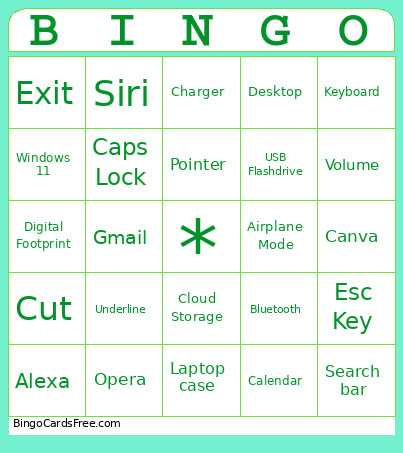 This DCN Bingo Cards Game contains following Words or Phrases: Face ID, Monitor, Cloud Storage, Settings, Folder, Calendar, Printer, Start Menu, Cellphone, Fingerprint ID, Keyboard, Virus, Email, Headphones, Mouse, Laptop, Airplane Mode, Pointer, Diploma, Enter Key, Power Button, USB Flashdrive, A+, Charger, No Internet, WiFi, Graduation Cap, Delete Key, Backspace Key, Space Key, Tab key, Microsoft Word, Microsoft Excel, Microsoft Powerpoint, Google Chrome, Microsoft Edge, Windows 11, Mac OS, Digital Footprint, Northstar, Smart City Logo, Update, Bluetooth, Volume, Mute, Brightness, Alt Key, Shift Key, Caps Lock, Ctrl Key, Esc Key, Fn Key, Num Lock Key, Zoom, Teams, Gmail, Outlook, Yahoo, Facebook, Mouse Pad, Touch Pad, Camera, Microphone, Speakers, Laptop case, Tablet, Smart Watch, ChatGPT, Copilot, Gemini, Antivirus, HDMI Cable, Recycle Bin, Desktop, Arrow Keys, QR Code, Password, HTTPS, Secure Lock, Cut, Copy, Paste, Bold, Italic, Underline, Google Docs, Scroll Bar, Racine Public Library, Racine Literacy Council, RKCAA, Firefox, Safari, Opera, Siri, Alexa, Youtube, Online Banking, Exit, Minimize, Maximize / Restore, Taskbar, Search bar, Refresh, Undue, Canva, Spreadsheet.