
Disney 2025 Bingo jmh Cards - Print Free or Customize
Print free Disney 2025 bingo jmh cards or modify, limitless prints! Select from 41,500+ templates or use the bingo card generator. Add numbers, words, pictures, or mix them all. Play using PDF prints, digital bingo cards, and the digital bingo caller, or go hybrid.
About: This bingo card is a fun-filled Disneyland adventure tracker, perfect for fans who love to explore every quirky and memorable moment the park offers. From spotting unique guests and surprising character encounters to ticking off classic treats and comedic mishaps, it’s a great way to add an extra layer of excitement for families, friends, or enthusiastic Disney-goers during their magical day.
How To: To download a PDF to print, click the Print button. You can alter the card count and other printing settings on the Print tab. Grid items and free space text can be added on the Basic tab. Appearance can be entirely personalized on the relevant tabs, or you can easily find any option using the 🔍 tab.
How to play Disney 2025 Bingo jmh Cards?
- Printed Caller: Print PDF calling list & calling slips and physically draw the slips.
- Digital Caller: Click on the Play button above.
- Digital Players: Click on the Play button above, and then click on the 🎫 button.
- Printed Players: Print PDF bingo cards and physically cross off the cards.
- Combo Play: Choose any combination above. For instance, caller can be either Offline or Digital. And players can be Offline or Digital or a combo of both.
Step-By-Step:
- Start by getting the Disney 2025 Bingo jmh PDF by clicking on the "Print" button above.
- Open the PDF and print a hard copy.
- For random drawing, you can print another copy of the call list, cut, fold and then draw them randomly at play time.
- Cut the bingo cards at the cut lines if there are more than 1 bingo cards per page.
- Give one card to each player. For marking, you can use markers. Crayons are the cheapest.
- Choose one person to be the caller. If you are playing in a small group, the caller can as well play along with their own Bingo card.
- The caller initiates the game by randomly drawing an item from the call list and calling out it to everyone.
- The players look at their cards to see if they have the called word. If they do, they mark that word.
- The first player to finish a horizontal, vertical, or a diagonal line of crossed items yells "Bingo!" and wins the play.
- The caller confirms that the items crossed off form a proper line as per the Bingo card and call list.
- You can play for different patterns or a full card blackout for an extended play.
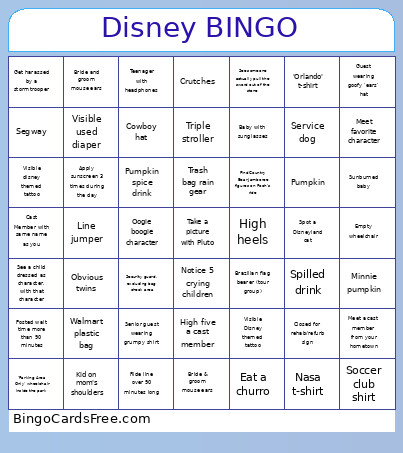 This Disney 2025 Bingo jmh Cards Game contains following Words or Phrases: Find some edible plants in Tomorrowland, Ride line over 90 minutes long, See a cast member with your same name, Apply sunscreen 3 times during the day, Spot a Disneyland cat, Spot a toddler on a leash, See a child dressed as character, with that character, Spot Cinderella, Notice a group who is fully drenched from a ride, Wave at Ursula, Get harassed by a stormtrooper, Let someone go before you in line, Attempt to pull the sword out of the stone, Eat a pickle, Eat a churro, Notice 5 crying children, Make a wish in the wishing well, Take a picture with Pluto, High five a cast member, See someone actually pull the sword out of the stone, See a group in ponchos, Accidentally drop your phone, Do a dab on a ride photo, Find Country Bear Jamboree figures on Pooh's ride, Meet a cast member from your hometown, Fanny pack, Bride & groom mouse ears, Visible Disney themed tattoo, Balloon tied to stroller, Brazilian flag bearer (tour group), Bride and groom mouse ears, Little girl in full princess outfit, 'Parking Area Only' wheelchair inside the park, Visible disney themed tattoo, Non-disney rental scooter, Segway, Security guard, excluding bag check area, Smoking inside the park, Walmart plastic bag, 'Orlando' t-shirt, Talking trash can, Non-disney rain poncho, Trash bag rain gear, Sunburned baby, Baby with sunglasses, Swimsuit as clothing, Kid on dad's shoulders, Kid on mom's shoulders, Toddler leash, Sleeping guest (strollers excluded), Souvenir hat with fake hair, Cowboy hat, Guest filming with video camera, Soccer club shirt, Triple stroller, Two people, one scooter, Crutches, Two characters appearing together, Guest wearing embroidered ears, Guest wearing donald 'duck bill' hat, Guest wearing goofy 'ears' hat, Senior guest wearing grumpy shirt, Disney hotel branded clothing or bag, Service dog, Spilled drink, Visible used diaper, Obvious twins, Empty wheelchair, Nasa t-shirt, High heels, Sunglasses on 'dark rides', Teenager with headphones, Line jumper, Posted wait time less than 10 minutes, Posted wait time more than 90 minutes, Closed for rehab/refurb sign, Walt disney quote plaque or sign, Cast Member with same name as you, Meet favorite character, Mickey pumpkin, Minnie pumpkin, Fab 5 merchandise, Jack skellington character, Oogie boogie character, Pumpkin spice drink, Pumpkin, Make a silly face/pose on a ride photo.