
Election Night Bingo Cards - Print Free or Customize
Print free Election Night bingo cards or personalize, limitless cards! Choose from 27,600+ templates or use the bingo card generator. Add numbers, phrases, photos, or all of them. Play using PDF prints, online bingo cards, and the online bingo caller, or go hybrid.
About: This bingo card is perfect for anyone watching CNN’s election night coverage, whether you’re a political junkie or just in it for the drama. Expect plenty of on-air quirks, over-the-top predictions, and iconic personalities as the results roll in. It’s a fun way to keep your spirits up during those long hours glued to the TV with friends or family.
How To: To download a PDF to print, click the Print button. You can adjust the card quantity and other printing options on the Print tab. Grid items and free space text can be changed on the Basic tab. Appearance can be highly customized on the relevant tabs, or you can easily search any setting on the 🔍 tab.
How to play Election Night Bingo Cards?
- Digital Caller: Click on the Play button above.
- Paper Players: Print PDF bingo cards and manually cross off the cards.
- Digital Players: Click on the Play button above, and then click on the 🎫 button.
- Paper Caller: Print PDF calling list & calling slips and manually select the slips.
- Mixed Mode: Pick any combination above. For instance, caller can be either Offline or Digital. And players can be Offline or Digital or a combination of both.
Step-By-Step:
- Start by saving the Election Night Bingo PDF by clicking on the "Print" button above.
- Open the PDF and print it.
- For random calling, you can print another copy of the call list, cut, fold and then draw them randomly at play time.
- Cut the bingo cards at the cut marks if there are greater than 1 bingo cards per page.
- Give one card to each player. For marking, you can use markers. Crayons cost the least.
- Pick one person to be the caller. If you are playing in a small group, the caller can also play along with their own Bingo card.
- The caller starts the game by randomly picking an item from the call list and announcing it to all players.
- The players scan their cards to see if they have the called word. If they do, they dab that word.
- The first player to finish a horizontal, vertical, or a diagonal line of marked items yells "Bingo!" and wins the game.
- The caller confirms that the items marked form a proper line as per the Bingo card and call list.
- You can play for different patterns or a full card blackout for an extended game.
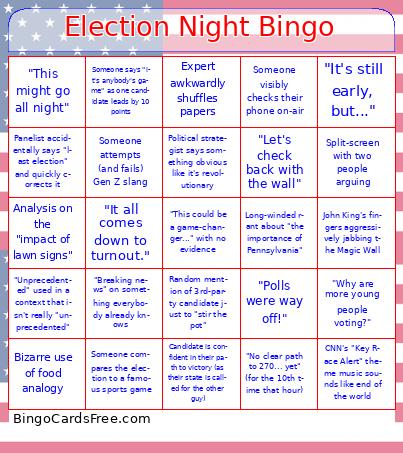 This Election Night Bingo Cards Game contains following Words or Phrases: "Breaking news" on something everybody already knows, John King's fingers aggressively jabbing the Magic Wall, Someone compares the election to a famous sports game, Commentator sighs and says, "It's a long night, folks", Anderson Cooper gives an intense side eye, CNN's "Key Race Alert" theme music sounds like end of the world, "No clear path to 270... yet" (for the 10th time that hour), Bizarre use of food analogy, Someone visibly checks their phone on-air, Expert awkwardly shuffles papers, "Unprecedented" used in a context that isn't really "unprecedented", Political strategist says something obvious like it's revolutionary, Long-winded rant about "the importance of Pennsylvania", Person in the crowd waves weird sign or costume behind reporter, Wolf Blitzer stares at the camera like he's rethinking his life choices, Someone attempts (and fails) Gen Z slang, Segment that dives way too deep into one random town's voting patterns, Candidate is confident in their path to victory (as their state is called for the other guy), Any commentary that somehow includes aliens or conspiracies, "Let's check back with the wall", Analysis on the "impact of lawn signs", Overly dramatic silence while waiting for 1% of the vote to be counted, Someone says "it's anybody's game" as one candidate leads by 10 points, Panelist accidentally says "last election" and quickly corrects it, Random mention of 3rd-party candidate just to "stir the pot", Host mispronounces a candidate's name, "Why are more young people voting?", Split-screen with two people arguing, "Polls were way off!", "It's still early, but...", Wolf Blitzer leans in close to the camera, "This might go all night", Someone tries to explain a youth trend, "This could be a game-changer..." with no evidence, "It all comes down to turnout.", Kentucky or Indiana gets called first.