Print free END UPDATE bingo cards or adjust them,
limitless prints! Select from 41,500+ templates or use the bingo card generator.
Add numbers, phrases, pictures, or any combination.
Play using printed PDF, digital bingo cards,
and the digital bingo caller, or mix physical and digital.
Similar Bingo Cards: Minecraft, Endupdate, Gameideas
About: This bingo card is perfect for Minecraft fans who love dreaming up new features and imagining a bigger, more mysterious End dimension. With creative biome ideas, fresh challenges, and unique loot concepts, this card brings excitement to any update brainstorming session or fan meetup. It's an imaginative toolkit for players passionate about game design and Minecraft’s future.
How To: To download a PDF to print, click the Print button.
You can change the card quantity and other
print settings on the Print tab.
Grid items and free space content can be added on the Basic tab.
Appearance can be fully personalized on the
relevant tabs, or you can quickly search any setting
on the 🔍 tab.
How to play END UPDATE Bingo Cards?
Paper Players: Print PDF bingo cards and physically mark the cards.
Online Players: Click on the Play button above, and then click on the 🎫 button.
Online Caller: Click on the Play button above.
Paper Caller: Print PDF calling list & calling slips and physically pick the slips.
Combo Play: Pick any combination above.
For example, caller can be either Offline or Online.
And players can be Offline or Online or a combo of both.
Step-By-Step:
Start by downloading the END UPDATE PDF by clicking on the "Print" button above.
Open the PDF and print it.
For random drawing, you can print another copy of the call list, cut, fold and then pick them randomly at play time.
Cut the bingo cards at the cut lines if there are more than 1 bingo cards per page.
Give one card to each player. For marking, you can use pencils. Crayons are the cheapest.
Pick one person to be the caller. If you are playing in a small group, the caller may also play along with their own Bingo card.
The caller starts the game by randomly drawing an item from the call list and announcing it to all players.
The players scan their cards to see if they have the announced word. If they do, they cross off that word.
The first player to finish a horizontal, vertical, or a diagonal line of crossed items yells "Bingo!" and wins the play.
The caller confirms that the items marked form a correct line as per the Bingo card and call list.
You can play for varied patterns or a full card blackout for an extended play.
This END UPDATE Bingo Cards Game contains following Words or Phrases: "void trees" Upside down trees hanging from the bottom of blocks over the void, pitch black wood, "purpur wood" the base wood for the purpur flower, the flowers grow on the tree creating massive forrests, Multi Level Islands, some on different levels, allowing for more elevation play, End dragon revamp, more difficult, new patterns, no 1 cycling, Vaults in end cities to replace chests, Guaranteed way to find a ship/get an elytra, Phantoms Perma move to the end and spawn normally in the air, Just like beds and respawn anchors, something in the end that respawns you, Super big enderman variants, Be able to remove the eyes of ender from portals, allow for newer players to be able to find out what to do without resorting to google, add a reason for someone to non accidentally use the eyes of ender, A plant that is not the easiest to farm that when eaten removes hunger, Some way of moving items wirelessly between chests (weak obviously, mainly to reduce lag from hoppers/water), Better Ender Chest storage, either double chests or something similar, A new way of renewably farming an old resource (ie diamonds), A new colour/trim for armour, "void sand" upside down sand that falls up, (tied to void sand) a structure upside down that has suspicious void sand that can be dug up to get treassure and armor trims, Potion made of void sand that dinnerbones you and lets you jump down and fall up, Obsidian Chunks biome (mountains of obsidian, sharp shards, boulders everywhere), Colour changing pastel blocks, Some islands are random shapes, like a sphere, or an island with cylindars cut out that makes it look like cheese, A second boss in a giant abandoned tower, larger than any end city with the insides abandoned and curroded and at the top a final boss, An item from anywhere that upgrades the beacon.

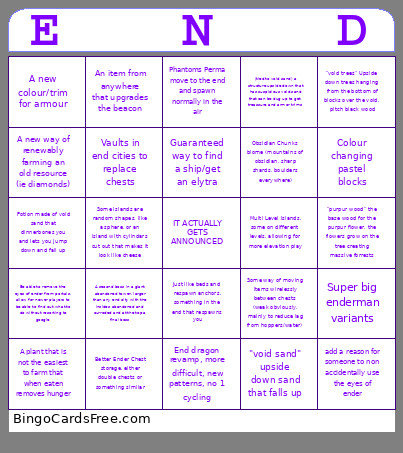 This END UPDATE Bingo Cards Game contains following Words or Phrases: "void trees" Upside down trees hanging from the bottom of blocks over the void, pitch black wood, "purpur wood" the base wood for the purpur flower, the flowers grow on the tree creating massive forrests, Multi Level Islands, some on different levels, allowing for more elevation play, End dragon revamp, more difficult, new patterns, no 1 cycling, Vaults in end cities to replace chests, Guaranteed way to find a ship/get an elytra, Phantoms Perma move to the end and spawn normally in the air, Just like beds and respawn anchors, something in the end that respawns you, Super big enderman variants, Be able to remove the eyes of ender from portals, allow for newer players to be able to find out what to do without resorting to google, add a reason for someone to non accidentally use the eyes of ender, A plant that is not the easiest to farm that when eaten removes hunger, Some way of moving items wirelessly between chests (weak obviously, mainly to reduce lag from hoppers/water), Better Ender Chest storage, either double chests or something similar, A new way of renewably farming an old resource (ie diamonds), A new colour/trim for armour, "void sand" upside down sand that falls up, (tied to void sand) a structure upside down that has suspicious void sand that can be dug up to get treassure and armor trims, Potion made of void sand that dinnerbones you and lets you jump down and fall up, Obsidian Chunks biome (mountains of obsidian, sharp shards, boulders everywhere), Colour changing pastel blocks, Some islands are random shapes, like a sphere, or an island with cylindars cut out that makes it look like cheese, A second boss in a giant abandoned tower, larger than any end city with the insides abandoned and curroded and at the top a final boss, An item from anywhere that upgrades the beacon.