Engagement Warming Party Bingo Cards - Print Free or Customize
Print free Engagement Warming Party bingo cards or modify,
unlimited cards! Pick from 32,700+ designs or use the bingo card generator.
Add numbers, words, images, or any combination.
Play using PDF prints, digital bingo cards,
and the digital bingo caller, or combine all formats.
About: This bingo card is perfect for a lively game night or party filled with friends who share inside jokes and quirky challenges. The prompts encourage everyone to mingle, discover fun facts about each other, and celebrate both shared interests and hilarious moments. It’s especially suited for a close-knit group looking to create memorable experiences together.
How To: To save a PDF to print, click the Print button.
You can change the card quantity and other
printing settings on the Print tab.
Grid items and free space text can be changed on the Basic tab.
Appearance can be entirely customized on the
relevant tabs, or you can quickly locate any option
on the 🔍 tab.
How to play Engagement Warming Party Bingo Cards?
Printed Players: Print PDF bingo cards and manually write on the cards.
Printed Caller: Print PDF calling list & calling slips and manually pick the slips.
Digital Caller: Click on the Play button above.
Digital Players: Click on the Play button above, and then click on the 🎫 button.
Combo Play: Choose any combination above.
For example, caller can be either Paper or Digital.
And players can be Paper or Digital or a combination of both.
Step-By-Step:
Start by downloading the Engagement Warming Party PDF by clicking on the "Print" button above.
Open the PDF and print a hard copy.
For random drawing, you can print another copy of the call list, cut, fold and then draw them randomly at play time.
Cut the bingo cards at the cut marks if there are more than 1 bingo cards per page.
Give one card to each player. For marking, you can use markers. Crayons are the cheapest.
Choose one person to be the caller. If you are playing in a small group, the caller can as well play along with their own Bingo card.
The caller opens the play by randomly pulling an item from the call list and saying it to all players.
The players scan their cards to see if they have the announced word. If they do, they dab that word.
The first player to finish a horizontal, vertical, or a diagonal line of crossed items yells "Bingo!" and wins the game.
The caller verifies that the items crossed off form a correct line as per the Bingo card and call list.
You can play for multiple patterns or a full card blackout for an extended game.
This Engagement Warming Party Bingo Cards Game contains following Words or Phrases: Wearing the color red, Has won a round already, Drives a Chevy, Traveled 1+ hour to be here, Has met a celebrity, Has had a speeding ticket, Has the same birth month as you, Has accidentally spilled something tonight, Get someone to say ____ without telling them this prompt, Beat Matt in Wii Sports Boxing tonight (could be you), Challenge and beat someone in Wii Sports tennis/table tennis, Challenge someone to a dance battle, winner initials, find a judge, Has played Stardew Valley, Has played Magic The Gathering, Get Andre to explain the Cell Saga from Dragon Ball, Get Jeffrey Abshie to explain the plot of Captain Marvel, Chris Church quotes a meme, unprovoked, Dalton makes a weird noise, unprovoked, Speaks more than one language, Has been to another country, Has a cat (not Tomas or Sarah), Likes pineapple on pizza, Has a tattoo, Sarah rolls her eyes, Tomas brings up Star Trek Academy, Stinky makes an appearance, Artemis head butts you, Bella shows you her tummy, Win a round of a card OR board game, Is currently watching the same show as you.

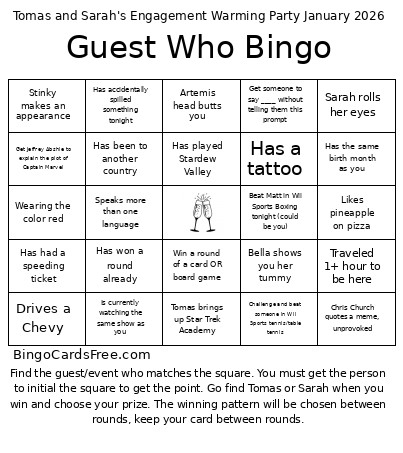 This Engagement Warming Party Bingo Cards Game contains following Words or Phrases: Wearing the color red, Has won a round already, Drives a Chevy, Traveled 1+ hour to be here, Has met a celebrity, Has had a speeding ticket, Has the same birth month as you, Has accidentally spilled something tonight, Get someone to say ____ without telling them this prompt, Beat Matt in Wii Sports Boxing tonight (could be you), Challenge and beat someone in Wii Sports tennis/table tennis, Challenge someone to a dance battle, winner initials, find a judge, Has played Stardew Valley, Has played Magic The Gathering, Get Andre to explain the Cell Saga from Dragon Ball, Get Jeffrey Abshie to explain the plot of Captain Marvel, Chris Church quotes a meme, unprovoked, Dalton makes a weird noise, unprovoked, Speaks more than one language, Has been to another country, Has a cat (not Tomas or Sarah), Likes pineapple on pizza, Has a tattoo, Sarah rolls her eyes, Tomas brings up Star Trek Academy, Stinky makes an appearance, Artemis head butts you, Bella shows you her tummy, Win a round of a card OR board game, Is currently watching the same show as you.