
Eurovision Bingo Cards - Print Free or Customize
Print free Eurovision bingo cards or customize, limitless prints! Choose from 36,100+ templates or use the bingo card generator. Add numbers, words, photos, or mix them all. Play using PDF printouts, online bingo cards, and the online bingo caller, or mix physical and digital.
About: Get ready for the ultimate Eurovision bingo experience! This card captures all the glitz, drama, and unpredictable fun that make the Eurovision Song Contest a yearly spectacle. Perfect for watch parties or fan gatherings, it spotlights everything from wild costumes to memorable interviews and over-the-top performances, keeping everyone engaged as you cheer on your favorites.
How To: To save a PDF to print, click the Print button. You can modify the card quantity and other printing preferences on the Print tab. Grid items and free space content can be changed on the Basic tab. Appearance can be totally personalized on the corresponding tabs, or you can quickly search any setting on the 🔍 tab.
How to play Eurovision Bingo Cards?
- Paper Players: Print PDF bingo cards and manually mark the cards.
- Virtual Caller: Click on the Play button above.
- Virtual Players: Click on the Play button above, and then click on the 🎫 button.
- Paper Caller: Print PDF calling list & calling slips and manually select the slips.
- Mixed Mode: Pick any combination above. For example, caller can be either Offline or Virtual. And players can be Offline or Virtual or a combo of both.
Step-By-Step:
- Start by getting the Eurovision PDF by clicking on the "Print" button above.
- Open the PDF and print a hard copy.
- For random calling, you can print another copy of the call list, cut, fold and then draw them randomly at play time.
- Cut the bingo cards at the cut lines if there are greater than 1 bingo cards per page.
- Give one card to each player. For marking, you can use crayons. Crayons cost the least.
- Pick one person to be the caller. If you are playing in a small group, the caller may as well play along with their own Bingo card.
- The caller begins the play by randomly drawing an item from the call list and saying it to everyone.
- The players look at their cards to see if they have the called word. If they do, they dab that word.
- The first player to complete a horizontal, vertical, or a diagonal line of marked items yells "Bingo!" and wins the play.
- The caller validates that the items marked form a proper line as per the Bingo card and call list.
- You can play for multiple patterns or a full card blackout for an extended play.
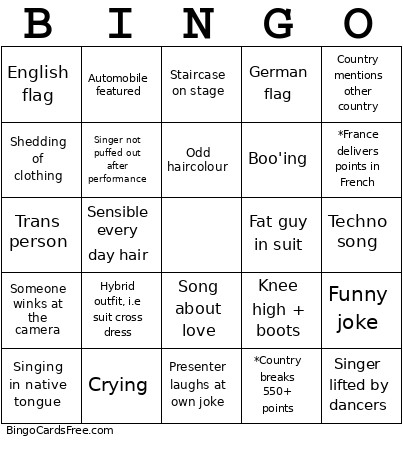 This Eurovision Bingo Cards Game contains following Words or Phrases: Whacky hair style, Glitter costume, Wind machine, Dance break, Power Ballard, Italian flag, Language barrier interview, Bad joke, Rain or water effect, Giant prop, Weird instrument, Singing in native tongue, Cleavage, Massive head, Sensible every day hair, Dancing turns into ground pound, Butt cleavage, Extremely-high high heels, Song about love, Country mentions other country, Sad song, Fire or fire effect, Funny joke, Piano intro, Boo'ing, German flag, 8+ people on stage, Green costume, 1 person on stage only for full performance, "I love you Europe" or similar, French flag, Song sung in French, Costume change, Electricity or electricity effect, Song about love, Twirling, Someone lowered or raised on stage, Knee high + boots, Sequence, Song about heartbreak, Someone blows a kiss, Staircase on stage, Sob story, Odd haircolour, Australian flag, Facial piercings, Someone crying, Rock/metal song, Whistling, Glitter or confetti canon, Feathers, Key change, Face paint of a flag, Stage has stage inside of it, Falling to knees, Grabbing at air, Techno song, Automobile featured, ABBA mentioned, Presenter laughs at own joke, Singer lifted by dancers, Shedding of clothing, Someone winks at the camera, Audience sings along, Ridiculous hat, Acrobatics, LGBT flag (not the updated flag), Glass or glass breaking effect, Dancers doing too much, Rolling on the floor, *"Deuce points goes to", Male with fully open shirt/vest, *Cyprus gives Greece 12 points, "HELLLLOOOO BEAUTIFUL VIENNA", Crying, Long train, Off key singing, Visible tattoos, *Country gets 0, Sequin, Fake instrument, Aussie performer is mentioned, English flag, *Palestine mentioned, Q*Greece gives Cyprus 12 points, *France delivers points in French, Ball gown, Singer not puffed out after performance, Bad sportsmanship, Hybrid outfit, i.e suit cross dress, Trans person, Guitar solo, *Country breaks 550+ points, Confetti, 3+ instruments on stage, Someone mentions a country being robbed, Aussie performer is mentioned, *Israel mentioned (outside of performance), *"Ciao from Italia", *Point giver blows a kiss, Face covering of some kind, Fat guy in suit, Visible sweat, Disappointment, Jean material, Duet, *>100 points between 2nd & 3rd place, Glitter, Folk dancing, Gushing over an outstanding performance, Aussie performer is mentioned, *Ukraine mentioned (outside of performance).