Print free F1 2026 bingo cards or alter them,
unlimited cards! Select from 41,500+ designs or use our bingo card generator.
Add numbers, words, images, or all of them.
Play using PDF printouts, online bingo cards,
and our online bingo caller, or combine all formats.
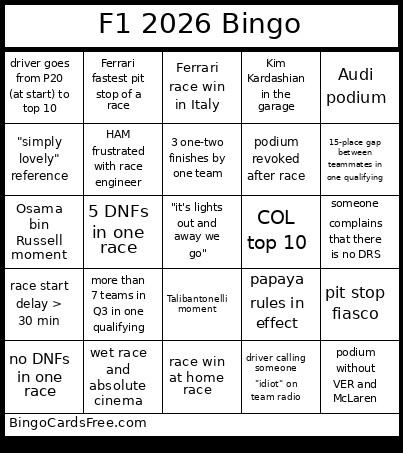
About: This bingo card is a must-have for hardcore Formula 1 fans who love to keep track of dramatic plot twists, on-track chaos, and iconic moments throughout the season. Perfect for watch parties with fellow F1 enthusiasts, it captures everything from unexpected podiums to meme-worthy team radios, making each Grand Prix even more interactive and fun.
How To: To save a PDF to print, click the Print button.
You can modify the card quantity and other
printing options on the Print tab.
Grid items and free space content can be edited on the Basic tab.
Appearance can be entirely customized on the
relevant tabs, or you can quickly find any setting
using the 🔍 tab.
How to play F1 2026 Bingo Cards?
Virtual Players: Click on the Play button above, and then click on the 🎫 button.
Printed Caller: Print PDF calling list & calling slips and physically pick the slips.
Virtual Caller: Click on the Play button above.
Printed Players: Print PDF bingo cards and physically mark the cards.
Combo Mode: Select any combination above.
For instance, caller can be either Paper or Virtual.
And players can be Paper or Virtual or a combo of both.
Step-By-Step:
Start by downloading the F1 2026 PDF by clicking on the "Print" button above.
Open the PDF and print a hard copy.
For random drawing, you can print another copy of the call list, cut, fold and then pick them randomly at play time.
Cut the bingo cards at the cut marks if there are more than 1 bingo cards per page.
Give one card to each player. For marking, you can use crayons. Crayons are the cheapest.
Select one person to be the caller. If you are playing in a small group, the caller may as well play along with their own Bingo card.
The caller opens the game by randomly drawing an item from the call list and announcing it to all players.
The players look at their cards to see if they have the announced word. If they do, they cross off that word.
The first player to finish a horizontal, vertical, or a diagonal line of crossed items shouts "Bingo!" and wins the play.
The caller validates that the items crossed off form a correct line according to the Bingo card and call list.
You can play for varied patterns or a full card blackout for a longer play.
This F1 2026 Bingo Cards Game contains following Words or Phrases: VER switches teams mid-season, ALO podium, Audi podium, PER > VER in a race (DNF doesn't count), BOT > HAM in a race (DNF doesn't count), 5 DNFs in one race, both Cadillacs top 10, new WDC leader (compared to 2025), 2 new race winners (compared to 2025), pit stop fiasco, team without race win brings upgrade and wins one of next 3 races, wet race and absolute cinema, terrible F1 direction, papaya rules in effect, 3 penalties for one driver in a single race, 4 yellow flags in one race, race start delay > 30 min, both Ferraris DNF in one race, Stroll being Stroll moment, both Red Bulls outside top 10 in one race, both Mercedes outside Q3 in one qualifying, red flag on lap 1, 3 one-two finishes by one team, more than 7 teams in Q3 in one qualifying, "king of street circuits" reference, DNF at home race, race win at home race, Osama bin Russell moment, 4 different race winners in a row, team principal gets replaced, podium without VER and McLaren, Ferrari race win in Italy, podium revoked after race, 2 DSQs in one race, RUS-VER crash, NOR-PIA crash, pit stop < 2.0 s, 15-place gap between teammates in one qualifying, Ferrari race win thanks to good strategy, VER team radio gets censored, HAM frustrated with race engineer, DNF without crash, driver goes from P20 (at start) to top 10, Kim Kardashian in the garage, VER fastest lap, someone complains that there is no DRS, Talibantonelli moment, HAM podium, Ferrari fastest pit stop of a race, 4 different tire compounds in one race, driver calling someone "idiot" on team radio, "simply lovely" reference, all 2025/26 rookies outside top 10 in one race, driver gets replaced for one race, pit stop > 20.0 s, Ferrari clown strategists, NOR loses P1 after turn 1, no DNFs in one race, 3 Mercedes power units on the podium in one race, COL top 10, OCO 10 s penalty, HAM-VER-BOT at any point.

 This F1 2026 Bingo Cards Game contains following Words or Phrases: VER switches teams mid-season, ALO podium, Audi podium, PER > VER in a race (DNF doesn't count), BOT > HAM in a race (DNF doesn't count), 5 DNFs in one race, both Cadillacs top 10, new WDC leader (compared to 2025), 2 new race winners (compared to 2025), pit stop fiasco, team without race win brings upgrade and wins one of next 3 races, wet race and absolute cinema, terrible F1 direction, papaya rules in effect, 3 penalties for one driver in a single race, 4 yellow flags in one race, race start delay > 30 min, both Ferraris DNF in one race, Stroll being Stroll moment, both Red Bulls outside top 10 in one race, both Mercedes outside Q3 in one qualifying, red flag on lap 1, 3 one-two finishes by one team, more than 7 teams in Q3 in one qualifying, "king of street circuits" reference, DNF at home race, race win at home race, Osama bin Russell moment, 4 different race winners in a row, team principal gets replaced, podium without VER and McLaren, Ferrari race win in Italy, podium revoked after race, 2 DSQs in one race, RUS-VER crash, NOR-PIA crash, pit stop < 2.0 s, 15-place gap between teammates in one qualifying, Ferrari race win thanks to good strategy, VER team radio gets censored, HAM frustrated with race engineer, DNF without crash, driver goes from P20 (at start) to top 10, Kim Kardashian in the garage, VER fastest lap, someone complains that there is no DRS, Talibantonelli moment, HAM podium, Ferrari fastest pit stop of a race, 4 different tire compounds in one race, driver calling someone "idiot" on team radio, "simply lovely" reference, all 2025/26 rookies outside top 10 in one race, driver gets replaced for one race, pit stop > 20.0 s, Ferrari clown strategists, NOR loses P1 after turn 1, no DNFs in one race, 3 Mercedes power units on the podium in one race, COL top 10, OCO 10 s penalty, HAM-VER-BOT at any point.