Feeling Lucky Bingo Cards - Print Free or Customize
Print free Feeling Lucky bingo cards or modify,
unlimited prints! Choose from 38,000+ designs or use our bingo card generator.
Add numbers, phrases, pictures, or all of them.
Play using PDF printouts, digital bingo cards,
and our digital bingo caller, or mix physical and digital.
About: This bingo card is perfect for an Austin-themed gathering, class reunion, or community event where guests want to connect and discover fun facts about each other. The squares highlight personal experiences, local connections, unique skills, and favorite things, making it a lively icebreaker that sparks conversation and laughter among people of all ages.
How To: To save a printable PDF, click the Print button.
You can modify the number of cards and other
printing settings on the Print tab.
Grid items and free space text can be added on the Basic tab.
Appearance can be entirely customized on the
corresponding tabs, or you can quickly find any setting
using the 🔍 tab.
How to play Feeling Lucky Bingo Cards?
Virtual Players: Click on the Play button above, and then click on the 🎫 button.
Printed Players: Print PDF bingo cards and manually write on the cards.
Virtual Caller: Click on the Play button above.
Printed Caller: Print PDF calling list & calling slips and manually pick the slips.
Combo Mode: Select any combination above.
For example, caller can be either Paper or Virtual.
And players can be Paper or Virtual or a mix of both.
Step-By-Step:
Start by downloading the Feeling Lucky PDF by clicking on the "Print" button above.
Open the PDF and print a hard copy.
For random drawing, you can print another copy of the call list, cut, fold and then pick them randomly at play time.
Cut the bingo cards at the cut marks if there are more than 1 bingo cards per page.
Give one card to each player. For marking, you can use pencils. Crayons cost the least.
Select one person to be the caller. If you are playing in a small group, the caller may also play along with their own Bingo card.
The caller starts the game by randomly picking an item from the call list and calling out it to everyone.
The players scan their cards to see if they have the called word. If they do, they mark that word.
The first player to complete a horizontal, vertical, or a diagonal line of marked items shouts "Bingo!" and wins the play.
The caller confirms that the items crossed off form a proper line as per the Bingo card and call list.
You can play for multiple patterns or a full card blackout for an extended play.
This Feeling Lucky Bingo Cards Game contains following Words or Phrases: Always Lived In Austin, Ate Dinner Before Coming, Austin High Alumni, Been On A Cruise, Been Skydiving, Been To An Ocean, Been To Disney, Been To England, Been To Vegas, Been Up North, Can Change A Tire, Can Knit, Can Speak Two Languages, Currently Wearing Green, Dislikes Chocolate, Dislikes Spam, Drives A White Car, Favorite Holiday Is Easter, Green Bay Packers Fan, Grew Up In A Big City, Grew Up In The Country, Has A Pet Dog, Has A Tattoo, Has Been On TV, Has Been Paddleboarding, Has Been Skiing, Has Braces, Has Pierced Ears, Has Won A Contest, In Elementary School, Is A Grandparent, Is A Middle Child, Is A Night Owl, Is A Parent, Is A Singer, Is An Early Bird, Is An Only Child, Is Left Handed, Is Wearing Sandals, Likes Lutefisk, Likes Peeps, March Birthday, Married Over 20 Years, Met Someone Famous, Owns A House, Owns A Reptile, Owns Roller Skates, Played Hockey In School, Plays An Instrument, Plays Chess, Rides The Bus, Rode The Spam Bell, Says Mower County, Seen A Broadway Show, Shares Your Favorite Color, Someone Irish, Wasn't Born In MN, Wears Glasses, Went Sledding This Year, Works In A School.

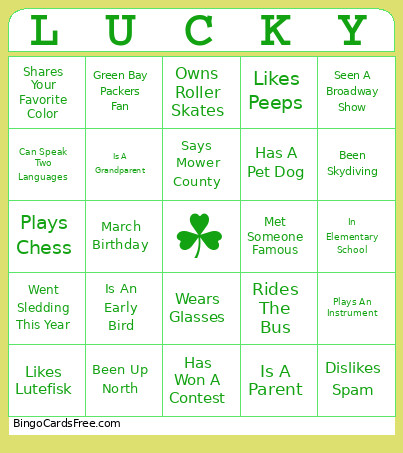 This Feeling Lucky Bingo Cards Game contains following Words or Phrases: Always Lived In Austin, Ate Dinner Before Coming, Austin High Alumni, Been On A Cruise, Been Skydiving, Been To An Ocean, Been To Disney, Been To England, Been To Vegas, Been Up North, Can Change A Tire, Can Knit, Can Speak Two Languages, Currently Wearing Green, Dislikes Chocolate, Dislikes Spam, Drives A White Car, Favorite Holiday Is Easter, Green Bay Packers Fan, Grew Up In A Big City, Grew Up In The Country, Has A Pet Dog, Has A Tattoo, Has Been On TV, Has Been Paddleboarding, Has Been Skiing, Has Braces, Has Pierced Ears, Has Won A Contest, In Elementary School, Is A Grandparent, Is A Middle Child, Is A Night Owl, Is A Parent, Is A Singer, Is An Early Bird, Is An Only Child, Is Left Handed, Is Wearing Sandals, Likes Lutefisk, Likes Peeps, March Birthday, Married Over 20 Years, Met Someone Famous, Owns A House, Owns A Reptile, Owns Roller Skates, Played Hockey In School, Plays An Instrument, Plays Chess, Rides The Bus, Rode The Spam Bell, Says Mower County, Seen A Broadway Show, Shares Your Favorite Color, Someone Irish, Wasn't Born In MN, Wears Glasses, Went Sledding This Year, Works In A School.