
asdfj Bingo Cards - Print Free or Customize
Print free asdfj bingo cards or customize, limitless prints! Select from 41,500+ designs or use our bingo card generator. Add numbers, words, photos, or any combination. Play using PDF prints, virtual bingo cards, and our virtual bingo caller, or go hybrid.
About: This bingo card is designed for geophysicists and Earth scientists, especially those with a passion for magnetism and fieldwork. It’s perfect for networking events, conferences, or workshops in the geosciences. The prompts spark engaging conversations about research experiences, technical skills, and the quirks of working with magnetic data and equipment around the world.
How To: To save a printable PDF, click the Print button. You can alter the card quantity and other printing options on the Print tab. Grid items and free space text can be changed on the Basic tab. Appearance can be entirely customized on the relevant tabs, or you can easily locate any preference on the 🔍 tab.
How to play asdfj Bingo Cards?
- Printed Caller: Print PDF calling list & calling slips and manually choose the slips.
- Digital Players: Click on the Play button above, and then click on the 🎫 button.
- Digital Caller: Click on the Play button above.
- Printed Players: Print PDF bingo cards and manually cross off the cards.
- Mixed Mode: Pick any combination above. For instance, caller can be either Paper or Digital. And players can be Paper or Digital or a combo of both.
Step-By-Step:
- Start by downloading the asdfj PDF by clicking on the "Print" button above.
- Open the PDF and print it.
- For random drawing, you can print another copy of the call list, cut, fold and then draw them randomly at play time.
- Cut the bingo cards at the cut marks if there are more than 1 bingo cards per page.
- Give one card to each player. For marking, you can use pencils. Crayons cost the least.
- Pick one person to be the caller. If you are playing in a small group, the caller can as well play along with their own Bingo card.
- The caller opens the play by randomly picking an item from the call list and announcing it to everyone.
- The players scan their cards to see if they have the announced word. If they do, they mark that word.
- The first player to finish a horizontal, vertical, or a diagonal line of crossed items shouts "Bingo!" and wins the play.
- The caller confirms that the items crossed off form a proper line according to the Bingo card and call list.
- You can play for multiple patterns or a full card blackout for a longer play.
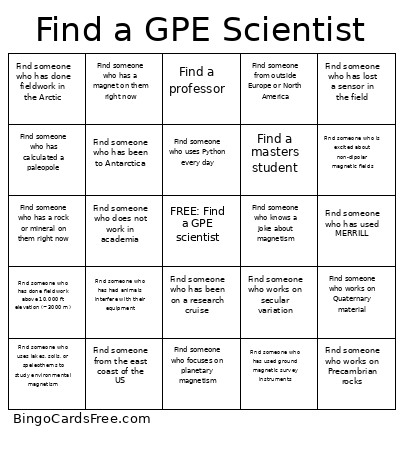 This asdfj Bingo Cards Game contains following Words or Phrases: Find someone who has used ground magnetic survey instruments, Find someone who has processed aeromagnetic data, Find someone who has worked with satellite magnetometer data, Find someone who works on secular variation, Find someone who has dealt with magnetic storms affecting instruments, Find someone who studies red beds, Find someone who has calculated a paleopole, Find someone who has run an MT (magnetotelluric) survey, Find someone who has used transient electromagnetic (TEM) methods, Find someone who has lost a sensor in the field, Find someone who works on inversions, Find someone who focuses on planetary magnetism, Find someone who uses lakes, soils, or speleothems to study environmental magnetism, Find someone who has used a quantum diamond microscope, Find someone who has had animals interfere with their equipment, Find someone who has been to Antarctica, Find someone who has done fieldwork in the Arctic, Find someone who has done fieldwork above 10,000 ft elevation (~3000 m), Find someone who has been on a research cruise, Find someone who has worked with archaeological materials, Find someone who knows Fortran, Find someone who uses MATLAB, Find someone who uses Python every day, Find someone who studies magnetofossils, Find someone who studies iron sulfides, Find someone who uses paleointensity, Find someone who has measured a FORC (first-order reversal curve), Find someone who has used MERRILL, Find someone who can explain a Zijderveld diagram, Find someone who can explain spherical harmonics, Find someone who can write out all of Maxwell's equations, Find someone who has broken a drill bit, Find someone who is excited about non-dipolar magnetic fields, Find someone who works on Precambrian rocks, Find someone who works on Quaternary material, Find an undergraduate student, Find a masters student, Find a PhD student, Find a postdoc, Find a professor, Find someone who does not work in academia, Find someone from the east coast of the US, Find someone from the west coast of the US, Find someone from the Midwestern US, Find someone from Canada or Mexico, Find someone from Europe, Find someone from outside Europe or North America, Find someone who has a magnet on them right now, Find someone who has a rock or mineral on them right now, Find someone who knows a joke about magnetism.