
Team Bingo Cards - Print Free or Customize
Print free Team bingo cards or modify, unlimited prints! Select from 35,600+ templates or use the bingo card generator. Add numbers, words, pictures, or any combination. Play using PDF printouts, digital bingo cards, and the digital bingo caller, or combine all formats.
About: This bingo card is all about sparking conversations and discovering fun facts about the people around you. With prompts that encourage players to learn quirky traits, hobbies, and hidden talents, it's perfect for icebreakers at team-building events, orientation sessions, or social gatherings where new connections are encouraged. The tone is friendly and inclusive, making everyone feel welcome and engaged.
How To: To save a printable PDF, click the Print button. You can adjust the card count and other print settings on the Print tab. Grid items and free space text can be changed on the Basic tab. Appearance can be highly customized on the relevant tabs, or you can easily find any setting on the 🔍 tab.
How to play Team Bingo Cards?
- Printed Players: Print PDF bingo cards and manually mark the cards.
- Virtual Players: Click on the Play button above, and then click on the 🎫 button.
- Printed Caller: Print PDF calling list & calling slips and manually choose the slips.
- Virtual Caller: Click on the Play button above.
- Mixed Mode: Select any combination above. For example, caller can be either Offline or Virtual. And players can be Offline or Virtual or a combination of both.
Step-By-Step:
- Start by getting the Team Bingo PDF by clicking on the "Print" button above.
- Open the PDF and print a hard copy.
- For random drawing, you can print another copy of the call list, cut, fold and then pull them randomly at play time.
- Cut the bingo cards at the cut lines if there are more than 1 bingo cards per page.
- Distribute one card per player. For marking, you can use crayons. Crayons are the cheapest.
- Select one person to be the caller. If you are playing in a small group, the caller can also play along with their own Bingo card.
- The caller initiates the game by randomly pulling an item from the call list and calling out it to everyone.
- The players look at their cards to see if they have the called word. If they do, they mark that word.
- The first player to complete a horizontal, vertical, or a diagonal line of crossed items shouts "Bingo!" and wins the game.
- The caller checks that the items marked form a proper line as per the Bingo card and call list.
- You can play for different patterns or a full card blackout for an extended game.
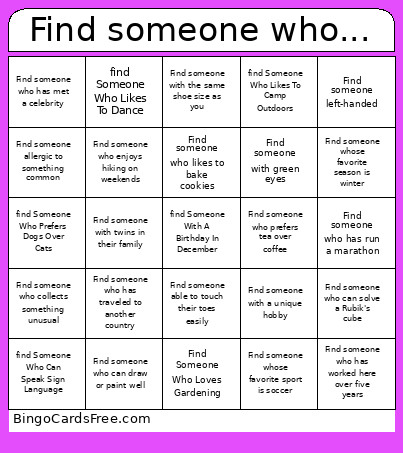 This Team Bingo Cards Game contains following Words or Phrases: Find Someone Who Loves Gardening, Find someone able to do a cartwheel, Find someone able to recite a poem from memory, Find someone able to touch their toes easily, Find someone afraid of heights, Find someone afraid of spiders, Find someone allergic to something common, Find someone born in another state or country, Find someone good at math puzzles, Find someone left-handed, Find someone wearing blue today, Find someone who can draw or paint well, Find someone who can solve a Rubik's cube, Find someone who can whistle loudly, Find someone who collects something unusual, Find someone who enjoys hiking on weekends, Find someone who has met a celebrity, Find someone who has run a marathon, Find someone who has traveled to another country, Find someone who has worked here over five years, Find someone who is an only child, Find someone who knows how to juggle, Find someone who likes to bake cookies, Find someone who loves to read books, Find someone who loves watching cartoons, Find someone who owns a pet, Find someone who plays a musical instrument, Find someone who prefers tea over coffee, Find someone who rides a bicycle to work, Find someone who speaks more than one language, Find someone whose birthday is in the same month as yours, Find someone whose favorite food is pizza, Find someone whose favorite season is winter, Find someone whose favorite sport is soccer, Find someone with a unique hobby, Find someone with curly hair, Find someone with green eyes, Find someone with siblings, Find someone with the same favorite color as you, Find someone with the same shoe size as you, Find someone with twins in their family, find Someone Who Can Speak Sign Language, find Someone Who Can Swim Well, find Someone Who Enjoys Singing Karaoke, find Someone Who Has A Green Thumb, find Someone Who Has Never Broken A Bone, find Someone Who Likes To Camp Outdoors, find Someone Who Likes To Dance, find Someone Who Prefers Dogs Over Cats, find Someone With A Birthday In December.