
Honua Laulima Bingo Cards - Print Free or Customize
Print free Honua Laulima bingo cards or alter them, limitless prints! Select from 42,200+ templates or use the bingo card generator. Add numbers, words, photos, or all of them. Play using PDF prints, online bingo cards, and the online bingo caller, or go hybrid.
About: This bingo card is perfect for educational events or youth gatherings in Hawaii, especially those focused on STEM, Hawaiian culture, and community involvement. It celebrates local experiences, academic achievement, and cultural knowledge while encouraging connection among students, teachers, and community members. The vibe is inclusive and fun, sparking conversations across generations and backgrounds.
How To: To get a printable PDF, click the Print button. You can adjust the card count and other print preferences on the Print tab. Grid items and free space text can be added on the Basic tab. Appearance can be exactly customized on the corresponding tabs, or you can easily locate any preference using the 🔍 tab.
How to play Honua Laulima Bingo Cards?
- Virtual Players: Click on the Play button above, and then click on the 🎫 button.
- Virtual Caller: Click on the Play button above.
- Paper Players: Print PDF bingo cards and physically cross off the cards.
- Paper Caller: Print PDF calling list & calling slips and physically choose the slips.
- Hybrid Mode: Choose any combination above. For instance, caller can be either Printed or Virtual. And players can be Printed or Virtual or a mix of both.
Step-By-Step:
- Start by downloading the Honua Laulima PDF by clicking on the "Print" button above.
- Open the PDF and print a hard copy.
- For random drawing, you can print another copy of the call list, cut, fold and then pull them randomly at play time.
- Cut the bingo cards at the cut lines if there are more than 1 bingo cards per page.
- Give one card to each player. For marking, you can use pencils. Crayons are the cheapest.
- Choose one person to be the caller. If you are playing in a small group, the caller may also play along with their own Bingo card.
- The caller initiates the game by randomly picking an item from the call list and announcing it to everyone.
- The players check their cards to see if they have the called word. If they do, they cross off that word.
- The first player to complete a horizontal, vertical, or a diagonal line of marked items yells "Bingo!" and wins the play.
- The caller validates that the items marked form a correct line according to the Bingo card and call list.
- You can play for different patterns or a full card blackout for an extended play.
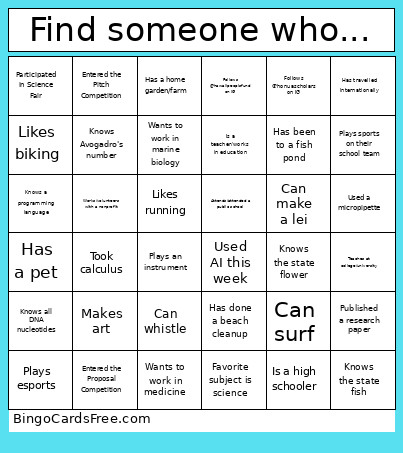 This Honua Laulima Bingo Cards Game contains following Words or Phrases: Attended a previous Laulima Symposium, Attends/attended a public school, Been to Iolani Palace, Can make a lei, Can name 10 elements, Can name 2+ Hawaiian Kings/Queens, Can name 5 Hawaiian fish, Can name 5 native species, Can name all major Hawaiian Islands, Can recite >8 digits of pi from memory, Can scuba, Can surf, Can whistle, Donated $1+ to Honua Scholars, Entered the Pitch Competition, Entered the Proposal Competition, Favorite food is Hawaiian food, Favorite subject is language arts, Favorite subject is math, Favorite subject is science, Favorite subject is social studies, Follows @hawaiipeoplsfund on IG, Follows @honuascholars on IG, Follows @pacehawaii on IG, Follows @purple_maia on IG, Has 3+ siblings, Has a holo card with them, Has a home garden/farm, Has a pet, Has a PhD or MD, Has been to a fish pond, Has been to a lo'i, Has been to HIMB (Moku o Lo'e), Has done a beach cleanup, Has eaten 'ulu (breadfruit), Has gone to the library this month, Has travelled internationally, Interested in robotics, Is a 1st-gen college student, Is a high schooler, Is a teacher/works in education, Is bilingual, Is in high school, Is middle schooler, Knows a programming language, Knows all DNA nucleotides, Knows Avogadro's number, Knows Oahu's official color, Knows the acceleration of gravity, Knows the state bird, Knows the state fish, Knows the state flower, Likes biking, Likes hiking, Likes poi, Likes running, Makes art, Participated in Science Fair, Plays an instrument, Plays esports, Plays sports on their school team, Presented at a conference, Published a research paper, Teaches at college/university, Took calculus, Used a micropipette, Used a microscope, Used AI this week, Vegetarian or Vegan, Wants to attend college, Wants to work in marine biology, Wants to work in medicine, Went to UH Manoa, Works/volunteers with a nonprofit, Wrote a paper longer than 10 pages.