Find Someone Who Bingo Cards - Print Free or Customize
Print free Find Someone Who bingo cards or customize,
unlimited prints! Select from 37,300+ templates or use our bingo card generator.
Add numbers, words, pictures, or any combination.
Play using PDF prints, online bingo cards,
and our online bingo caller, or combine all formats.
About: This bingo card is all about breaking the ice and discovering quirks, hobbies, and unique experiences among a group. Perfect for social gatherings, classroom activities, or team-building events, it’s designed to spark conversations and help people find common ground in a fun, relaxed way. Expect plenty of laughter and interesting stories as everyone mingles.
How To: To download a printable PDF, click the Print button.
You can alter the card count and other
printing preferences on the Print tab.
Grid items and free space content can be added on the Basic tab.
Appearance can be fully customized on the
relevant tabs, or you can quickly find any setting
using the 🔍 tab.
How to play Find Someone Who Bingo Cards?
Digital Caller: Click on the Play button above.
Printed Caller: Print PDF calling list & calling slips and manually draw the slips.
Digital Players: Click on the Play button above, and then click on the 🎫 button.
Printed Players: Print PDF bingo cards and manually mark the cards.
Combo Mode: Choose any combination above.
For instance, caller can be either Printed or Digital.
And players can be Printed or Digital or a mix of both.
Step-By-Step:
Start by saving the Find Someone Who PDF by clicking on the "Print" button above.
Open the PDF and print a hard copy.
For random drawing, you can print another copy of the call list, cut, fold and then pull them randomly at play time.
Cut the bingo cards at the cut lines if there are more than 1 bingo cards per page.
Distribute one card per player. For marking, you can use pencils. Crayons cost the least.
Choose one person to be the caller. If you are playing in a small group, the caller may also play along with their own Bingo card.
The caller initiates the play by randomly pulling an item from the call list and calling out it to all players.
The players scan their cards to see if they have the announced word. If they do, they cross off that word.
The first player to complete a horizontal, vertical, or a diagonal line of marked items shouts "Bingo!" and wins the game.
The caller checks that the items marked form a correct line as per the Bingo card and call list.
You can play for multiple patterns or a full card blackout for a longer game.
This Find Someone Who Bingo Cards Game contains following Words or Phrases: has a pet, has eaten sushi this week, has a birthday in the same month as you, can roller-skate, likes pineapple on pizza, has seen a movie in a theater this month, drinks coffee or tea every morning, is wearing colorful socks, has traveled outside their home country, was born in a different state/country, has visited a national park, has lived in more than three cities, plays a musical instrument, speaks more than one language, can cook a meal from scratch, enjoys dancing, is good at math or a specific subject, has a favorite book they've read more than once, has been stuck in an elevator, has tried a bizarre food, has met a celebrity, has a hidden talent, walks to campus, ate seafood in the last week, hasn't had breakfast today, has won a contest, is a couch potato, has seen a snake in the wild, watches more than one hour of TV every day, has argued with a friend recently, likes very spicy food, was born in January, does not like broccoli, drank coffee this morning, is afraid of spiders, wakes up early, wears socks to bed, has had stiches, loves to swim, who has more than four siblings, is an only child, can use chopsticks, can whistle.

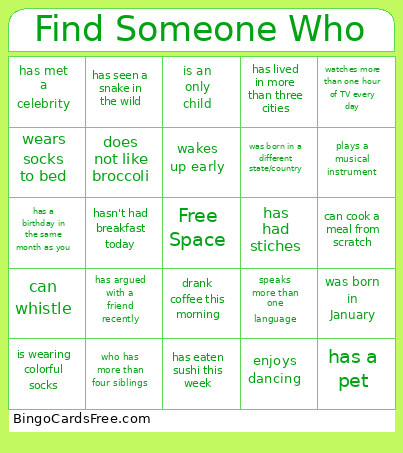 This Find Someone Who Bingo Cards Game contains following Words or Phrases: has a pet, has eaten sushi this week, has a birthday in the same month as you, can roller-skate, likes pineapple on pizza, has seen a movie in a theater this month, drinks coffee or tea every morning, is wearing colorful socks, has traveled outside their home country, was born in a different state/country, has visited a national park, has lived in more than three cities, plays a musical instrument, speaks more than one language, can cook a meal from scratch, enjoys dancing, is good at math or a specific subject, has a favorite book they've read more than once, has been stuck in an elevator, has tried a bizarre food, has met a celebrity, has a hidden talent, walks to campus, ate seafood in the last week, hasn't had breakfast today, has won a contest, is a couch potato, has seen a snake in the wild, watches more than one hour of TV every day, has argued with a friend recently, likes very spicy food, was born in January, does not like broccoli, drank coffee this morning, is afraid of spiders, wakes up early, wears socks to bed, has had stiches, loves to swim, who has more than four siblings, is an only child, can use chopsticks, can whistle.