
Find Someone Who... Bingo Cards - Print Free or Customize
Print free Find Someone Who... bingo cards or customize, limitless cards! Choose from 30,500+ templates or use our bingo card generator. Add numbers, words, pictures, or any combination. Play using PDF printouts, digital bingo cards, and our digital bingo caller, or combine all formats.
About: This bingo card is all about discovering surprising stories and hidden talents within a group. Perfect for team-building, family gatherings, or icebreaker activities, it invites people to share unique experiences, quirks, and hobbies. The tone is playful and inclusive, helping participants connect over fun facts and unlikely coincidences they might never have guessed about each other.
How To: To download a PDF to print, click the Print button. You can modify the number of cards and other print settings on the Print tab. Grid items and free space content can be edited on the Basic tab. Appearance can be fully customized on the relevant tabs, or you can quickly locate any setting on the 🔍 tab.
How to play Find Someone Who... Bingo Cards?
- Paper Players: Print PDF bingo cards and manually mark the cards.
- Virtual Caller: Click on the Play button above.
- Virtual Players: Click on the Play button above, and then click on the 🎫 button.
- Paper Caller: Print PDF calling list & calling slips and manually choose the slips.
- Mixed Mode: Choose any combination above. For example, caller can be either Printed or Virtual. And players can be Printed or Virtual or a mix of both.
Step-By-Step:
- Start by getting the Find Someone Who... PDF by clicking on the "Print" button above.
- Open the PDF and print a hard copy.
- For random drawing, you can print another copy of the call list, cut, fold and then pull them randomly at play time.
- Cut the bingo cards at the cut lines if there are greater than 1 bingo cards per page.
- Give one card to each player. For marking, you can use pencils. Crayons are the cheapest.
- Choose one person to be the caller. If you are playing in a small group, the caller can also play along with their own Bingo card.
- The caller starts the game by randomly drawing an item from the call list and saying it to everyone.
- The players look at their cards to see if they have the announced word. If they do, they dab that word.
- The first player to finish a horizontal, vertical, or a diagonal line of crossed items shouts "Bingo!" and wins the game.
- The caller confirms that the items crossed off form a proper line according to the Bingo card and call list.
- You can play for varied patterns or a full card blackout for a longer game.
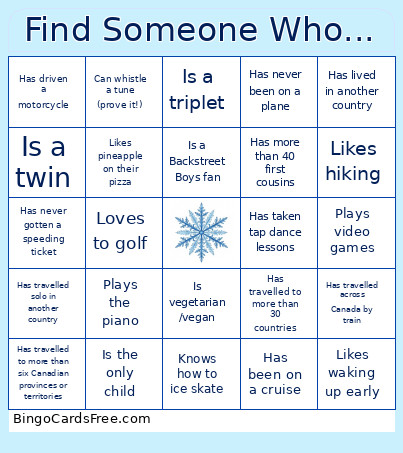 This Find Someone Who... Bingo Cards Game contains following Words or Phrases: Speaks three or more languages, Grows herbs, Can whistle a tune (prove it!), Likes spicy food, Uses a bicycle to commute to work, Has driven a motorcycle, Doesn't have a Facebook account, Has both a dog and a cat at home, Has a pet other than a dog or a cat at home, Is the oldest sibling, Is the only child, Was born in the same month as you, Has been on a cruise, Is left-handed, Does not like coffee, Can do a cartwheel, Has changed a car tire, Plays the piano, Does not like cheese, Has a tattoo, Knows how to sew, Can country line-dance, Has never been on a plane, Has never been to Disneyland/ Disneyworld, Is vegetarian /vegan, Can play the piano, Has never broken a bone, Has been in a parade, Likes waking up early, Loves horror movies, Reads at least ten books a year, Plays video games, Is in a book club, Has never gotten a speeding ticket, Dislikes chocolate, Has a boat, Knows how to ice skate, Has run a marathon, Is a night owl, Believes in ghosts, Loves to cook, Has lived on a farm, Likes pineapple on their pizza, Volunteered in the last month, Is a twin, Has met Richard Simmons, Has travelled across Canada by train, Is a triplet, Loves to golf, Used to be a teacher, Has lived in another country, Has travelled to more than six Canadian provinces or territories, Hates the cold, Likes hiking, Has been married for more than two decades, Has travelled solo in another country, Has more than 40 first cousins, Has travelled to more than 30 countries, Likes Pokémon, Writes fiction or poetry, Has chickens!, Is a Backstreet Boys fan, Has taken tap dance lessons, Feeds chickadees from the palm of their hand.