Find & Write the Name of Someone Who... Bingo Cards - Print Free or Customize
Print free Find & Write the Name of Someone Who... bingo cards or personalize,
limitless prints! Choose from 38,000+ templates or use our bingo card generator.
Add numbers, words, pictures, or any combination.
Play using printable PDF, online bingo cards,
and our online bingo caller, or mix physical and digital.
About: This bingo card is perfect for bringing together a group of women with diverse backgrounds and life experiences, such as at a book club, church social, or community gathering. The prompts focus on meaningful milestones, personal quirks, and shared memories, creating an upbeat and nostalgic atmosphere where participants can discover fun connections and celebrate each other's unique journeys.
How To: To get a PDF to print, click the Print button.
You can alter the card quantity and other
print settings on the Print tab.
Grid items and free space content can be changed on the Basic tab.
Appearance can be exactly personalized on the
relevant tabs, or you can quickly search any preference
using the 🔍 tab.
How to play Find & Write the Name of Someone Who... Bingo Cards?
Printed Caller: Print PDF calling list & calling slips and physically draw the slips.
Printed Players: Print PDF bingo cards and physically scratch the cards.
Digital Caller: Click on the Play button above.
Digital Players: Click on the Play button above, and then click on the 🎫 button.
Mixed Play: Select any combination above.
For instance, caller can be either Printed or Digital.
And players can be Printed or Digital or a combination of both.
Step-By-Step:
Start by downloading the Find & Write the Name of Someone Who... PDF by clicking on the "Print" button above.
Open the PDF and print a hard copy.
For random drawing, you can print another copy of the call list, cut, fold and then pull them randomly at play time.
Cut the bingo cards at the cut marks if there are more than 1 bingo cards per page.
Give one card to each player. For marking, you can use crayons. Crayons cost the least.
Select one person to be the caller. If you are playing in a small group, the caller can as well play along with their own Bingo card.
The caller begins the game by randomly drawing an item from the call list and saying it to everyone.
The players check their cards to see if they have the announced word. If they do, they cross off that word.
The first player to complete a horizontal, vertical, or a diagonal line of marked items announces "Bingo!" and wins the play.
The caller verifies that the items crossed off form a correct line according to the Bingo card and call list.
You can play for different patterns or a full card blackout for a longer play.
This Find & Write the Name of Someone Who... Bingo Cards Game contains following Words or Phrases: Has lived in more than three states or countries: ___________, Has changed careers at least once: ___________, Learned something new recently: ___________, Has taken a memorable road trip: _____________, Has tried (and liked!) a food she never expected to: _____________, Knits, quilts, crochets or sews: _____________, Has a signature recipe: _____________, Regularly sends handwritten cards: _____________, Has a favorite decade: _____________, Has kept a friendship for over 20 years: _____________, Prefers tea over coffee: _____________, Has taken a class recently: _____________, Has a collection: _____________, Will sing a line from her favorite song/hymn: _____________, Has an unusual holiday tradition: _____________, Can tell you the first line of her favorite movie/show: _____________, Can tell you her favorite Bible passage: _____________, Wakes up without an alarm: _____________, Knows her neighbors by name: _____________, Has a favorite local spot: _____________, Has watched a sunrise or sunset recently: _____________, Can cook a recipe from memory: _____________, Has more than 4 siblings: _____________, Plays an instrument: _____________, Moved recently: _____________, Can speak another language: _____________, Has had an unusual pet: _____________, Shares your favorite season of the year: _____________, Has already read 3 books this year: _____________, Loves to stay up late: _____________, Crossed an ocean last year: _____________.

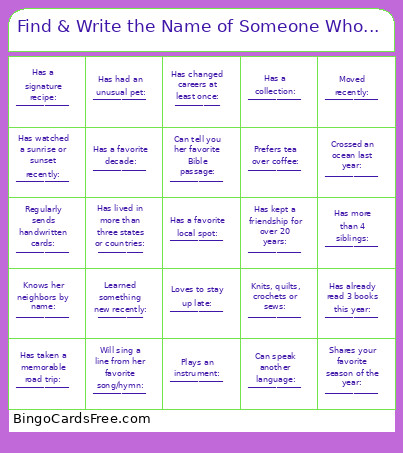 This Find & Write the Name of Someone Who... Bingo Cards Game contains following Words or Phrases: Has lived in more than three states or countries: ___________, Has changed careers at least once: ___________, Learned something new recently: ___________, Has taken a memorable road trip: _____________, Has tried (and liked!) a food she never expected to: _____________, Knits, quilts, crochets or sews: _____________, Has a signature recipe: _____________, Regularly sends handwritten cards: _____________, Has a favorite decade: _____________, Has kept a friendship for over 20 years: _____________, Prefers tea over coffee: _____________, Has taken a class recently: _____________, Has a collection: _____________, Will sing a line from her favorite song/hymn: _____________, Has an unusual holiday tradition: _____________, Can tell you the first line of her favorite movie/show: _____________, Can tell you her favorite Bible passage: _____________, Wakes up without an alarm: _____________, Knows her neighbors by name: _____________, Has a favorite local spot: _____________, Has watched a sunrise or sunset recently: _____________, Can cook a recipe from memory: _____________, Has more than 4 siblings: _____________, Plays an instrument: _____________, Moved recently: _____________, Can speak another language: _____________, Has had an unusual pet: _____________, Shares your favorite season of the year: _____________, Has already read 3 books this year: _____________, Loves to stay up late: _____________, Crossed an ocean last year: _____________.