
generic retreat cards Bingo - Print Free or Customize
Print free generic retreat cards bingo or alter them, limitless prints! Select from 42,200+ designs or use the bingo card generator. Add numbers, words, photos, or all of them. Play using printable PDF, online bingo cards, and the online bingo caller, or mix physical and digital.
About: This bingo card perfectly captures the chaos, quirks, and classic moments of modern workplace meetings and corporate events. Packed with familiar phrases, technical mishaps, and all-too-real office banter, it’s ideal for team offsites, all-hands calls, or remote workshops. Anyone who’s ever survived a project meeting will recognize this mix of virtual call blunders and business jargon.
How To: To save a PDF to print, click the Print button. You can modify the card count and other print preferences on the Print tab. Grid items and free space text can be changed on the Basic tab. Appearance can be completely customized on the relevant tabs, or you can easily find any option using the 🔍 tab.
How to play generic retreat cards Bingo?
- Paper Caller: Print PDF calling list & calling slips and manually choose the slips.
- Online Caller: Click on the Play button above.
- Online Players: Click on the Play button above, and then click on the 🎫 button.
- Paper Players: Print PDF bingo cards and manually mark the cards.
- Combo Play: Choose any combination above. For instance, caller can be either Printed or Online. And players can be Printed or Online or a mix of both.
Step-By-Step:
- Start by getting the generic retreat cards PDF by clicking on the "Print" button above.
- Open the PDF and print a hard copy.
- For random calling, you can print another copy of the call list, cut, fold and then pick them randomly at play time.
- Cut the bingo cards at the cut marks if there are more than 1 bingo cards per page.
- Give one card to each player. For marking, you can use crayons. Crayons are the cheapest.
- Choose one person to be the caller. If you are playing in a small group, the caller can also play along with their own Bingo card.
- The caller opens the play by randomly pulling an item from the call list and saying it to all players.
- The players scan their cards to see if they have the announced word. If they do, they dab that word.
- The first player to finish a horizontal, vertical, or a diagonal line of crossed items shouts "Bingo!" and wins the play.
- The caller confirms that the items marked form a correct line according to the Bingo card and call list.
- You can play for varied patterns or a full card blackout for a longer play.
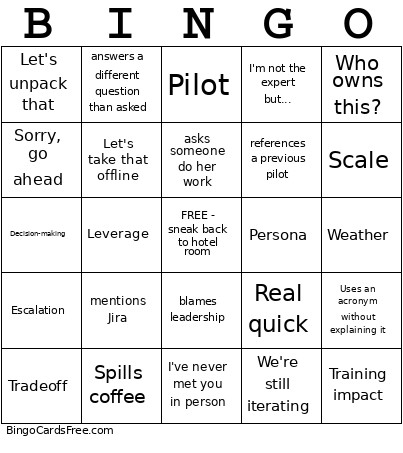 This generic retreat cards Bingo Game contains following Words or Phrases: asks again for timeline (already sent), let me know if you need anything, changes timeline without warning, giggles to cover for lack of information, suggests unworkable solution, novel attempt to create or modify a ppt, propose an impossible modification, asks how to use a tool regularly used, answers a different question than asked, refers to meeting where not clear on what was decided, irrelevantly quotes team or leadership, not clear on what leadership wants, circular or hard-to-follow description of an issue, no resolution achieved in meeting, emergency request, interesting use of Excel, last minute panic, Sorry, Teams crashed, Can you hear me?, Double-mutes themselves, Talks while muted, Forgets to share screen, I'll keep this brief (and doesn't), Apologizes for a dog barking, Real quick, One last thing, 100+ browser tabs open, Starts talking while another person is talking, Just to piggyback on that..., Sorry, go ahead, Sorry, I was on mute, References a meeting from months ago, That's a good callout, Let's unpack that, I'll volunteer someone else, Uses corporate jargon unironically, Does that make sense?, I'm not the expert but..., That's a fair point, Shares the wrong screen, Can everyone see that?, Strategic, Roadmap, Visibility, Priority, Cross-functional, Resourcing, Tradeoff, Risk, Future state, Budget, Decision-making, Ownership, Accountability, Escalation, Organizational change, Outcomes, Alignment (twice in one sentence), Partnership, AI, Let's revisit that, What success looks like, Efficiency, Sustainability, Operating model, Learning objective, Modality, QA, Demo video, Adoption, Pendo, Scope, Jira, Engagement, Persona, Release readiness, Stakeholder review, NPS, Customer feedback, Requirements changed, Governance, LMS, Best practice, Knowledge transfer, Who's the audience?, Process improvement, Training impact, Metrics, Standardize, Gets lost, I know you from Teams!, Coffee, Forgets where lunch is, Parking, You're taller than I expected, Complains about travel, WiFi, Loses a charger, Restroom, I've never met you in person, Weather, What room are we in next?, Group selfie, Jet lag, Spills coffee, Agenda, Forgets badge, I thought this started at..., Previous retreat, Takes notes on paper, Flight, Let's get a picture, Technical difficulties, You're on mute, Alignment, Circle back, Teams notification goes off, Can everyone see my screen?, Bandwidth, Pilot, Great question, Takes a picture of a slide, Customer obsession, Uses an acronym without explaining it, Operationalize, At the end of the day, Let's take that offline, Scale, Quick win, Stakeholder, Asks for the deck, Capacity, Leverage, Innovation, Arrives late, will not hear what is being said, asks someone do her work, missed deadline, refers to meeting where not she is clear on what was decided, blames leadership, tries to use Excel, cannot hear what is being said, gives incorrect information, It depends, mentions a Tiger Team, We'll need to socialize that, references a previous pilot, Let's document it, Who owns this?, Can we standardize it?, references a process that nobody follows, We'll discuss that offline, I thought that was already decided, mentions Jira, I have concerns, Let's start small, We're still iterating.