Print free GOTYA bingo cards or alter them,
unlimited cards! Choose from 32,700+ designs or use the bingo card generator.
Add numbers, words, images, or mix them all.
Play using PDF prints, online bingo cards,
and the online bingo caller, or combine all formats.
About: This bingo card is perfect for anyone tuning in to a big gaming awards show or industry presentation, like The Game Awards or a major showcase. It captures all the surprising moments, running jokes, unexpected announcements, and familiar faces that make these events so entertaining for gamers and pop culture fans alike. Get ready for some over-the-top fun as you play along!
How To: To download a PDF to print, click the Print button.
You can alter the card quantity and other
print options on the Print tab.
Grid items and free space text can be added on the Basic tab.
Appearance can be highly personalized on the
corresponding tabs, or you can easily search any preference
on the 🔍 tab.
How to play GOTYA Bingo Cards?
Paper Players: Print PDF bingo cards and manually scratch the cards.
Paper Caller: Print PDF calling list & calling slips and manually choose the slips.
Online Players: Click on the Play button above, and then click on the 🎫 button.
Online Caller: Click on the Play button above.
Combo Play: Choose any combination above.
For instance, caller can be either Printed or Online.
And players can be Printed or Online or a mix of both.
Step-By-Step:
Start by getting the GOTYA PDF by clicking on the "Print" button above.
Open the PDF and print it.
For random calling, you can print another copy of the call list, cut, fold and then pick them randomly at play time.
Cut the bingo cards at the cut lines if there are more than 1 bingo cards per page.
Distribute one card per player. For marking, you can use pens. Crayons are the cheapest.
Choose one person to be the caller. If you are playing in a small group, the caller can as well play along with their own Bingo card.
The caller opens the play by randomly drawing an item from the call list and saying it to everyone.
The players scan their cards to see if they have the announced word. If they do, they mark that word.
The first player to complete a horizontal, vertical, or a diagonal line of marked items shouts "Bingo!" and wins the game.
The caller verifies that the items marked form a proper line according to the Bingo card and call list.
You can play for different patterns or a full card blackout for an extended game.
This GOTYA Bingo Cards Game contains following Words or Phrases: Celebrity gives an award, Random shot of the desert monolith, Game is announced with just a name, Someone is timed out of a speech, Game X Musical Guest Performance, Cosplay on stage, Recent meme used (67), Mascot appearance, New IP announced, Trailer for a game that was announced 3+ years ago, A game is shadow dropped, Remaster of an already HD game, E33 / DS2 / Ghost LOSE to another game, Fromsoft trailer / announcement, Headliner Nintendo game announced, Bethesda announcement, New Larian Studios game, New hardware announcement, New cozy game (it's a farming sim), Video game franchise goes mobile, Revived franchise (10+ years), Kojima on stage, Anti-AI messaging, SPORTS, Annual first person shooter, Expedition 33 DLC trailer, New video game movie trailer, Fighting game announcement, New character in a seasonal game, A studio announces a game delay, New anime game, Lies of P 2 announced, Persona mentioned, Terrible joke (group vote), Blazer + graphic tee goes hard, Witcher 4 release date, Crossover game, VR-only game, Reggie, Sakurai, Doug, or Aonuma speaks, Todd Howard speaks, Final Fantasy announcement, Flubbed a line from the teleprompter, Geoff has played the game before release, Devolver game announced, PC port of a PS game, LEGO!.

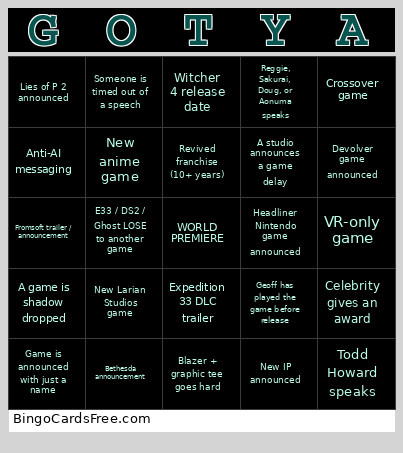 This GOTYA Bingo Cards Game contains following Words or Phrases: Celebrity gives an award, Random shot of the desert monolith, Game is announced with just a name, Someone is timed out of a speech, Game X Musical Guest Performance, Cosplay on stage, Recent meme used (67), Mascot appearance, New IP announced, Trailer for a game that was announced 3+ years ago, A game is shadow dropped, Remaster of an already HD game, E33 / DS2 / Ghost LOSE to another game, Fromsoft trailer / announcement, Headliner Nintendo game announced, Bethesda announcement, New Larian Studios game, New hardware announcement, New cozy game (it's a farming sim), Video game franchise goes mobile, Revived franchise (10+ years), Kojima on stage, Anti-AI messaging, SPORTS, Annual first person shooter, Expedition 33 DLC trailer, New video game movie trailer, Fighting game announcement, New character in a seasonal game, A studio announces a game delay, New anime game, Lies of P 2 announced, Persona mentioned, Terrible joke (group vote), Blazer + graphic tee goes hard, Witcher 4 release date, Crossover game, VR-only game, Reggie, Sakurai, Doug, or Aonuma speaks, Todd Howard speaks, Final Fantasy announcement, Flubbed a line from the teleprompter, Geoff has played the game before release, Devolver game announced, PC port of a PS game, LEGO!.