
Hääbingo Cards - Print Free or Customize
Print free Hääbingo cards or adjust them, unlimited cards! Choose from 41,100+ designs or use the bingo card generator. Add numbers, phrases, pictures, or all of them. Play using printed PDF, virtual bingo cards, and the virtual bingo caller, or mix physical and digital.
How To: To get a printable PDF, click the Print button. You can alter the card count and other print settings on the Print tab. Grid items and free space content can be edited on the Basic tab. Appearance can be entirely customized on the relevant tabs, or you can easily locate any preference using the 🔍 tab.
How to play Hääbingo Cards?
- Printed Caller: Print PDF calling list & calling slips and physically pick the slips.
- Printed Players: Print PDF bingo cards and physically scratch the cards.
- Digital Caller: Click on the Play button above.
- Digital Players: Click on the Play button above, and then click on the 🎫 button.
- Combo Mode: Select any combination above. For example, caller can be either Printed or Digital. And players can be Printed or Digital or a mix of both.
Step-By-Step:
- Start by saving the Hääbingo PDF by clicking on the "Print" button above.
- Open the PDF and print a hard copy.
- For random calling, you can print another copy of the call list, cut, fold and then pick them randomly at play time.
- Cut the bingo cards at the cut marks if there are more than 1 bingo cards per page.
- Give one card to each player. For marking, you can use crayons. Crayons cost the least.
- Select one person to be the caller. If you are playing in a small group, the caller may also play along with their own Bingo card.
- The caller begins the game by randomly picking an item from the call list and calling out it to everyone.
- The players scan their cards to see if they have the called word. If they do, they dab that word.
- The first player to finish a horizontal, vertical, or a diagonal line of crossed items announces "Bingo!" and wins the game.
- The caller verifies that the items marked form a proper line as per the Bingo card and call list.
- You can play for different patterns or a full card blackout for a longer game.
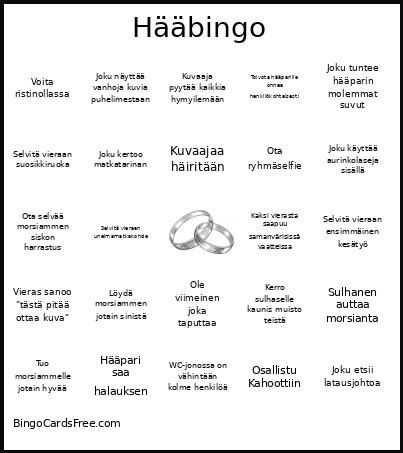 This Hääbingo Cards Game contains following Words or Phrases: Anna toisen voittaa, Anoppi herkistyy, Cheek soi, Esittäkää yhteislaulu, Esittele drinkkiä asiantuntevasti, Etsi henkilö, joka tunsi morsiamen ennen sulhasta, Etsi vierustoverin kanssa yhtenäisyys, Hääpari kättelee vieraita, Hääpari saa halauksen, Haasta joku karaokeen, Hanki sulhasen enon nimmari, Ihaile pöytäkoristeita kovaan ääneen, Iltapala tarjoillaan, Inssit laulaa yhteislaulun, Joku alkaa muistella 90-lukua, Joku etsii latausjohtoa, Joku hakee lisää viiniä, Joku heittäytyy peliin täysiä mukaan, Joku ihailee morsiammen sormusta, Joku juoksee, Joku kaivaa laukustaan nenäliinan, Joku käyttää aurinkolaseja sisällä, Joku kehuu ruokaa, Joku kertoo huonon mutta hauskan vitsin, Joku kertoo kalastusjutun, Joku kertoo matkatarinan, Joku kertoo metsästysjutun, Joku kertoo miten hääpari tapasi, Joku kertoo olevansa nälkäinen, Joku kertoo tarinan hääparista, Joku kertoo tarinan, joka alkaa sanoilla "et usko tätä...", Joku kuvaa videota, Joku kysyy kellonaikaa, Joku löytää taskustaan jotain yllättävää, Joku mainitsee lapset, Joku muu kuin anoppi itkee, Joku nauraa, Joku näyttää vanhoja kuvia puhelimestaan, Joku ottaa kengät pois, Joku ottaa kuvan kuvaajasta, Joku ottaa nokoset, Joku puhuu joulusta, Joku puhuu työasioista, Joku puhuu urheilusta, Joku puuttuu kuvasta, Joku sotkee, Joku tanssii yksin, Joku tarkistaa taskunsa vähintään kolme kertaa, Joku tuntee hääparin molemmat suvut, Joku unohtaa mihin jätti juomansa, Joku valittaa kirjoitusvirheistä, Joku vertailee sääsovelluksia, Jollakin on kimaltavat kengät, Jollakin on samanlainen nimi kuin toisella vieraalla, Juoma läikkyy, Kaaso auttaa morsianta, Kaaso korjaa morsiammen mekkoa, Kaksi vierasta saapuu samanvärisissä vaatteissa, Kännykkä putoaa lattialle, Kättele 5 uutta ihmistä, Kättele appiukkoa, Käyttää sanaa "legendaarinen" 5 kertaa 3 minuutin aikana järkevästi, Kehu jonkun kampausta, Kehu morsianta, Kehu ruokaa vieruskaverille, Kehu sulhasta, Keksi uusi nimilyhenne hääparille, Kerro jokin hauska tarina kouluajoilta, Kerro morsiammelle kaunis muisto teistä, Kerro morsiammelle pakoauton olevan lähtövalmis, Kerro morsiusparille ohjeet kuinka hääkakku leikataan, Kerro sulhaselle kaunis muisto teistä, Kiitä ruuasta, Kippis, Kovaa naurua, Kuvaaja pyytää kaikkia hymyilemään, Kuvaajaa häiritään, Kysy tuntemattomalta ohjeet kotiin, Kysy vieraan tulevaisuuden suunnitelmista, Lainaa toiselle kynää, Laseja kilistetään, Löydä henkilö, joka juhlii syntymäpäiväänsä seuraavan kuukauden aikana, Löydä morsiammen jotain sinistä, Luo uusi muisto, Morsiammen veljessä on glitteriä, Morsian liikuttuu, Nauti drinkki, Ole viimeinen joka taputtaa, Osallistu Kahoottiin, Osallistu ryhmäselfieen, Ota kuva morsiusparin tanssista, Ota kuva morsiusparista, Ota kuva ruuasta, Ota ryhmäselfie, Ota selfie morsiammen veljen kanssa, Ota selfie pihalla, Ota selvää kuinka monen sukunimi on Brotkin, Ota selvää miten kaverit ovat tutustuneen morsiuspariin, Ota selvää morsiammen siskon harrastus, Puheen pitäjä sekoaa sanoissaan, Puheessa on vitsi, jota ei kukaan ymmärrä, Pyydä joku pariksesi Beerpongiin, Ryhmätanssi, Saa bestman twerkkaamaan, Saa sulhasen veli nauramaan, Selvitä vieraan ensimmäinen auto, Selvitä vieraan ensimmäinen kesätyö, Selvitä vieraan harrastus, jota harva tietää, Selvitä vieraan lempielokuva, Selvitä vieraan lempijäätelömaku, Selvitä vieraan lempimusiikkiartisti, Selvitä vieraan lempipaikka Suomessa, Selvitä vieraan lempivuodenaika, Selvitä vieraan suosikkiruoka, Selvitä vieraan unelmamatkakohde, Serkukset kinaavat, Sukkahousut rikkuu, Sulhanen auttaa morsianta, Sulhanen esittää tanssiliikkeitään kaasolle, Sulhanen herkistyy, Sulhanen on hukassa, Sulhanen ottaa takin pois, Tanssi 3 kappaletta alusta loppuun, Tanssita anoppia, Tanssita appiukkoa, Toivota hääparille onnea henkilökohtaisesti, Tuo morsiammelle jotain hyvää, Tuo sulhaselle välivesi, Tutustu uuteen ihmiseen, Uskettele bestmanille olevasi Supersankari, Valtaa tanssilattia, Vie astiasi pois, Vie jollekkin juotavaa, Vieras ottaa salaa kuvan, Vieras sanoo "tästä pitää ottaa kuva", Voita, Voita kps kolme kertaa putkeen, Voita ristinollassa, WC-jonossa on vähintään kolme henkilöä, Yllätä appiukko uudella tiedolla.