
Home Visitor BINGO Cards - Print Free or Customize
Print free Home Visitor BINGO cards or personalize, limitless cards! Select from 41,500+ designs or use the bingo card generator. Add numbers, phrases, pictures, or all of them. Play using printable PDF, virtual bingo cards, and the virtual bingo caller, or mix physical and digital.
About: This bingo card perfectly captures the real-life moments and meaningful connections that home visitors and early childhood professionals experience every day. Blending humor, resilience, and emotional insight, it's a fun way to spark conversations or celebrate shared experiences at team meetings, trainings, or staff appreciation events in family support or early intervention programs.
How To: To download a PDF to print, click the Print button. You can alter the number of cards and other printing preferences on the Print tab. Grid items and free space content can be edited on the Basic tab. Appearance can be totally customized on the corresponding tabs, or you can easily find any preference using the 🔍 tab.
How to play Home Visitor BINGO Cards?
- Paper Players: Print PDF bingo cards and manually cross off the cards.
- Paper Caller: Print PDF calling list & calling slips and manually draw the slips.
- Online Caller: Click on the Play button above.
- Online Players: Click on the Play button above, and then click on the 🎫 button.
- Hybrid Play: Pick any combination above. For instance, caller can be either Offline or Online. And players can be Offline or Online or a mix of both.
Step-By-Step:
- Start by downloading the Home Visitor BINGO PDF by clicking on the "Print" button above.
- Open the PDF and print a hard copy.
- For random calling, you can print another copy of the call list, cut, fold and then draw them randomly at play time.
- Cut the bingo cards at the cut lines if there are more than 1 bingo cards per page.
- Distribute one card per player. For marking, you can use pencils. Crayons cost the least.
- Pick one person to be the caller. If you are playing in a small group, the caller may as well play along with their own Bingo card.
- The caller starts the play by randomly pulling an item from the call list and announcing it to all players.
- The players scan their cards to see if they have the announced word. If they do, they cross off that word.
- The first player to complete a horizontal, vertical, or a diagonal line of crossed items announces "Bingo!" and wins the game.
- The caller checks that the items marked form a correct line according to the Bingo card and call list.
- You can play for varied patterns or a full card blackout for an extended game.
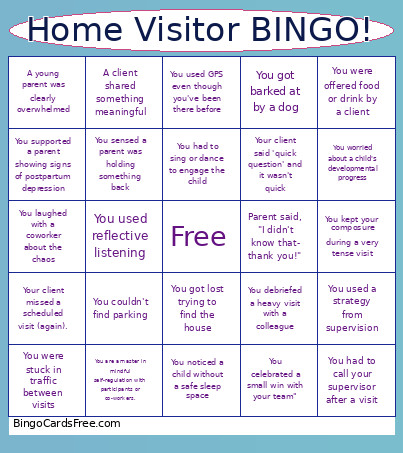 This Home Visitor BINGO Cards Game contains following Words or Phrases: A child smiled or lit up when they saw you, A client thanked you for just listening, A client shared something meaningful, A sibling tried to "help" with the visit, A visit confirmed but did not open the door when it was time to., A young parent was clearly overwhelmed, All your visits that day did not confirm, Kids waved at you through a window but no one answered the door, Parent proudly showed you a new baby item, You adapted your entire visit plan on the fly, You are a master in mindful self-regulation with participants or co-workers., You ate lunch in your car, You celebrated a small win with your team", You checked the time and were surprised, You clapped for a milestone like it was the Olympics, You clicked 'save' just in case, You complimented a parent and saw their face light up, You couldn't find parking, You felt like your work mattered, You finished documentation the same day (!!), You forgot to drink your coffee, You forgot why you walked into a room, You got barked at by a dog, You got caught in the rain running to the door, You got lost trying to find the house, You had a family graduate!, You had an interpreter problem., You had to build rapport from zero, You had to call your supervisor after a visit, You held space for something hard, You helped a coworker problem-solve, You kept your composure during a very tense visit, You knocked and someone yelled, "It's open!" but it wasn't, You laughed with a coworker about the chaos, You left a visit emotionally full AND exhausted, You left a visit feeling proud, You noticed a child without a safe sleep space, You offered resources and the client declined them, You opened a text and immediately got distracted, You reframed something positively, You said 'that's a great question' or "tell me more" to buy time or have an MSR moment., You sat on the floor for longer than planned, You sensed a parent was holding something back, You silently celebrated a cancellation, You supported a parent showing signs of postpartum depression, You thought about a family after hours, You used a strategy from supervision, You used GPS even though you've been there before, You used reflective listening, You validated a caregiver, You were offered food or drink by a client, You were stuck in traffic between visits, You wore something comfortable but work-appropriate, You worried about a child's developmental progress, You've said, "Let's just sit on the floor" more than once, Your client missed a scheduled visit (again)., Your client said 'quick question' and it wasn't quick, You debriefed a heavy visit with a colleague, You supported a client in crisis without judgement, You helped link a parent to mental health or addiction supports, Something unexpected happened with a diaper, You had to sing or dance to engage the child, Parent said, "I didn't know that- thank you!", Toddler follow you to the door.