
Human Bingo Cards - Print Free or Customize
Print free Human bingo cards or customize, limitless prints! Select from 42,600+ templates or use the bingo card generator. Add numbers, words, images, or all of them. Play using printable PDF, digital bingo cards, and the digital bingo caller, or go hybrid.
About: This bingo card is perfect for team-building events or staff socials at the University of North Dakota, especially among UIT or campus support teams. It mixes campus experiences, tech skills, and personal interests for a fun way to get colleagues talking and discovering shared experiences. Expect lots of laughs and plenty of “me too!” moments as everyone finds common ground.
How To: To download a PDF to print, click the Print button. You can alter the card quantity and other print preferences on the Print tab. Grid items and free space content can be changed on the Basic tab. Appearance can be exactly personalized on the corresponding tabs, or you can easily find any option using the 🔍 tab.
How to play Human Bingo Cards?
- Digital Players: Click on the Play button above, and then click on the 🎫 button.
- Printed Caller: Print PDF calling list & calling slips and manually draw the slips.
- Printed Players: Print PDF bingo cards and manually write on the cards.
- Digital Caller: Click on the Play button above.
- Hybrid Play: Select any combination above. For instance, caller can be either Paper or Digital. And players can be Paper or Digital or a combo of both.
Step-By-Step:
- Start by downloading the Human Bingo PDF by clicking on the "Print" button above.
- Open the PDF and print it.
- For random drawing, you can print another copy of the call list, cut, fold and then pick them randomly at play time.
- Cut the bingo cards at the cut marks if there are greater than 1 bingo cards per page.
- Give one card to each player. For marking, you can use pens. Crayons cost the least.
- Select one person to be the caller. If you are playing in a small group, the caller can also play along with their own Bingo card.
- The caller opens the play by randomly drawing an item from the call list and announcing it to all players.
- The players look at their cards to see if they have the announced word. If they do, they mark that word.
- The first player to complete a horizontal, vertical, or a diagonal line of crossed items shouts "Bingo!" and wins the play.
- The caller validates that the items crossed off form a proper line as per the Bingo card and call list.
- You can play for different patterns or a full card blackout for a longer play.
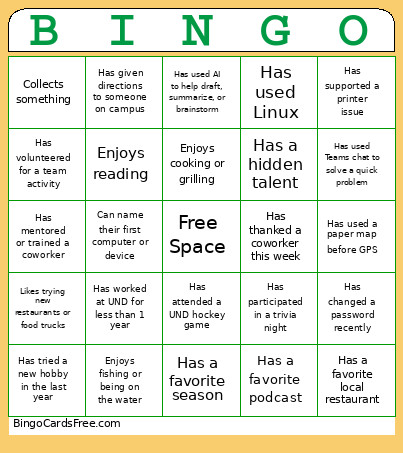 This Human Bingo Cards Game contains following Words or Phrases: Has worked at UND for more than 10 years, Has worked at UND for less than 1 year, Graduated from UND, Has attended a UND hockey game, Has worked in another higher education institution, Works with faculty or students regularly, Has served on a UND committee or project group, Has been to more than one UND campus building this week, Knows where to get the best coffee on campus, Has helped support a campus event, Has participated in a UIT training or retreat, Has worked with someone from another UIT area this month, Has a favorite UND tradition, Has taken a walk around campus during lunch, Has given directions to someone on campus, Uses keyboard shortcuts every day, Prefers dark mode, Uses more than one monitor, Has automated a task with a script or workflow, Has built or upgraded a computer, Has a home lab or test environment, Has used Linux, Has supported a printer issue, Has used a ticketing system today, Has joined a meeting from a mobile device, Has learned a new technology this year, Has explained a technical issue without using jargon, Has used AI to help draft, summarize, or brainstorm, Has changed a password recently, Has been on call or responded after hours, Has mentored or trained a coworker, Has presented information to a group, Has worked on a cross-functional project, Has solved a problem by asking another team for help, Has written documentation or a knowledge article, Has received helpful advice from a coworker, Has volunteered for a team activity, Has participated in a project kickoff meeting, Has helped onboard a new employee, Has worked with someone they had not met before, Has used Teams chat to solve a quick problem, Has shared a useful tip with their team, Has joined a meeting early just to catch up, Has helped translate technical information for a non-technical audience, Has thanked a coworker this week, Enjoys camping or hiking, Enjoys cooking or grilling, Plays or watches sports, Enjoys board games or card games, Plays a musical instrument, Enjoys gardening or yard work, Has a favorite podcast, Enjoys reading, Has a creative hobby, Enjoys photography, Likes trying new restaurants or food trucks, Enjoys video games, Collects something, Enjoys fishing or being on the water, Has a favorite picnic food, Can name their first computer or device, Has traveled to another country, Has lived outside North Dakota, Has a favorite local restaurant, Has tried a new hobby in the last year, Has participated in a trivia night, Has a favorite movie they can rewatch, Has a favorite season, Has taken a road trip longer than 8 hours, Has a favorite snack at work, Has a hidden talent, Has won a contest, drawing, or raffle, Has a favorite way to relax after work, Has used a paper map before GPS, Can recommend a local activity for visitors.