Human Bingo RSM Retreat Cards - Print Free or Customize
Print free Human bingo RSM Retreat cards or alter them,
limitless cards! Select from 41,100+ templates or use our bingo card generator.
Add numbers, phrases, images, or all of them.
Play using PDF prints, digital bingo cards,
and our digital bingo caller, or mix physical and digital.
About: This bingo card is perfect for breaking the ice and sparking conversations in youth groups, school orientations, or community gatherings. With a mix of fun facts, hobbies, travel experiences, and quirky traits, it helps participants find common ground and learn surprising things about each other in a lively, welcoming atmosphere.
How To: To save a PDF to print, click the Print button.
You can adjust the card count and other
printing preferences on the Print tab.
Grid items and free space content can be changed on the Basic tab.
Appearance can be totally personalized on the
relevant tabs, or you can quickly locate any setting
on the 🔍 tab.
How to play Human Bingo RSM Retreat Cards?
Digital Players: Click on the Play button above, and then click on the 🎫 button.
Digital Caller: Click on the Play button above.
Printed Caller: Print PDF calling list & calling slips and manually choose the slips.
Printed Players: Print PDF bingo cards and manually write on the cards.
Combo Play: Pick any combination above.
For instance, caller can be either Paper or Digital.
And players can be Paper or Digital or a combination of both.
Step-By-Step:
Start by getting the Human Bingo RSM Retreat PDF by clicking on the "Print" button above.
Open the PDF and print a hard copy.
For random drawing, you can print another copy of the call list, cut, fold and then draw them randomly at play time.
Cut the bingo cards at the cut lines if there are more than 1 bingo cards per page.
Distribute one card per player. For marking, you can use pens. Crayons are the cheapest.
Pick one person to be the caller. If you are playing in a small group, the caller may also play along with their own Bingo card.
The caller initiates the play by randomly pulling an item from the call list and saying it to all players.
The players check their cards to see if they have the called word. If they do, they mark that word.
The first player to complete a horizontal, vertical, or a diagonal line of crossed items shouts "Bingo!" and wins the play.
The caller validates that the items crossed off form a correct line as per the Bingo card and call list.
You can play for multiple patterns or a full card blackout for a longer play.
This Human Bingo RSM Retreat Cards Game contains following Words or Phrases: Recently moved to the area, Has 3 or more siblings, Is the oldest child, Has a cat, Has a dog, Has lived in another state, Has lived in another country, Speaks more than one language, Has traveled to 5+ countries, Has run a 5K or marathon, Has gone camping in the past year, Has been skydiving/Bungee Jumping/Cliff Diving, Plays a musical instrument, Enjoys hiking, Loves Coffee, Loves Tea, Is a morning person, Is a night owl, Loves board games, Plays Football, Plays Basketball, Plays Soccer, Plays Volleyball, Plays Baseball, Enjoys cooking, Loves reading, Watches documentaries, Serves in the RKM (Kids Ministry), Is Homeschooled, Has twins in their family, Loves spicy food, Doesn't like coffee, Prefers mountains over beach, Prefers beach over mountains, Is left-handed, Is an introvert, Is an extrovert, Has broken a bone, Has a hidden talent, Has the same birthday month as you, Likes pineapple on pizza, Can drive, Likes scary movies, Has pulled an all-nighter, Can say the alphabet backwards, Has been to a concert, Hates vegetables, Has met someone famous, Has been stung by a bee/wasp, Is currently wearing mismatched socks, Can speak another language, Would rather call than text, Wears glasses, Is an only child, Favorite subject is math, Knows a martial art, Shares your eye color, Can Juggle/Knows a Magic Trick, Been to Europe, Can Ice Skate, Has ridden in a limo, Has a pet fish, Has baked a cake, Likes Bugs, Is Graduating this Year.

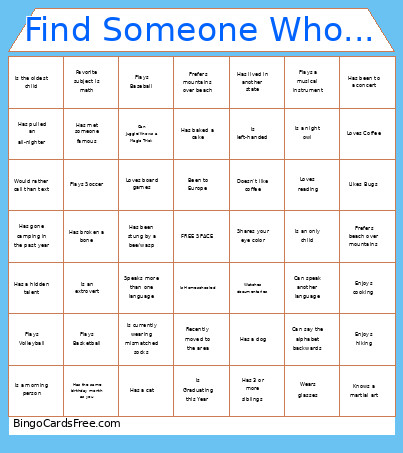 This Human Bingo RSM Retreat Cards Game contains following Words or Phrases: Recently moved to the area, Has 3 or more siblings, Is the oldest child, Has a cat, Has a dog, Has lived in another state, Has lived in another country, Speaks more than one language, Has traveled to 5+ countries, Has run a 5K or marathon, Has gone camping in the past year, Has been skydiving/Bungee Jumping/Cliff Diving, Plays a musical instrument, Enjoys hiking, Loves Coffee, Loves Tea, Is a morning person, Is a night owl, Loves board games, Plays Football, Plays Basketball, Plays Soccer, Plays Volleyball, Plays Baseball, Enjoys cooking, Loves reading, Watches documentaries, Serves in the RKM (Kids Ministry), Is Homeschooled, Has twins in their family, Loves spicy food, Doesn't like coffee, Prefers mountains over beach, Prefers beach over mountains, Is left-handed, Is an introvert, Is an extrovert, Has broken a bone, Has a hidden talent, Has the same birthday month as you, Likes pineapple on pizza, Can drive, Likes scary movies, Has pulled an all-nighter, Can say the alphabet backwards, Has been to a concert, Hates vegetables, Has met someone famous, Has been stung by a bee/wasp, Is currently wearing mismatched socks, Can speak another language, Would rather call than text, Wears glasses, Is an only child, Favorite subject is math, Knows a martial art, Shares your eye color, Can Juggle/Knows a Magic Trick, Been to Europe, Can Ice Skate, Has ridden in a limo, Has a pet fish, Has baked a cake, Likes Bugs, Is Graduating this Year.