
IPS01 Bingo Cards - Print Free or Customize
Print free IPS01 bingo cards or alter them, limitless prints! Select from 41,500+ designs or use our bingo card generator. Add numbers, words, photos, or mix them all. Play using PDF printouts, online bingo cards, and our online bingo caller, or go hybrid.
About: This bingo card is perfect for IPS (Individual Placement and Support) employment specialists or NHS mental health teams. It playfully highlights everyday wins and mishaps at work, from tech troubles to client successes. Bring this to your next team meeting or staff event for a fun way to share relatable moments and boost camaraderie among colleagues.
How To: To download a PDF to print, click the Print button. You can change the card count and other print settings on the Print tab. Grid items and free space content can be edited on the Basic tab. Appearance can be fully customized on the relevant tabs, or you can quickly find any option on the 🔍 tab.
How to play IPS01 Bingo Cards?
- Online Caller: Click on the Play button above.
- Paper Caller: Print PDF calling list & calling slips and manually choose the slips.
- Paper Players: Print PDF bingo cards and manually write on the cards.
- Online Players: Click on the Play button above, and then click on the 🎫 button.
- Combo Mode: Select any combination above. For instance, caller can be either Offline or Online. And players can be Offline or Online or a combo of both.
Step-By-Step:
- Start by downloading the IPS01 PDF by clicking on the "Print" button above.
- Open the PDF and print a hard copy.
- For random calling, you can print another copy of the call list, cut, fold and then pull them randomly at play time.
- Cut the bingo cards at the cut marks if there are more than 1 bingo cards per page.
- Give one card to each player. For marking, you can use markers. Crayons are the cheapest.
- Select one person to be the caller. If you are playing in a small group, the caller may as well play along with their own Bingo card.
- The caller begins the game by randomly drawing an item from the call list and calling out it to all players.
- The players check their cards to see if they have the called word. If they do, they dab that word.
- The first player to finish a horizontal, vertical, or a diagonal line of crossed items shouts "Bingo!" and wins the play.
- The caller confirms that the items crossed off form a correct line according to the Bingo card and call list.
- You can play for multiple patterns or a full card blackout for a longer play.
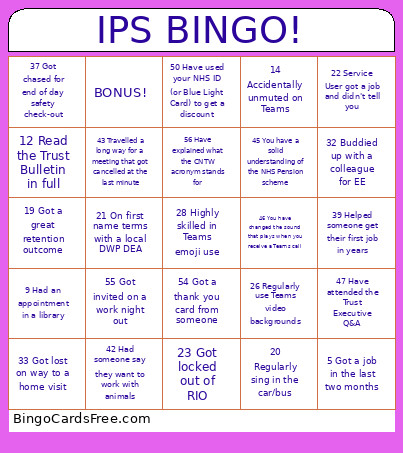 This IPS01 Bingo Cards Game contains following Words or Phrases: 1 Lost a RIO Progress Note, 2 Got a parking ticket at work, 3 Had a Fidelity Review, 4 Had a recent joint visit, 5 Got a job in the last two months, 6 Accidentally set off Lone Worker, 7 Used a public loo, 8 Lost a laptop charger, 9 Had an appointment in a library, 10 Can name a commonly prescribed medication, 11 Been to an IPS Grow event, 12 Read the Trust Bulletin in full, 13 Have your own cup in your team base, 14 Accidentally unmuted on Teams, 15 Actually used a business card, 16 Received service user feedback, 17 Visited a Job Centre, 18 Took part in IPS recruitment, 19 Got a great retention outcome, 20 Regularly sing in the car/bus, 21 On first name terms with a local DWP DEA, 22 Service User got a job and didn't tell you, 23 Got locked out of RIO, 24 Got locked out of ESR, 25 Have visited Jose's allotment, 26 Regularly use Teams video backgrounds, 27 Quoted the Equality Act, 28 Highly skilled in Teams emoji use, 29 Taken part in a fire drill at work, 30 Forgot your pitch during EE, 31 Had a successful employer engagement, 32 Buddied up with a colleague for EE, 33 Got lost on way to a home visit, 34 Met someone from a different IPS Service, 35 Used AI to write a CV, 36 Got accidentally locked in a team base, 37 Got chased for end of day safety check-out, 38 Negotiated interview questions in advance, 39 Helped someone get their first job in years, 40 Helped someone share their mental health with an employer, 41 Had to explain what IPS stands for, 42 Had someone say they want to work with animals, 43 Travelled a long way for a meeting that got cancelled at the last minute, 44 Been asked to help someone volunteer, 45 You have a solid understanding of the NHS Pension scheme, 46 You have changed the sound that plays when you receive a Teams call, 47 Have attended the Trust Executive Q&A, 48 Have some annual leave booked, 49 Have received a Shout Out on the Trust homepage, 50 Have used your NHS ID (or Blue Light Card) to get a discount, 51 Got called a Support Worker by accident, 52 Got asked about your NHS pay banding, 53 Can name two countries where IPS is practiced, 54 Got a thank you card from someone, 55 Got invited on a work night out, 56 Have explained what the CNTW acronym stands for.