
Junaur Bingo Cards - Print Free or Customize
Print free Junaur bingo cards or alter them, unlimited prints! Select from 42,200+ templates or use our bingo card generator. Add numbers, words, images, or any combination. Play using printed PDF, virtual bingo cards, and our virtual bingo caller, or go hybrid.
About: This bingo card is perfect for any close-knit friend group embarking on a chaotic, memory-filled road trip to a convention or fandom event. With in-jokes, quirky mishaps, and classic road trip blunders, the tone is playful and lighthearted. It's great for those who love celebrating their unique dynamics while making new inside jokes along the way.
How To: To download a printable PDF, click the Print button. You can adjust the number of cards and other print settings on the Print tab. Grid items and free space content can be added on the Basic tab. Appearance can be entirely personalized on the corresponding tabs, or you can easily locate any option using the 🔍 tab.
How to play Junaur Bingo Cards?
- Paper Players: Print PDF bingo cards and manually scratch the cards.
- Online Players: Click on the Play button above, and then click on the 🎫 button.
- Paper Caller: Print PDF calling list & calling slips and manually select the slips.
- Online Caller: Click on the Play button above.
- Hybrid Play: Pick any combination above. For example, caller can be either Printed or Online. And players can be Printed or Online or a mix of both.
Step-By-Step:
- Start by getting the Junaur PDF by clicking on the "Print" button above.
- Open the PDF and print a hard copy.
- For random calling, you can print another copy of the call list, cut, fold and then pull them randomly at play time.
- Cut the bingo cards at the cut marks if there are greater than 1 bingo cards per page.
- Distribute one card per player. For marking, you can use crayons. Crayons are the cheapest.
- Pick one person to be the caller. If you are playing in a small group, the caller can as well play along with their own Bingo card.
- The caller initiates the play by randomly pulling an item from the call list and calling out it to everyone.
- The players look at their cards to see if they have the announced word. If they do, they mark that word.
- The first player to finish a horizontal, vertical, or a diagonal line of marked items announces "Bingo!" and wins the play.
- The caller verifies that the items crossed off form a proper line as per the Bingo card and call list.
- You can play for multiple patterns or a full card blackout for an extended play.
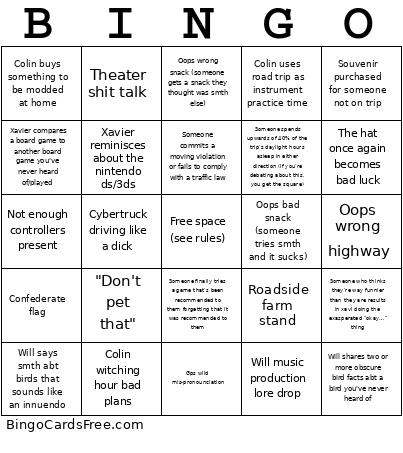 This Junaur Bingo Cards Game contains following Words or Phrases: Gps wild mis-pronounciation, Stop made at a fast food place youve never heard of, Disagreement over best version of song, Someone finally tries a game that's been recommended to them forgetting that it was recommended to them, Norton reference, Juno gushes over a niche horror/sci-fi film, Juno oc lore drop, Juno gays out abt their partner, "Colin, please don't", Not enough controllers present, 3 or more gaming devices brought collectively, Will says smth abt birds that sounds like an innuendo, Roadside farm stand, Keys lost, Souvenir purchased for someone not on trip, Xavier compares a board game to another board game you've never heard of/played, Oops wrong highway, "Don't pet that", Will shares two or more obscure bird facts abt a bird you've never heard of, Colin road rages way too silently, Someone commits a moving violation or fails to comply with a traffic law, Bump into other ppl road tripping to same convention at rest stop, Valuable object left at gas stop (wallet, luggage, goods, etc), Car has to be turned around three or more times, Oops wrong exit, Juno: "I just-" followed by head in hands, Someone starts playing board game and is not seen again for at least 4 hours, Juno keeps referring to a specific near-miss during the trip, Rest stop needed within 30 minutes of leaving another rest stop, Colin engages in gambling addict behavior, Any tesla with two or more trump stickers, Colin uses road trip as instrument practice time, Will music production lore drop, Confederate flag, New Pope declared, Someone who thinks they're way funnier than they are results in xavi doing the exasperated "okay…" thing, "No one watches that show" /ref (see rules), Colin buys something to be modded at home, Theater shit talk, Colin witching hour bad plans, Xavier reminisces about the nintendo ds/3ds, Will road rages way too nicely, "Are you sure we're in the right place?" > "I know where we are" (lost), More than 10 minutes spent looking for parking, Oops bad snack (someone tries smth and it sucks), Cybertruck driving like a dick, Oops wrong snack (someone gets a snack they thought was smth else), The hat once again becomes bad luck, Someone spends upwards of 40% of the trip's daylight hours asleep in either direction (if you're debating about this, you get the square).